For a long time, an element was either on the page or it wasn't. A tooltip that went from display: none to display: block had nothing to animate from, because there was no earlier computed style to transition out of. So designers wrote a class toggle, a setTimeout that waited 250 ms, and a second toggle to remove the element once the fade finished. Three moving parts to fake one fade.
Which Three Declarations Replace the Timer?
The demo above runs two components with no script. A popover fades and rises in, then fades out. A disclosure slides open to the height of its content, whatever that is. Underneath are three CSS features, and what makes this topic interesting in October 2026 is that they don't share a support story.
TL;DR:
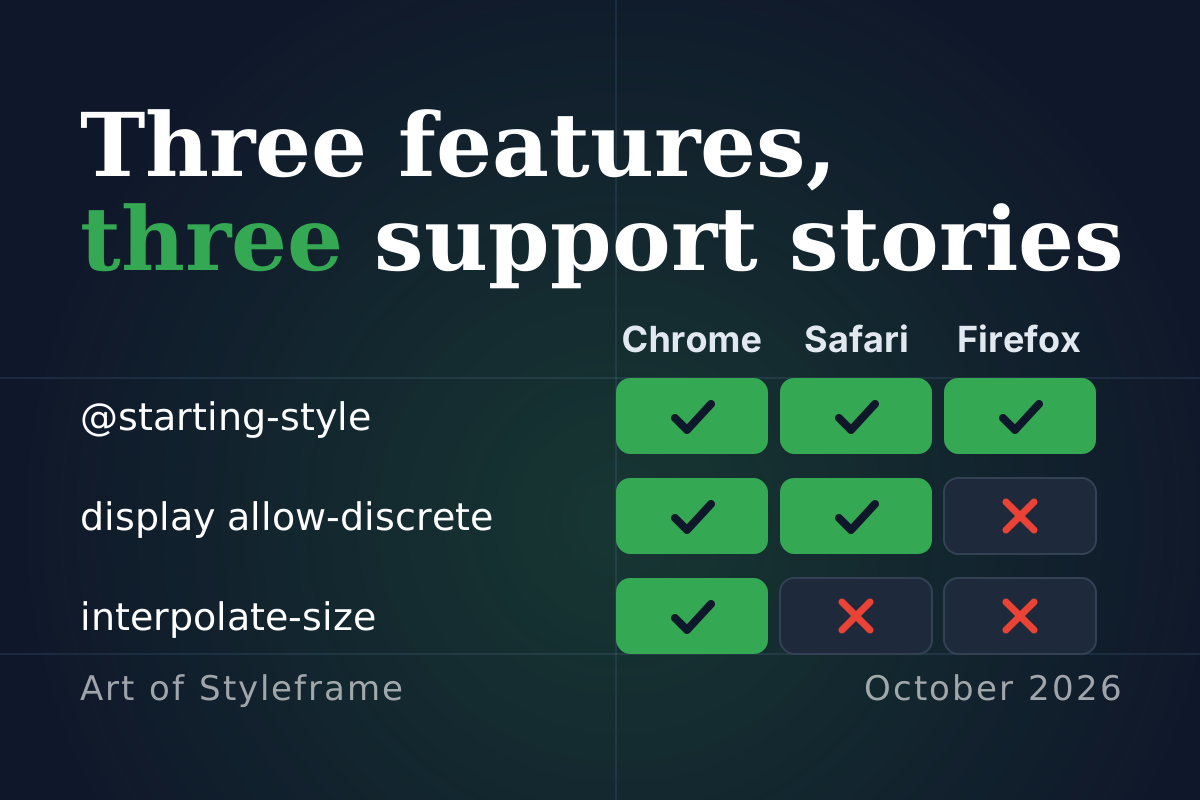
@starting-styleanimates an element's entry and works in Chrome, Firefox and Safari. Exit animations acrossdisplay: noneneedtransition-behavior: allow-discreteand work in Chrome 117 and Safari 18. Firefox has the code in its tree behind a preference that is off by default, so treat Firefox as an instant exit (checked October 15, 2026). Animating toheight: autoneedsinterpolate-size, which only Chromium has. In every case the fallback is an instant change, not a broken page.
That last sentence is the design rule. Each of these is polish layered over a state change that already works, so a browser that skips the polish loses a fade and nothing else. Write the logic so the page is correct with all three declarations deleted, then add them.
Does @starting-style Work Everywhere for Entry?
The first half is the easy half. @starting-style gives a transition something to start from when an element renders for the first time: a popover opening, a node inserted by script, an element leaving display: none. MDN's page describes the starting values as those an element transitions from "when the element receives its first style update", and files the feature under Baseline 2024, newly available since August 2024. The first versions are Chrome 117, Firefox 129 and Safari 17.5.
The rule that trips people is order. @starting-style has the same specificity as the rule it's modifying, so it has to come after that rule. MDN says so directly. In a headless Chromium 145 check run against this page's own demo, the popover sampled 120 ms into its opening sat at an opacity of 0.64, mid-fade. Move the @starting-style block above the rule it describes and the same sample read 1: no entry animation at all, with no error anywhere to tell you why.
Remove the block entirely and you get the same result. The popover just appears.
If the entry fade works and the exit snaps, you forgot one word: display.
How Does allow-discrete Handle Exit, and Where Does Firefox Stand?
Going out is harder, because display isn't a number. It can't be halfway between block and none. CSS calls that kind of property discrete, and a discrete property normally flips at the midpoint of a transition. Two things change that.
First, transition-behavior: allow-discrete, which you can write inside the transition shorthand as above, lets a discrete property take part in a transition at all. MDN's transition-behavior page documents it as Baseline 2024 as well, from Chrome 117, Firefox 129 and Safari 17.4. Second, the specification gives display a special rule: moving from none to a visible value flips at the start, and moving to none flips at the end, so the element stays rendered for the whole transition.
That second rule is the one that matters here, and it's the one with uneven support. Here's what a headless Chromium 145 check measured when each line was removed from the demo's popover rule. The pattern held in Chrome 152 on a stand-alone page too. A snippet further down shows how to take the same readings yourself.
| Variation | Opacity 120 ms into closing | What happened |
|---|---|---|
| Full rule | 0.43 | Fading out, display still block |
display removed from the list | 0 | display: none on the first frame, no exit |
overlay removed from the list | 0.42 | Same as the full rule |
The last row is honest, not a typo. For a lone popover on an empty page, dropping overlay changed nothing in this check. MDN's example keeps it in the list so a top-layer element isn't removed from the top layer before its exit finishes, and it's Chrome-only (117) per the compatibility data, so treat it as cheap insurance for cases where something else stacks or clips over the element mid-exit. Is it required? A simple page doesn't make it look required. Keep it anyway.
To reproduce the readings above, pause each transition and read the computed style. Run this from the console on a copy of the demo as its own page, with the popover closed:
const pop = document.querySelector('#tip');
const frame = () => new Promise(r => requestAnimationFrame(r));

async function sampleAt(ms, toggle) {
  toggle();
  await frame();
  const anims = pop.getAnimations();           // one CSSTransition per property
  anims.forEach(a => { a.pause(); a.currentTime = ms; });
  const style = getComputedStyle(pop);
  const row = {
    running: anims.map(a => a.transitionProperty),
    opacity: style.opacity,
    display: style.display,
  };
  anims.forEach(a => a.finish());
  return row;
}

pop.showPopover();
await Promise.all(pop.getAnimations().map(a => a.finished));
console.log('closing, 120 ms in', await sampleAt(120, () => pop.hidePopover()));
A display entry in running is the proof that the exit is being animated. In a browser that skips it, display is missing from that list and reads none straight away. Delete a line from the transition list and run it again to get the other rows. For the disclosure, call getAnimations({ subtree: true }) on the <details> element, which includes its ::details-content transitions, and read getBoundingClientRect().height of the content instead of opacity. This is the method behind the tables, written out, not a fresh run, so expect a pixel or a hundredth of difference between builds.
Firefox is the gap, and the status below was checked on October 15, 2026 instead of carried over from an older note. MDN's browser-compat-data still records display as not animatable in Firefox, and since October 14, 2026 it marks transition-behavior as a partial implementation there, because display and content-visibility don't transition. The web-features dataset, read through webstatus.dev, lists the combined "display animation" feature as limited availability: Chrome 117 and Safari 18 only.
Mozilla's tracking bug, 1882408, changed on October 14, 2026. It's now RESOLVED FIXED and retitled "[meta] Fully implement transition-behavior", and that status does not mean visitors get the feature. Its two dependencies are fixed in the source tree: bug 2057005 (interpolation for display, landed in mozilla-central on August 7 and flagged fixed for Firefox 155) and bug 2057006 (keep animations running when the frame is destroyed, landed August 14, assigned to 156). The catch is a preference, layout.css.display-animations.enabled. It was added as false, and it is still false in Firefox's StaticPrefList.yaml on main today. The bug to switch it on in Nightly, 2057013, is NEW and unassigned, and bug 2057011 (terminate animations when display computes to none without them) is open too. The release notes for Firefox 155 and 156 (September 1 and 15, 2026, per MDN) list neither allow-discrete nor display transitions.
So the honest status is: fixed in the tree, off by default, not in any release note, not enabled on Nightly. What I couldn't verify is what a 155 or 156 build does when someone flips the preference by hand, because I didn't run Firefox, and the open follow-up bugs suggest rough edges. "Firefox doesn't animate display" is still the safe assumption for your visitors. It has an expiry date, though: when 2057013 lands, Nightly shows it first and the release notes follow.

Safari's side deserves a mention too. WebKit's feature post for Safari 27.0, dated September 17, 2026, lists a fix for display property transitions that made popovers and other elements animate incorrectly when closing. If you saw a strange exit in Safari 18 or 26, check it again on 27.
What should you ship? Whatever the exit looks like in Firefox must be acceptable, because that's what a good share of your visitors will see until the preference ships on by default. An instant disappearance is acceptable for a tooltip. It isn't acceptable if the exit carries meaning, like confirming a deletion, so don't hang logic on it. Fade-in, instant out is an asymmetry people notice but forgive. The reverse, a flash of content that refuses to leave, they don't.
Who Supports interpolate-size for Auto Height?
The third problem is older than the other two. height: auto has never been animatable, because the browser can't compute a halfway point between 0 and "whatever the content needs". Everyone has a workaround: max-height: 500px and a guess, or JavaScript measuring scrollHeight.
interpolate-size: allow-keywords fixes that by opting a subtree into interpolating between a length and an intrinsic keyword such as auto, min-content or fit-content. Chrome's release notes put it in Chrome 129, which reached stable on September 17, 2024. MDN labels it limited availability and experimental. The property is inherited, so setting it on :root covers the document, and MDN notes that it can't be on by default because many existing stylesheets assume intrinsic sizes don't animate.
Who else has it? In the compatibility data, nobody. Firefox and Safari are both marked unsupported for interpolate-size and for calc-size(), and a text search of WebKit's Safari 27.0 feature post finds neither name. I could only check that against the published sources, not against a running Safari or Firefox. Treat it as Chromium-only for now.
The demo pairs it with ::details-content, the pseudo-element for the part of a <details> that opens and closes. The web-features dataset lists it as Baseline newly available since September 2025, with Chrome 131, Firefox 143 and Safari 18.4. Two details from the same check are worth having before you copy it:
| Variation | Height 120 ms into opening | Height 120 ms into closing |
|---|---|---|
| Full rule | 32 px of 67 | 29 px, still sliding |
No interpolate-size | 67 px, already open | 0 px, already shut |
No content-visibility transition | 37 px | 0 px |
The third row is the catch. Closing a <details> also switches the hidden content off through content-visibility, which is a discrete property too, so without content-visibility ... allow-discrete in the list the open animation works and the close snaps. It's the same trap as display, hiding in a different property.
If you only need one property to animate, calc-size(auto, size) does the job without the root-level opt-in. Swapping block-size: auto for block-size: calc-size(auto, size) in the open state gave the same result in the check: 37 px at 120 ms opening, 34 px at 120 ms closing, 67 px settled.

What Does Each Browser Show?
Checked on 2026-10-15 against MDN browser-compat-data, webstatus.dev, Mozilla Bugzilla and the Firefox 155 and 156 release notes. The Firefox column describes default settings.
| Feature | Chrome | Firefox | Safari | What the others see |
|---|---|---|---|---|
@starting-style entry | 117 | 129 | 17.5 | Animated everywhere |
display exit with allow-discrete | 117 | off by default (pref) | 18 | Instant disappearance in Firefox |
overlay in the transition list | 117 | not yet | not yet | Ignored, harmless |
interpolate-size, calc-size() | 129 | not yet | not yet | Panel snaps open and shut |
::details-content | 131 | 143 | 18.4 | Selector unsupported, plain <details> |
Gate the height animation where it matters. A feature query works for interpolate-size because the property itself is queryable:
@supports (interpolate-size: allow-keywords) {
  :root { interpolate-size: allow-keywords; }
}
There's no equivalent query for display transitions. A comment on the bug links a JavaScript feature test, and a CSS Working Group issue about adding a dedicated @supports keyword was filed in January 2026. Until something like that exists, design the exit to survive being skipped.
How Should Reduced Motion Work: Keep the Fade, Drop the Travel?
The demo ends with the usual second design. When the visitor has asked for reduced motion, the popover's rise is cancelled in both its resting and its starting state, and the disclosure stops sliding:
@media (prefers-reduced-motion: reduce) {
  .pop, .pop:popover-open { translate: none; }
  @starting-style { .pop:popover-open { translate: none; } }
  .faq::details-content { transition: none; }
}
The opacity fade stays, because it's the cue that something appeared or left. Cancelling the starting-style translation matters: forget it and the element still travels 10 px on the way in, only it now does it from a rule you thought you'd removed. The easing guide calls this answering the media query instead of complying with it.
Where Does This Fit?
Exit animations were the classic reason to pull in a library. The CSS versus GSAP comparison lists AnimatePresence among the things Framer Motion handles for React, and for a simple fade that is now a few lines of CSS in two of the three engines. Height is a different cost: animating block-size triggers layout on every frame, so keep those panels small, and read the main thread budget piece before you animate a section that holds a table. The broader craft of what to animate at all lives in motion design for the web. If what's entering is a row of cards, the sibling-index() stagger spaces their arrivals without a script, the Motion versus CSS stagger teardown prices the library route in bytes, and animated stats cards covers when a dashboard should skip the entrance altogether.
Summary
Entry animations from display: none work in Chrome 117, Firefox 129 and Safari 17.5 through @starting-style, which has to follow the rule it describes. Exit animations need display in the transition list with allow-discrete, work in Chrome 117 and Safari 18. In Firefox the code for animating display is in the source tree behind a preference that is off by default, and bug 1882408 reads RESOLVED FIXED only because it became a tracking bug, so plan for an instant exit there (checked October 15, 2026). Animating to auto needs interpolate-size or calc-size(), which only Chrome 129 and later support, and a <details> also needs content-visibility in its transition list or the close snaps. Write the page so it's correct with all of it deleted, then add the motion. And honor prefers-reduced-motion by dropping travel and keeping the fade.