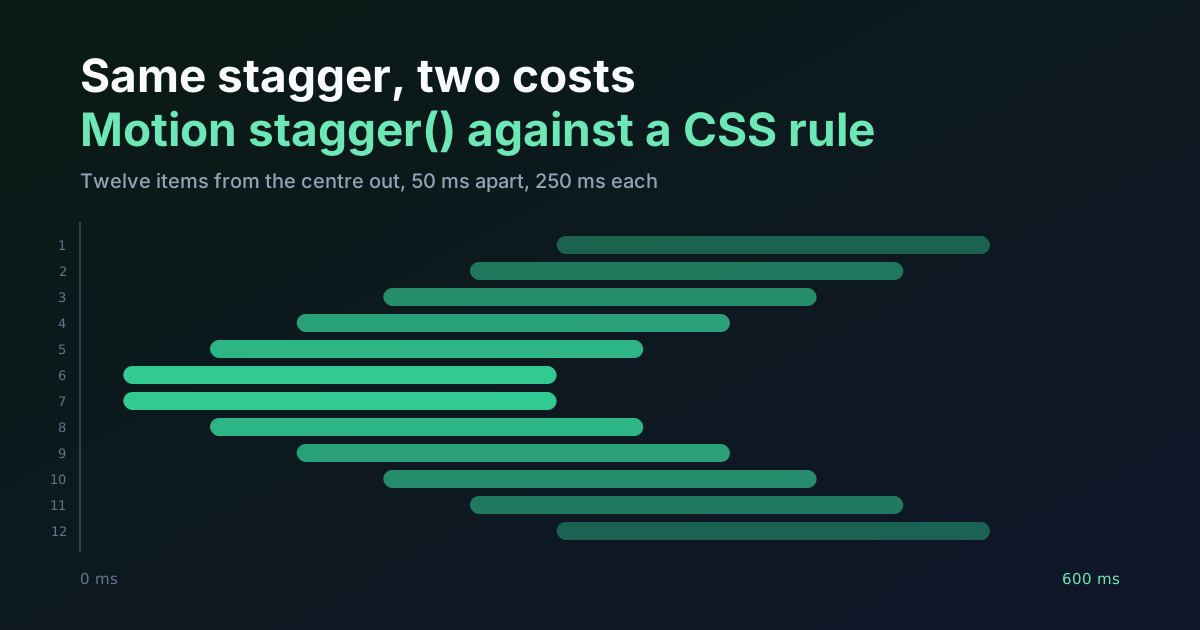
A twelve-item stagger is not a hard problem. Each item waits for its distance from a starting point multiplied by a step, then plays the same animation. That's the whole mechanism, and it's identical whether a library computes it or a stylesheet does. So why does the choice matter? Because the delays come out the same and almost everything around them doesn't.
I built the same centre-out entrance four ways, bundled each with esbuild 0.28.2 against Motion 14.0.0, and read the delays back in a Chromium tab. What follows is what that turned up, including two behaviours of stagger() I'd have bet money on being different.
TL;DR: For the same origin and step, Motion's
stagger()and a CSScalc()rule give identical delays, 275 ms at the edges and 25 ms at the middle for twelve items. The cost differs: 20,468 bytes gzipped throughanimate()plusstagger(), 3,413 through the mini build, 192 for the nativeelement.animate()call, and none for CSS. Use CSS when the origin is known at design time. Use Motion when the origin or the easing of the cascade is decided at runtime (Motion docs, 2026).
What Does a Stagger Actually Compute?
One subtraction and one multiplication. Take the item's index, subtract the index you want to start from, drop the sign, multiply by the step. The preview above runs that in a single declaration, and you can break it: swap the abs() for the bare index and the wave runs left to right.
.cell {
  --step: 50ms;
  --mid: 5.5;
  animation: rise 250ms cubic-bezier(0, 0, 0.58, 1) both;
  animation-delay: calc(abs(var(--i) - var(--mid)) * var(--step));
}

@keyframes rise { from { opacity: 0; translate: 0 14px; } }
Each list item carries its own --i as an inline style, 0 through 11. Twelve items put the centre at 5.5, so the two middle cells start first and the outer two start last. Here's the Motion version of the same cascade.
import { animate, stagger } from "motion";

animate(
  "li",
  { opacity: [0, 1], y: [14, 0] },
  { duration: 0.25, ease: [0, 0, 0.58, 1], delay: stagger(0.05, { from: "center" }) },
);
Motion's stagger() is a plain function. It takes the step in seconds and returns another function that receives an item's index and the total, then hands back a delay. I read the source rather than trusting the docs page, and the core is four lines: work out the origin index, take the absolute distance, multiply by the step, add the optional startDelay.
Then the check. I called the function for twelve items and, in the same tab, read animationDelay from the twelve CSS cells. Both lists were identical, which is the point of this section:
| item | 1 | 2 | 3 | 4 | 5 | 6 | 7 | 8 | 9 | 10 | 11 | 12 |
|---|---|---|---|---|---|---|---|---|---|---|---|---|
| delay, ms | 275 | 225 | 175 | 125 | 75 | 25 | 25 | 75 | 125 | 175 | 225 | 275 |
The same function accepts from: "first", "last", "center" or a number. With from: 3 the twelve delays ran 150, 100, 50, 0, 50, 100 and on up to 400. Everything a CSS rule needs to match any of those is a different --mid.
What Does Each Version Weigh?
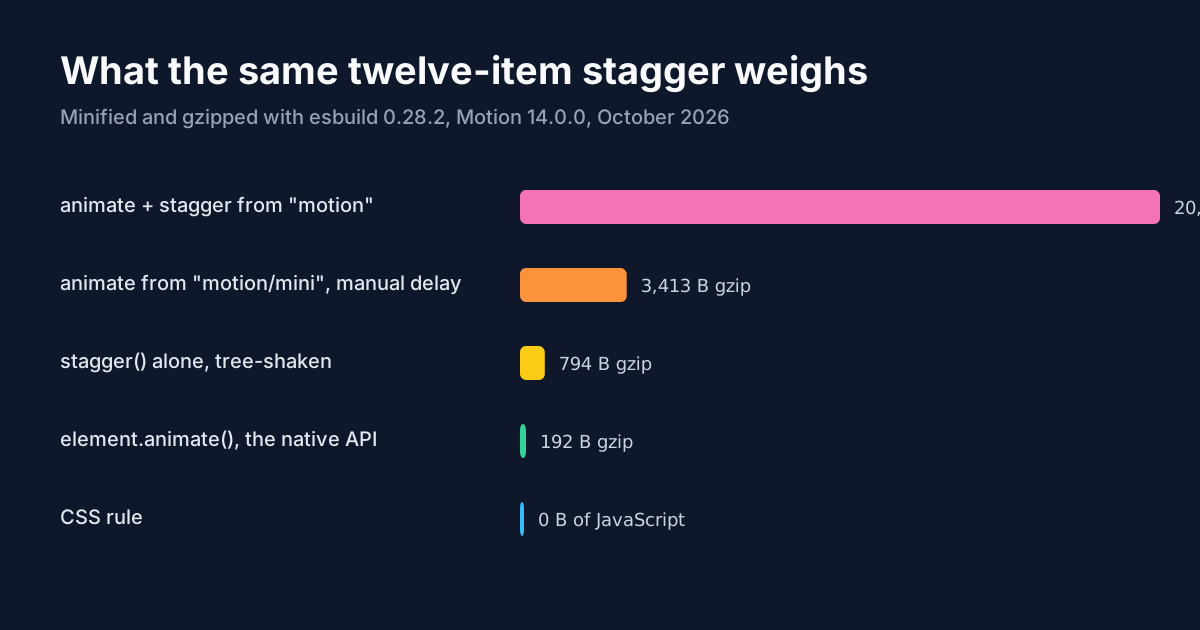
Here's where they stop being equivalent. I bundled five variants with esbuild 0.28.2 (--bundle --minify --format=esm) and gzipped the output at level 9.
| variant | minified | gzipped |
|---|---|---|
animate + stagger from "motion" | 55,455 B | 20,468 B |
animate from "motion/mini", delay computed by hand | 8,500 B | 3,413 B |
stagger alone, tree-shaken | 1,269 B | 794 B |
native element.animate() in a loop | 191 B | 192 B |
| the CSS rule above | 0 B | 0 B |
Two things jump from the numbers. The first is how much of the bill is animate() rather than stagger(). The delay function is 794 bytes gzipped; the engine that plays it is the other 19,000. If you only want the cascade arithmetic, you can write the line yourself.
The second is the mini build. It doesn't export stagger at all. My first attempt at bundling it failed with exactly that error, so with motion/mini the delay is a loop counter you write, and that's not a hardship. i * 0.05 is the entire feature.
If the origin of your stagger is known at design time, you're paying for a runtime to do a subtraction your stylesheet can do for free.
Who Actually Animates It?
Size is a proxy. What a reader's device does with the frames matters more, so I checked which thread each version used. In Chromium, I called animate("li", { opacity: [0, 1], y: [14, 0] }, ...) on twelve items and looked at getAnimations() 120 ms in.
Each element had exactly one Web Animations API animation. Its keyframes held opacity only, with a delay of 275 ms on the first element and 25 ms on the sixth, a 250 ms duration and the easing I'd asked for. The y value wasn't there. It was being written into the element's inline transform on every frame, and the inline style read translateY(6.75908px) mid-flight.
That's the hybrid engine doing what it was built to do, which is use the browser's animation API where it can and fall back to script for values it can't hand over. It isn't a defect. But "Motion animates on the compositor" is a sentence that needs a qualifier, and the qualifier is the property you pick. A CSS animation on translate and opacity, or a native element.animate() call, leaves both properties with the browser. Whether that difference is visible depends on how busy your main thread is, which is why I'd check it in your own build before treating it as a rule. The main thread budgets piece covers how to tell.
What Can stagger() Do That CSS Can't?
Three things, and they share a root: the value arrives at runtime.
An origin you only learn on click. from takes a number. Click item 7 and pass from: 6, and the cascade ripples outward from where the finger landed. CSS can do the same with a --mid set by a script, but at that point there's a script anyway, and you're back to deciding which side owns the arithmetic.
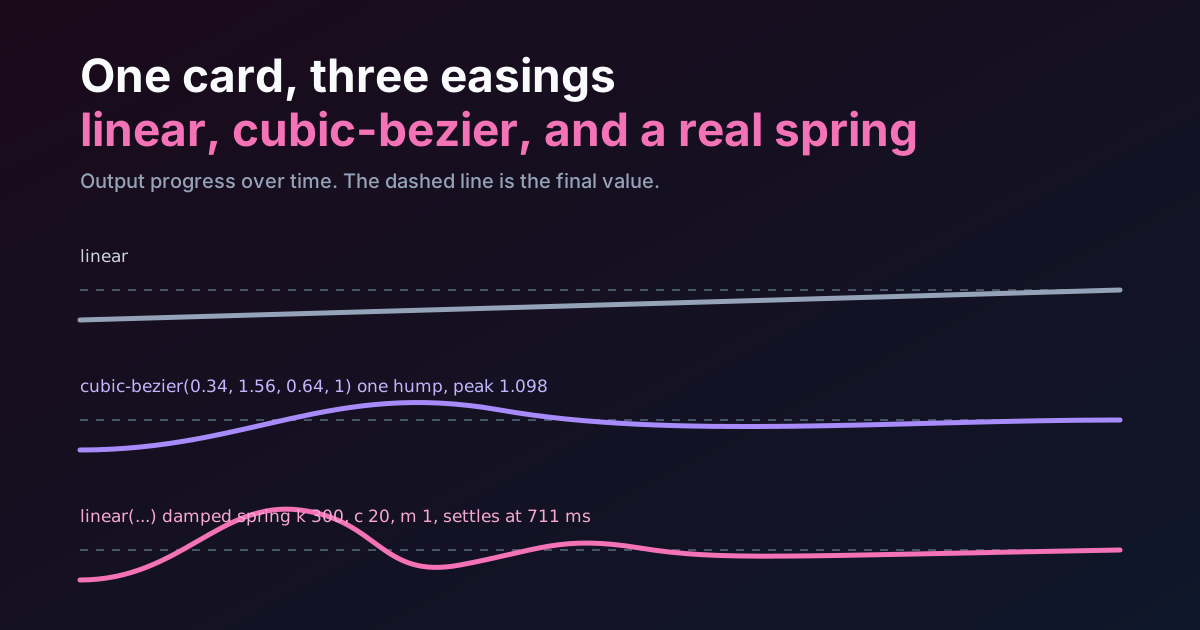
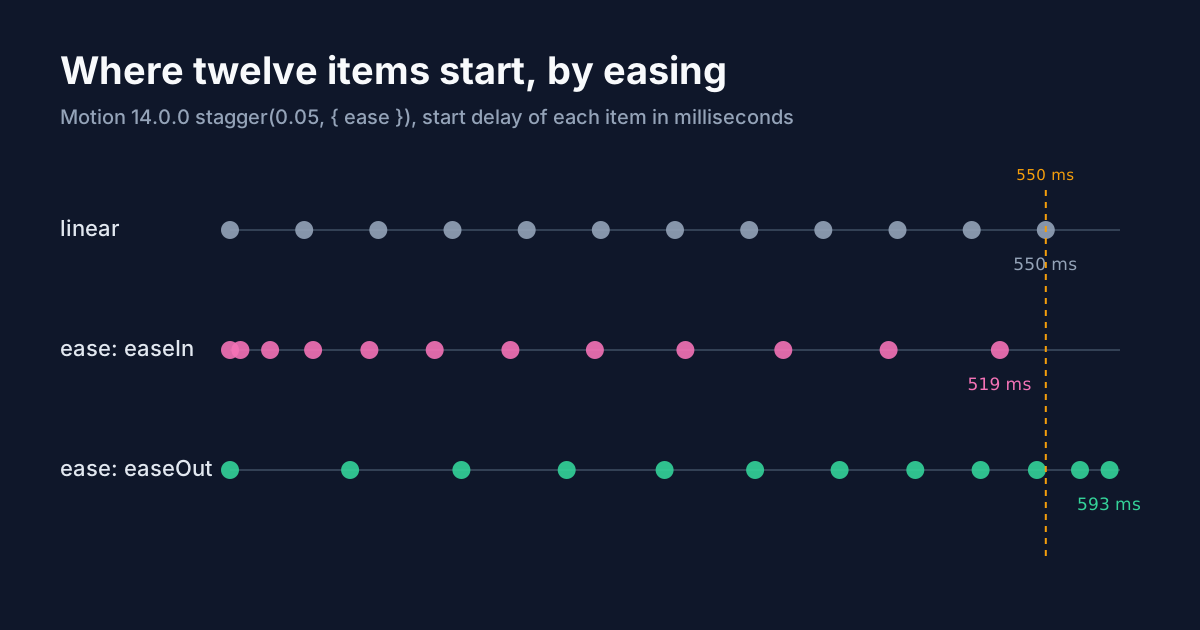
Easing of the whole cascade. stagger(0.05, { ease: "easeIn" }) bends the spacing between delays, so the first items start close together and the last ones spread out. I ran it for twelve items with a 50 ms step. Linear spacing ends at 550 ms. With easeIn the last delay was 519 ms, and with easeOut it was 593 ms, which is later than the linear version. The reason is in the source: the shape is normalised against the step times the total count, twelve times 50, not eleven times 50. That's a quirk, not a bug, but it means an eased cascade doesn't end where a linear one does. Measure it before you promise a designer a 550 ms ceiling.
One object to stop. animate() returns controls you can stop(), so a second click can cancel a cascade that's still running. A CSS animation is cancelled by removing the class, which works, but it snaps. I haven't found a CSS-only way to hand a half-finished cascade to a new origin.
What Can CSS Do That You Shouldn't Ask Motion To?
Run before the page has JavaScript. The preview at the top of this page is a good example: it plays with scripting off, because the browser reads the delays from the stylesheet. A script-driven stagger waits for the bundle, then hydrates, then starts. On a slow phone that's the difference between a cascade the reader sees and one that finishes before they look.
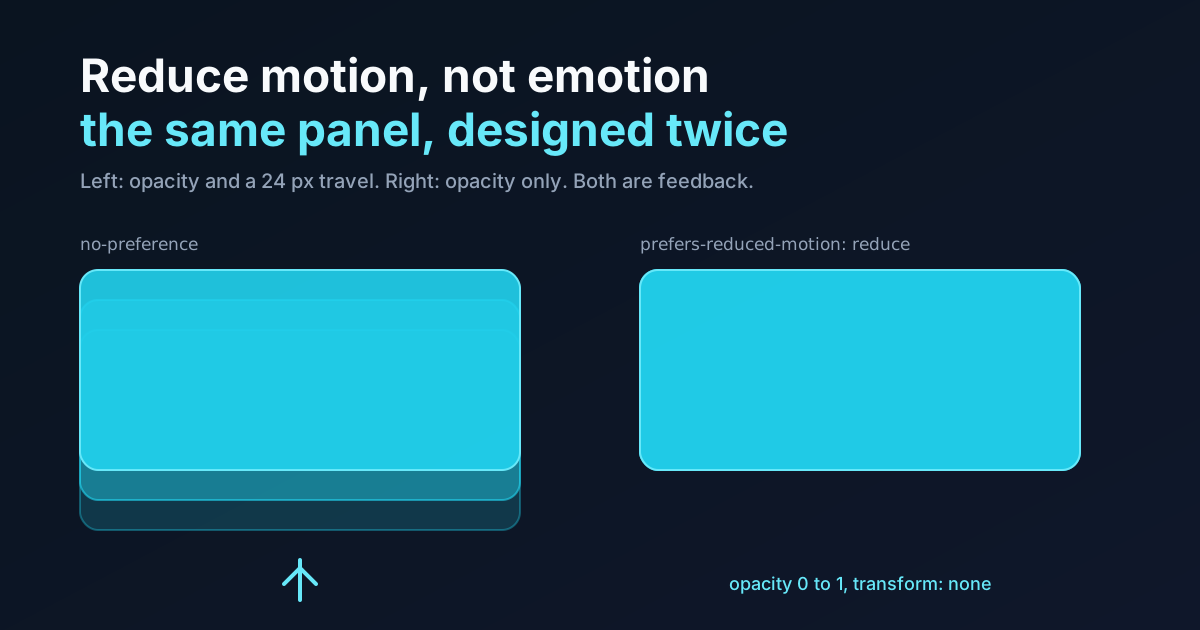
The second thing is the reduced-motion answer. In CSS it's a media query that swaps the rise keyframes for a plain fade, six lines, and the user's setting is honoured with no code path to forget. In a script you check matchMedia yourself and branch.
And the third is dynamic length. A fixed 50 ms step is a bug waiting for a longer list: twenty items with stagger(0.05) put the last delay at 950 ms, which is how a tidy entrance turns into a slideshow. The fix is to work back from a ceiling, and the cleanest version of that needs sibling-count(), covered in the sibling-index stagger tutorial. That piece does the ceiling arithmetic in CSS; this one is about whether you need CSS at all.
Where Do Both Versions Break?
Insertion. Add a thirteenth item in the middle of the list and every --i after it is wrong, unless a script renumbers them or you use sibling-index(). The Motion version has the mirror-image problem: call animate() on just the new element and its index is 0, so it plays with no delay and looks like a glitch rather than part of the wave. You'll need to pass a startDelay or animate the whole set again.
Hidden items are the other one. A display-none item keeps its slot in the CSS count and its delay. If you filter a list and replay the entrance, count what you're passing. It's the same error in both worlds.
There's also a naming trap. Older Motion tutorials, and the earlier Framer Motion guide, use staggerChildren in variants. In Motion 14.0.0 the type definitions mark staggerChildren and staggerDirection deprecated, pointing to delayChildren: stagger(interval) and from: "last". Code that uses the old names still runs. I'd write the new form in anything you start today, since deprecation notices tend to precede removal.
So Which Should You Use?
CSS for most of them. That's the opinionated bit, and you can disagree with it: a list that enters from first to last, a card grid that reveals from the centre, an exit that runs in reverse. All of those are known at design time, and spending 3 KB at the least, or 20 KB at the most, to have a library do a subtraction is a bad trade on a page where somebody is waiting on a phone.
Reach for Motion when at least one of three things is true: the origin comes from where the user clicked, the cascade needs to be cancelled or redirected mid-flight, or the stagger sits inside a React tree that already ships Motion for layout and presence animations. In that last case the 20 KB is already paid, and stagger() is free.
The native element.animate() loop is the quiet third option. At 192 bytes gzipped it has no dependency, runs on the browser's animation engine, and gives you a controls object with cancel() and reverse(). If you want script-level control without a library, it's the thing I'd try first.
Summary
Motion's stagger() and a CSS calc() rule produced the same twelve delays, from 275 ms at the edges to 25 ms in the middle, so the choice isn't about what the effect looks like. It's about weight, thread and ownership. Through animate() it cost 20,468 bytes gzipped, with opacity on the Web Animations API and y on the main thread. Through the mini build it was 3,413 bytes, and the delay was a loop counter. In plain CSS it was nothing, and it ran with scripting off. Pick CSS when the origin is known at design time, Motion when it arrives with the click, and measure any eased cascade before you promise a ceiling, because ease moves the last delay to 519 or 593 ms rather than 550.