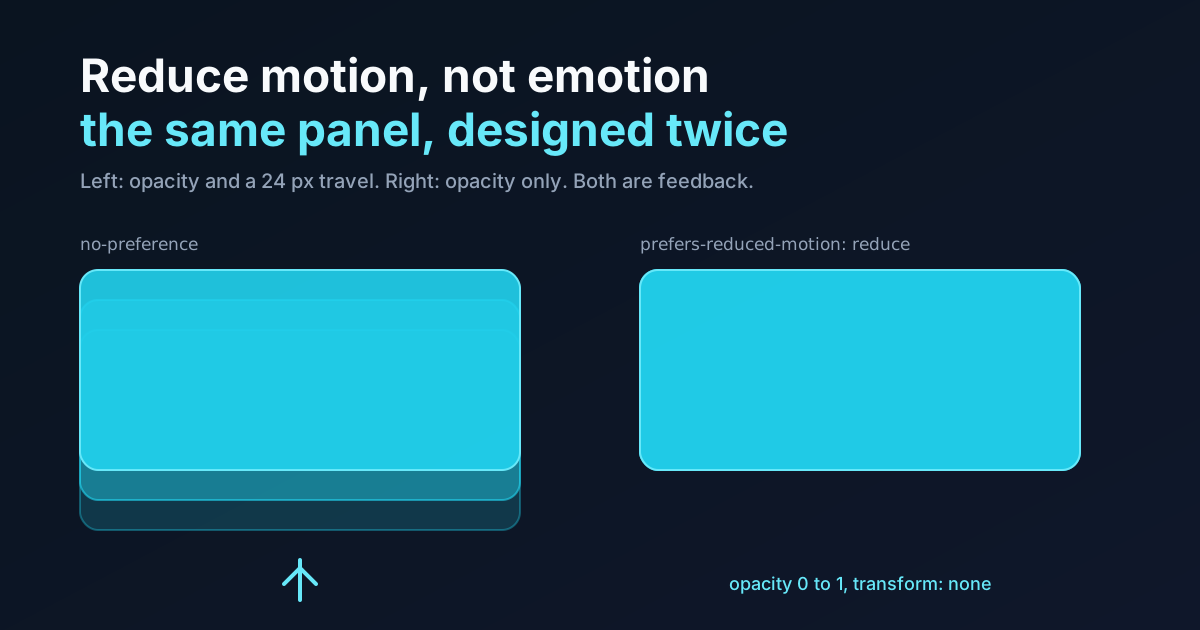
The setting is called Reduce Motion. Not Remove Feedback. Not Disable Animation. Reduce motion.
I keep coming back to that wording because almost every implementation I audit answers a different request than the one the user made. Somebody turns the setting on because parallax makes them queasy or a zooming page transition gives them a headache, and the stylesheet responds by deleting the 150 ms fade on every button, every tooltip, every toast. The interface they get is the one with the vestibular triggers removed, yes. It's also the one where nothing confirms anything happened. Who asked for that?
This piece is the practical side of a line from the easing curves guide: prefers-reduced-motion is a second design of the same transition, not a kill switch. Here are the four ways people answer the query, ranked from bluntest to kindest, then what to do about the awkward cases the usual snippet never covers: scroll-driven animation, view transitions, autoplaying video, and the JavaScript that has to know.
What the Media Query Says, and What the User Meant
The query has two values. no-preference means the user hasn't said anything. reduce means they've turned the setting on, and @media (prefers-reduced-motion) with no value is shorthand for reduce. MDN lists it as Baseline, available across browsers since January 2020, so there's no support argument left to have.
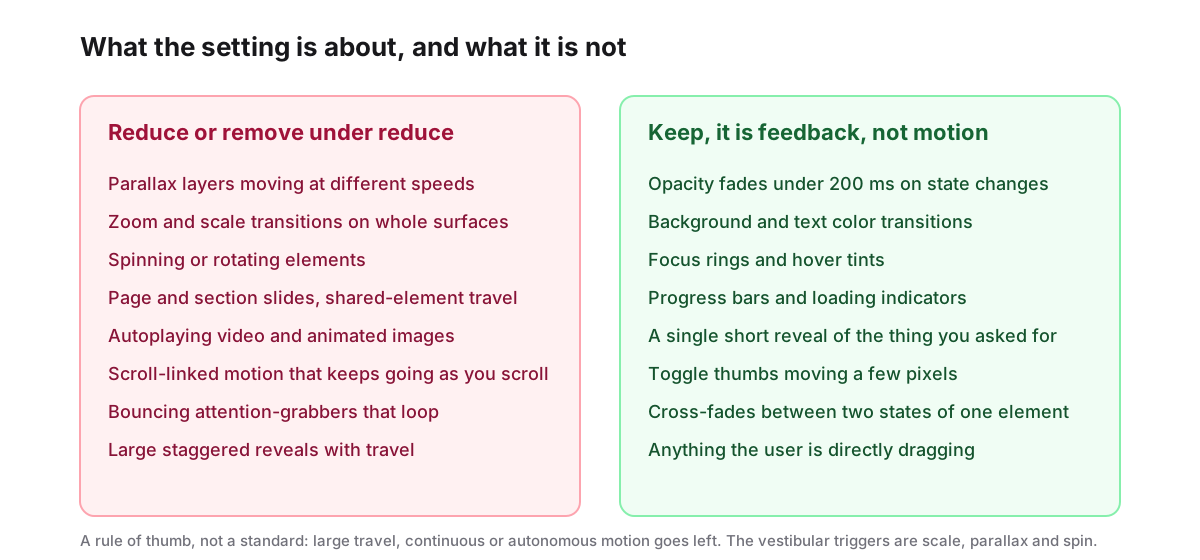
So what is the setting actually for? Something narrower than its name. The things that trigger vestibular symptoms are large, continuous, or autonomous movement: parallax layers sliding at different speeds, surfaces scaling up to fill the screen, anything spinning, slides across the whole viewport, video that starts itself. A button's background lightening over 150 ms does none of that. A panel fading in does none of that.
The preview above makes the point with one panel. Both copies open on a toggle. The left one travels 24 px and fades; the right one only fades, because the reduced design dropped the transform and kept the opacity. If your OS setting is on, the preview's own frame also silences its animations, so the two will look alike, which is the whole idea.
The Blanket Override, and Why It Says 0.01ms Instead of none
You've seen this block. It's in half the CSS resets on GitHub:
@media (prefers-reduced-motion: reduce) {
  *, *::before, *::after {
    animation-duration: 0.01ms !important;
    animation-iteration-count: 1 !important;
    transition-duration: 0.01ms !important;
    scroll-behavior: auto !important;
  }
}
Two details in it are smarter than they look, and worth understanding before you decide whether to keep it.
Why 0.01ms and not animation: none? Because none removes the animation entirely, and an animation that never exists never ends. The animationend event doesn't fire. Any script waiting on it, to remove a toast from the DOM, to unmount a dialog after its exit animation, to flip a state after a spinner, waits forever. A 0.01 ms duration keeps the animation real, so it ends on the next frame and the event fires. The iteration-count: 1 line is there for the same reason in the other direction: an infinite loop at 0.01 ms would end never, and would also burn a frame callback forever.
So the snippet is well engineered. It's also the wrong design, for the reason the previous section gave: it treats a 150 ms fade and a full-screen zoom as the same crime. Every state change on the site now pops. Hover feedback vanishes. A toast appears at full opacity from nowhere, and the thing the user most needed, a signal that the click registered, is gone.
My honest position is that the blanket override is acceptable as a safety net on a site with no motion design to speak of, and a regression on a site that has one. If you've spent any time choosing curves, don't let one rule throw the choice away.
Four Patterns, From Bluntest to Kindest
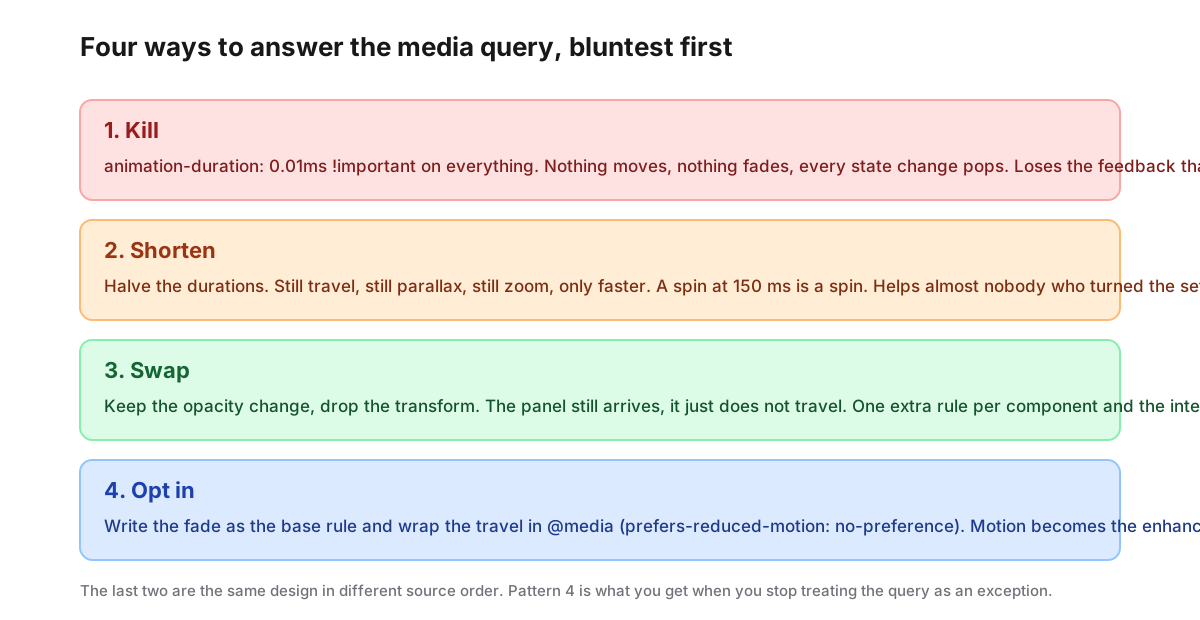
| Pattern | What it does | What it costs |
|---|---|---|
| Kill | 0.01ms on everything | All feedback |
| Shorten | Halve every duration | Nothing; also fixes nothing |
| Swap | Keep opacity, drop transforms | One extra rule per component |
| Opt in | Travel only under no-preference | A habit change |
Shorten deserves a word, because it's the one that looks reasonable and isn't. A 400 ms zoom cut to 200 ms is still a zoom. A parallax layer at half speed still moves against its neighbours. The people who turned the setting on aren't bothered by how long the movement lasts, they're bothered by the movement. Shortening is what you do when you want to say you did something.
Swap is the pattern from the preview, and it's the one most of the site's existing posts already use. In the sibling-index stagger piece, the reduced version keeps the fade and loses the 14 px rise, and the same trade applies to elements entering from display: none with @starting-style. Written out:
.panel {
  opacity: 0;
  transform: translateY(24px);
  transition: opacity 200ms cubic-bezier(0, 0, 0.58, 1),
              transform 320ms cubic-bezier(0.05, 0.7, 0.1, 1);
}

@media (prefers-reduced-motion: reduce) {
  .panel {
    transition: opacity 200ms cubic-bezier(0, 0, 0.58, 1);
    transform: none;
  }
}
That's an extra rule per component. Is that expensive? For a design system with forty components, it's forty rules, and most of them are the same two lines. For a site with no system, it's whatever the site has. Either way the cost is honest: it's the cost of designing the second state instead of deleting the first.
A reduced-motion stylesheet that removes every fade isn't an accessibility feature. It's a second broken interface, shipped on purpose, to the users least able to complain.
The Opt-in Form Is the One I'd Standardise On
Flip the source order and swap becomes opt in. Write the calm version as the base rule, then add the travel only when the user hasn't objected:
.panel {
  opacity: 0;
  transition: opacity 200ms cubic-bezier(0, 0, 0.58, 1);
}

@media (prefers-reduced-motion: no-preference) {
  .panel {
    transform: translateY(24px);
    transition: opacity 200ms cubic-bezier(0, 0, 0.58, 1),
                transform 320ms cubic-bezier(0.05, 0.7, 0.1, 1);
  }
}

.panel.is-open { opacity: 1; transform: none; }
Same two states. So why bother flipping the order? Because of what you get when you forget. Under swap, a component whose author never wrote the reduce block ships with full travel to everyone, and the omission is invisible until somebody with the setting on finds it. Under opt in, a forgotten block means the component ships calm to everyone, which is a visible, boring, safe failure that a designer will notice in the first review. I'd rather the default failure be "too still" than "too much".
There used to be a browser-support reason to avoid this form: a browser that didn't understand the query never matched no-preference, so it got no motion at all. That stopped mattering in 2020. Today the only cost is the habit of writing the still version first, and I think that's a feature. You end up designing the panel, then adding its motion, which is the order the work should happen in anyway.
Isn't this the same as pattern 3? In the shipped CSS, nearly. In what happens when a team of nine forgets, it's the opposite.
Scroll-Driven Animation, View Transitions, and Video
The snippet covers animation and transition. What about everything it never reaches? Three things on a modern page are neither, or are both in a way the snippet doesn't reach.
Scroll-driven animation runs on animation-timeline, so the 0.01 ms override does hit it, and badly: a scroll-linked parallax layer with a 0.01 ms duration snaps to its end state and stays there, which may be wrong for a layer meant to be visible at the start. Decide per effect. Parallax, scroll-linked zoom and anything that keeps moving as you scroll should be turned off, and animation: none is right here because nothing waits for a scroll timeline to end. A reading-progress bar, on the other hand, is the user's own scroll position drawn as a line, and I'd keep it. Scroll-driven timing patterns has the ranges and the fallbacks; the reduce rule is one block at the end:
@media (prefers-reduced-motion: reduce) {
  .parallax-layer { animation: none; }
}
View transitions default to a cross-fade, which is already the reduced design. The problem is what people add on top: custom ::view-transition-old() and ::view-transition-new() keyframes that slide and scale. Under reduce, remove the custom keyframes and let the default fade stand, which keeps the continuity cue and loses the travel:
@media (prefers-reduced-motion: reduce) {
  ::view-transition-group(*),
  ::view-transition-old(*),
  ::view-transition-new(*) {
    animation: none !important;
  }
}
That block removes the default cross-fade as well, so the swap is instant. If you want to keep the fade, override only your own named groups instead of the wildcard. Worth saying: I haven't checked every browser's behaviour for a transition whose pseudo-elements all have animation: none, so test the snapshot timing before relying on it.
Autoplaying video and animated images aren't CSS at all. For an animated image inside a <picture>, a <source> with a media attribute can serve a still frame when the query matches:
<picture>
  <source srcset="/hero-still.webp" media="(prefers-reduced-motion: reduce)">
  <img src="/hero-animated.webp" alt="..." width="1200" height="630">
</picture>
For a <video autoplay> the answer is script, which is the next section.
JavaScript Has to Know Too
The media query is readable from script through matchMedia, and it has a change event, because a user can flip the setting while your page is open:
const reduce = window.matchMedia("(prefers-reduced-motion: reduce)");

function applyMotionPreference() {
  for (const video of document.querySelectorAll("video[autoplay]")) {
    if (reduce.matches) {
      video.pause();
      video.removeAttribute("autoplay");
    }
  }
}

applyMotionPreference();
reduce.addEventListener("change", applyMotionPreference);
Two notes. Pausing isn't enough on its own, because a later load() or a source swap re-reads the autoplay attribute, so remove it. And the Web Animations API doesn't read the query for you: an element.animate() call with a translateY keyframe runs under reduce exactly as it does otherwise. Pass a different keyframe list when reduce.matches is true, the same swap as the CSS version. Libraries vary; the CSS versus GSAP piece covers what each stack gives you for free.
Our own preview component takes the blunt route, by the way. Its frame applies a global 0.001 ms override under reduce, which is why the demo above goes still for a reader with the setting on. That's a defensible choice for a sandbox whose whole purpose is to run arbitrary CSS, and a poor one for a product. I mention it because it'd be odd to argue against the blanket override on a page that uses one.
What WCAG Actually Requires
Which criterion does the query actually satisfy? Two matter, and they're at different levels.
Success Criterion 2.3.3, Animation from Interactions, is Level AAA. It asks that motion animation triggered by an interaction can be disabled, unless the animation is essential to the function or the information. Honouring prefers-reduced-motion is the standard way to meet it, and the "triggered by interaction" wording is why the patterns above focus on transitions and reveals rather than on decoration.
Success Criterion 2.2.2, Pause, Stop, Hide, is Level A, and the media query doesn't satisfy it on its own. It covers moving, blinking or scrolling content that starts automatically, lasts more than five seconds and sits alongside other content, and it requires a mechanism on the page to pause, stop or hide it. A user who never found the OS setting, or who's on a machine they don't control, still needs a button. Autoplaying hero video, marquees and looping illustrations fall under this one whether or not your reduce block is perfect.
So the honest statement is: the query gets you the AAA criterion and makes the Level A one easier, but a looping hero still needs a visible control.
Testing It Without Touching Your Settings
Chrome's DevTools can emulate the media feature from the Rendering panel, which is the fastest loop while you're writing the rules. Firefox reads ui.prefersReducedMotion from about:config, 1 for reduce and 0 for no preference, and MDN notes the change takes effect at once. Safari follows macOS, where the setting lives under System Settings, Accessibility, then Display on macOS 15 and earlier or Motion from macOS 26. On iOS it's Settings, Accessibility, Motion; on Windows 11, Settings, Accessibility, Visual Effects, Animation Effects; on Android 9 and later, Settings, Accessibility, Remove animations.
Then do the test that matters: turn it on and use the site for a minute. Not "check that nothing moves". Check that you can still tell what happened. If a save confirmation appears from nowhere and you weren't sure it appeared, you reduced the emotion along with the motion, and the right-hand panel in the preview is the fix.
Summary
prefers-reduced-motion: reduce is a request to cut large-scale, continuous or autonomous movement, parallax, zoom, spin, slides and autoplay, not to delete feedback. The common blanket override uses 0.01ms rather than none so that animationend still fires and scripts waiting on it don't hang, and animation-iteration-count: 1 so infinite loops end; it is well built and still the wrong design, because it removes every opacity fade along with the triggers. Of the four patterns, shortening fixes nothing, swapping keeps the fade and drops the transform at one extra rule per component, and the opt-in form under no-preference gives the same result with a safer default when someone forgets. Scroll-linked parallax should use animation: none; view transitions should lose their custom keyframes and keep the fade; animated images can serve a still through a <source media>; video and the Web Animations API need matchMedia with a change listener. The query meets WCAG 2.3.3 at Level AAA but not 2.2.2 at Level A, which still wants an on-page pause control for anything that loops.