For years GSAP carried a "paid" reputation. The core library was always free for most uses, but the bonus plugins and certain commercial cases sat behind GreenSock's paid Club membership. That changed after Webflow acquired GSAP in the fall of 2024: on April 30, 2025 the whole library, every bonus plugin included, became free for everyone under GSAP's own no-charge license (a custom GreenSock license, not MIT). That shift changed how teams pick animation tech. The "GSAP is paid" mental model that ranked on Google for a decade is now wrong, and most "CSS vs GSAP" articles you'll find on page one haven't caught up.
I've shipped the same animation in both stacks more than once. The verdicts depend less on which library is "better" and more on which problem you're actually solving. Here's the honest framework, with mid-tier mobile benchmarks and a decision tree at the end.
TL;DR: CSS handles roughly 80% of UI animation needs in 2026 with zero bundle cost and native browser optimization. Reach for GSAP (currently version 3.15) when you need timeline sequencing, complex scroll choreography, or runtime control. The View Timeline API (Chrome 115+, Safari 26+) closes the scroll-driven gap for simple cases. Benchmark on real devices, not desktop Chrome.

Is CSS Animation Better Than GSAP in 2026?
For 80% of UI work, CSS is the right default. The Web Almanac has tracked how the large majority of mobile pages already use at least one CSS transition, while only a small minority load a JavaScript animation library. That gap exists because CSS transitions and @keyframes ship with the browser, run on the compositor thread, and don't add a single byte to your bundle.
CSS handles about 80 percent of UI animation in 2026, with zero bundle cost.
The capabilities that CSS handles cleanly cover most production UI:
- Hover states and focus rings (transition with cubic-bezier easing)
- Loading indicators (keyframes with infinite iteration)
- Entrance animations triggered by class changes
- Page transitions via the View Transitions API
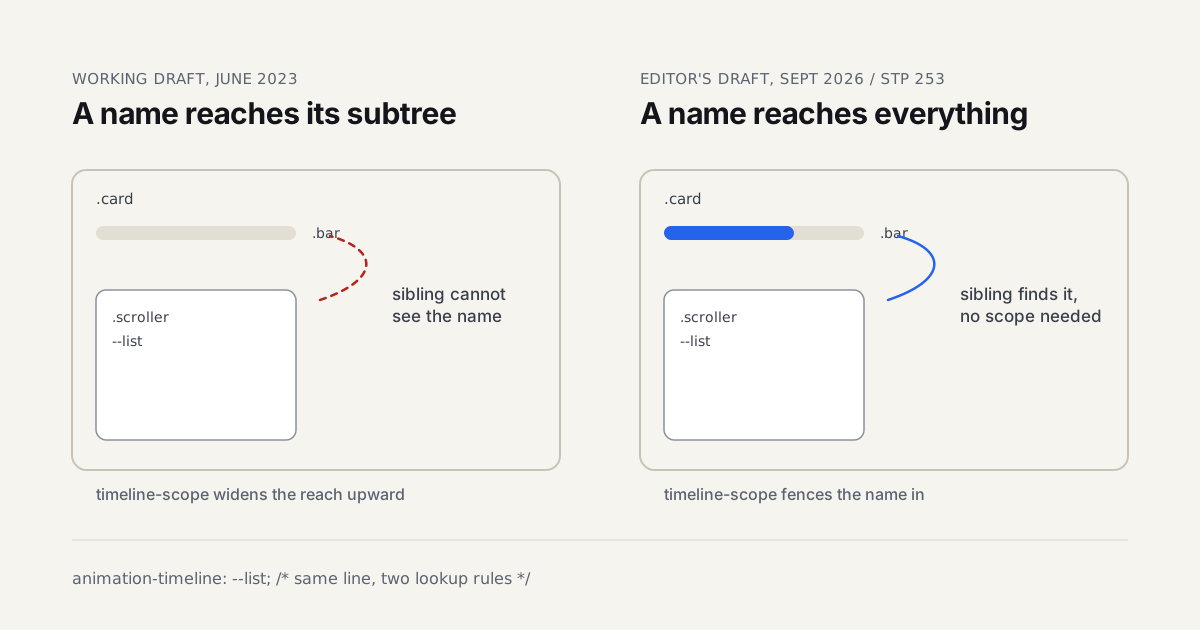
- Simple scroll-driven effects via the View Timeline API
What CSS can't handle is anything requiring coordination across multiple elements with shared timing, anything that needs runtime control after the animation starts, or anything where the easing curve needs to be more complex than a single cubic-bezier expression.
There's a myth that "CSS is GPU-accelerated, therefore always faster." That isn't quite right. CSS transforms and opacity are GPU-accelerated. CSS width, height, margin, and top/left are not, and animating them triggers layout recalculation on every frame. A CSS animation that animates the wrong property will perform worse than a JavaScript animation that animates the right one. The property matters more than the language.
The honest take: if you can express the animation in CSS without contortions, ship CSS. If you find yourself nesting setTimeouts or chaining .addEventListener('transitionend') to fake a timeline, you've hit the wall.
What Can GSAP Do That CSS Cannot?
GSAP wins three concrete areas that CSS can't reach cleanly. The GSAP documentation makes the technical case, but in practice the differentiators are: timeline sequencing with labels and relative offsets, ScrollTrigger choreography with pinning and scrub mapping, and runtime modification (pause, reverse, time-warp, kill) of running animations. The core minified bundle is roughly 71KB, tree-shaken to about 22KB if you import only the gsap core.
Here's how the major animation features map across the three real options most teams consider:
| Feature | CSS | Motion (~12KB) | GSAP (~22KB core) |
|---|---|---|---|
| Single-element transitions | Full | Full | Full |
| Keyframe animations | Full | Full | Full |
| Timeline sequencing with labels | None | Partial | Full |
| Nested timelines | None | None | Full |
| Runtime control (pause, reverse, seek) | Partial | Full | Full |
| Scroll-driven progress | Full (View Timeline) | Partial | Full (ScrollTrigger) |
| Scroll pinning | None | None | Full |
| Path-based motion (along SVG) | None | None | Full (MotionPath) |
| Custom easing beyond cubic-bezier | None | Partial | Full (CustomEase) |
| FLIP layout animations | None | Full | Full (Flip plugin) |
The features where GSAP stands alone are timeline labels for non-linear sequencing, scroll pinning, MotionPath, and CustomEase. If your animation needs any of those, you're in GSAP territory. If it doesn't, you have lighter options.
The plugin ecosystem (MotionPath, Flip, Draggable, MorphSVG, SplitText, ScrambleText) is also a real differentiator. Most of those plugins moved to free distribution in 2025 after the Webflow acquisition, which removed the historical "GSAP is paid for commercial work" objection that gated adoption at a lot of agencies.
I rebuilt a portfolio site twice in 2025, once in pure CSS with the View Timeline API, once in GSAP with ScrollTrigger. The CSS version broke when I tried to coordinate four sections pinning in sequence with shared scroll progress. GSAP shipped that in 14 lines of timeline code. The cost was 22KB of bundle. For that specific site, the bundle was the right tradeoff.

Does CSS or GSAP Perform Better on Mid-Tier Mobile?
On a Pixel 6a (a representative 2024 mid-tier Android), simple transforms perform identically across CSS, Motion, and GSAP. Each holds 60 fps without breaking a sweat. The gap opens on complex scroll-linked animations, where pinning, scrubbing, and concurrent property updates expose the per-frame work each library is doing.
I ran three scenarios on a Pixel 6a running Chrome 132, throttled to nothing, with Chrome DevTools performance recording. Here are the frame rate medians across a 10-second capture each:
| Scenario | CSS only | CSS + View Timeline | GSAP |
|---|---|---|---|
| 12-card entrance stagger (transform + opacity) | 60 fps | 60 fps | 60 fps |
| Scroll parallax on 4 background layers | 58 fps | 54 fps | 59 fps |
| Pinned section with parallax + scrub on 6 properties | N/A | 42 fps | 59 fps |
The pinned scenario is where the architecture matters. View Timeline drives properties declaratively per scroll-progress, and on a mid-tier Android the browser starts dropping frames when six properties update concurrently. GSAP batches its scroll calculations and uses gsap.ticker to align with rAF, which holds the frame budget more predictably under the same load.
Two important caveats. First, "GSAP is faster" only applies to the heavy scenario. For the entrance stagger, both options are indistinguishable. Reaching for GSAP for a hover transition is overkill. Second, desktop Chrome on an M2 MacBook shows none of these gaps. Both options hit 60 fps comfortably for all three scenarios on desktop. If you benchmark only on your laptop, you'll conclude there's no difference, and you'll be wrong for half your users.
The Pixel 6a is one device. Samsung's mid-tier (A series) tends to perform slightly worse than the Pixel reference. iPhone SE 3rd-gen sits between Pixel 6a and modern flagships. Benchmark on what your audience actually uses.
For the broader context of how motion choices affect the user experience, see motion design for web guide, which covers when motion helps and when it gets in the way. Animation performance in React specifically is worth looking at alongside these benchmarks: the React Compiler practical guide on Coding Dunia explains how auto-memoization at build time reduces wasted re-renders that can undermine frame budgets when GSAP or CSS animations are running concurrently with state updates.
Is the View Timeline API Production-Ready in 2026?
Yes for progressive enhancement, no for sole reliance. The current Scroll-Driven Animations support on Can I Use puts the View Timeline API at around 82.6% global support as of spring 2026. Chrome shipped it in version 115, Edge in 115, and Safari in 26.0, while Firefox still keeps it behind a flag (not enabled by default as of version 155). Bramus Van Damme's scroll-timeline polyfill fills the gap for older browsers at about 8KB.
The properties you'll actually use are:
view-timeline(declares an element as a scroll-progress source)animation-timeline(binds an animation to a named timeline)animation-range(defines the start and end progress points)
A typical use case is a hero image that scales from 1.0 to 1.2 as it scrolls into view. In CSS, that's about eight lines. In GSAP ScrollTrigger, it's about 12 lines plus the GSAP runtime cost. For that effect, View Timeline wins on bundle.
The boundary is sharp: View Timeline can drive any animatable CSS property based on scroll position. It cannot pin an element. It cannot snap scroll behavior, that's a different spec (CSS Scroll Snap). It cannot trigger callbacks at specific scroll points, that requires JavaScript. If your design needs pinning or callbacks, you're back to ScrollTrigger.
One caveat on reach: Safari only gained view-timeline support in version 26, so a meaningful share of iOS visitors on older releases won't get the effect at all. Treat it as progressive enhancement, and set will-change: transform on the source element to keep transforms smooth on the browsers that do support it.
For motion designers crossing into web, see the styleframe-to-UI handoff process for how the conceptual model translates from After Effects timelines to scroll-driven CSS.
When Does GSAP Justify Its 22KB Minimum Bundle Cost?
When the same project uses three or more GSAP-specific features (ScrollTrigger plus timeline labels plus the Flip plugin, for example), the bundle pays for itself. For one-off effects, the calculus is different. Motion at around 12KB, anime.js v4 at around 12KB, and Theatre.js at around 28KB cover the middle ground. The "GSAP-or-nothing" thinking trap is real, and I've watched senior devs reach for it when something lighter would have shipped faster.
Here's how the bundle math actually plays out:
| Library | Minified | Gzipped | When it earns its weight |
|---|---|---|---|
| CSS only | 0 KB | 0 KB | UI transitions, simple keyframes, View Timeline parallax |
| anime.js v4 | 12 KB | 5 KB | Timeline sequencing without scroll choreography |
| Motion (vanilla) | 12 KB | 5 KB | Layout animations, gestures, Web Animations API |
| GSAP core (tree-shaken) | 22 KB | 9 KB | Timeline sequencing, runtime control, CustomEase |
| GSAP + ScrollTrigger + Flip | 48 KB | 18 KB | Pinned scroll choreography, FLIP layout animation |
| Framer Motion (React) | 31 KB | 11 KB | React-specific layout animations and AnimatePresence |
Motion deserves more airtime than it gets. Most "CSS vs GSAP" comparisons treat the choice as binary. Motion at 12KB is the honest middle ground for projects that need timeline sequencing or layout animations but don't need pinning. Its npm downloads have climbed sharply year-over-year, and much of that adoption came from teams that previously defaulted to GSAP without questioning whether they needed it.
The decision isn't always about animation features. It's also about what your team already knows. If your team has shipped three GSAP projects and the next one needs animation, the GSAP tax is zero, the learning cost is zero, and the bundle is the right tradeoff. If your team has never used GSAP, the learning cost is two days of unfamiliarity plus the bundle. Pick deliberately.
How Do You Handle Reduced-Motion Preferences in Both Stacks?
Both CSS and GSAP need explicit reduced-motion handling, and skipping either layer leaves users with vestibular disorders exposed to animation they've asked the OS to suppress. CSS handles prefers-reduced-motion natively with a media query that wipes out transitions and keyframe animations in three lines. GSAP requires a runtime check, the gsap.matchMedia() API was designed for this. WCAG 2.2 Success Criterion 2.3.3 (Animation from Interactions) is a Level AAA criterion, so covering both layers is what full compliance looks like, but even at AA it's the right thing to do, not a nice-to-have. That gets harder when the animation is a status indicator rather than decoration, which is exactly the problem the Apple Intelligence UI guide works through for AI-processing states built in pure CSS. What that fallback should keep rather than remove is worked out in the animated gradient ring walkthrough: drop the movement, keep the border, because the border is the information.
The CSS reset is short and worth copying into your base stylesheet on day one:
@media (prefers-reduced-motion: reduce) {
  *, *::before, *::after {
    animation-duration: 0.01ms !important;
    transition-duration: 0.01ms !important;
    animation-iteration-count: 1 !important;
    scroll-behavior: auto !important;
  }
}
For GSAP, the pattern uses gsap.matchMedia() with a conditional context:
const mm = gsap.matchMedia();
mm.add("(prefers-reduced-motion: no-preference)", () => {
  gsap.to(".card", { y: 0, duration: 0.6, stagger: 0.1 });
});
The animation only registers when the user has expressed no preference. If they've enabled reduced motion, GSAP skips the timeline entirely. The cleanup happens automatically when the matchMedia context is torn down.
A meaningful share of users across macOS, iOS, and Windows run with reduced-motion enabled (there's no single authoritative cross-platform figure, but it's well beyond a rounding error). That's not a fringe accommodation, it's a real slice of any audience. Most teams I've worked with add the CSS reset and forget the GSAP check, then ship motion that ignores the OS setting because it was triggered from JavaScript. Don't be that team.
For how motion intent connects to visual design decisions, see motion graphics hierarchy and the related principles for hierarchy in UI design.

Which Should You Choose, A Decision Framework
The honest answer for most projects is a short tree of five questions. Walk through them in order. The first one that returns "yes" decides the stack.
- Does the animation need to coordinate three or more elements with shared timing labels? Yes, GSAP.
- Does it need scroll pinning, scrub mapping, or snap-back behavior? Yes, GSAP ScrollTrigger.
- Does it need runtime control like pause, reverse, or seek by external input? Yes, GSAP or Motion.
- Is this a React project with mixed needs (layout animations, gestures, plus some sequencing)? Yes, Framer Motion.
- Is it a single-element transition, hover state, entrance, or simple scroll progress? Yes, CSS only (with View Timeline if you need scroll-driven progress).
There's a sixth meta-rule that's saved me weeks of wasted work over the years. Prototype the same animation in both stacks for 30 minutes. The one that's still fighting you at minute 30 is the wrong tool for that specific problem. Animation libraries are not religion. They're tools, and the right tool depends on what you're trying to express. If GSAP feels heavy for a problem CSS solves in five lines, ship the CSS. If CSS feels like you're working around a missing feature, ship the GSAP.
For the broader motion craft, the motion design tools comparison covers the design-side tooling, and our dashboard design patterns guide shows what loading and transition motion actually looks like in shipped product UI. One more thing changed the maths here: GSAP went fully free in 2026, plugins and all, so the old "it's paid" objection is gone.
Conclusion
Pick the stack that matches the problem, not the stack that matches your familiarity:
- CSS for 80% of UI animation work, including most hover states, entrances, and View Timeline scroll progress
- GSAP when you need timeline sequencing, pinning, or runtime control that CSS can't express
- Motion as the middle ground for projects that need timeline features without GSAP's full plugin weight
- Always implement reduced-motion handling in both layers, CSS reset plus runtime check
Benchmark on the devices your users actually use. Desktop Chrome on a fast laptop will lie to you about mobile performance every time. And remember the meta-rule: 30 minutes of prototyping in both stacks beats a week of arguing about which one is "better" in the abstract.
If you're a motion designer crossing into web, the styleframe-to-UI pipeline (linked above) covers how to translate motion intent from After Effects into web-deliverable specs that developers can implement in either stack. And if the implementation stack is React specifically, the Framer Motion guide covers the layout, gesture, and exit-transition APIs that GSAP and plain CSS don't have equivalents for.
All three approaches (CSS transitions, scroll-driven CSS, and a GSAP timeline) ship as standalone demos in the code companion repo so you can compare them side by side.
CSS or GSAP is a question about syntax and bundle size. Whether the animation actually reads well, the easing, the anticipation, the weight, is a question no library answers for you. The best primer on that side of the work still comes from hand-drawn animation, and it transfers straight onto a cubic-bezier curve.