You can read an easing curve in a second. A staircase takes longer, and nobody plots one.
The easing curves guide on this site is about shapes you draw with four numbers, and the spring teardown is about the shape one linear() list can hold. Neither says what steps() does between its jumps, and neither says what happens to a curve when the animation plays backwards. Those are the two places where easing quietly does something other than what the chart in your head says. I wanted numbers for both, so I sampled them.
Short answer:
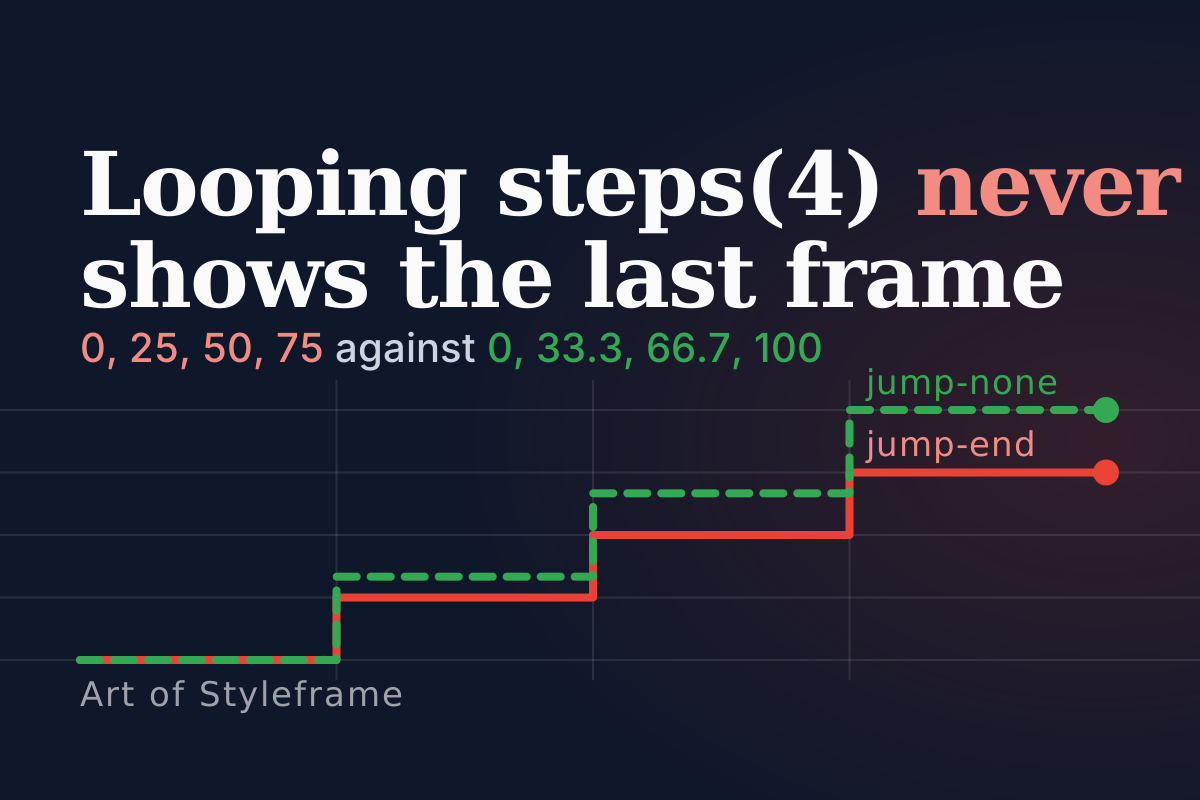
steps(n)has four jump terms and they differ in which values are ever displayed:jump-endnever shows the final value in a loop,jump-startnever shows the first,jump-noneshows both,jump-bothshows neither. Reversed playback reverses the easing too, soease-inon analternateanimation decelerates on the way back. Chrome 155, Firefox 153 and a WebKit build agreed on every stepped value and on every curve to within 0.01px on 100px of travel.
Which of the Four steps() Jump Terms Do You Want?
Watch the top four lanes in the preview. Same keyframe, same 180px, same 3.2 seconds, steps(4) in all of them. Only the second argument differs.
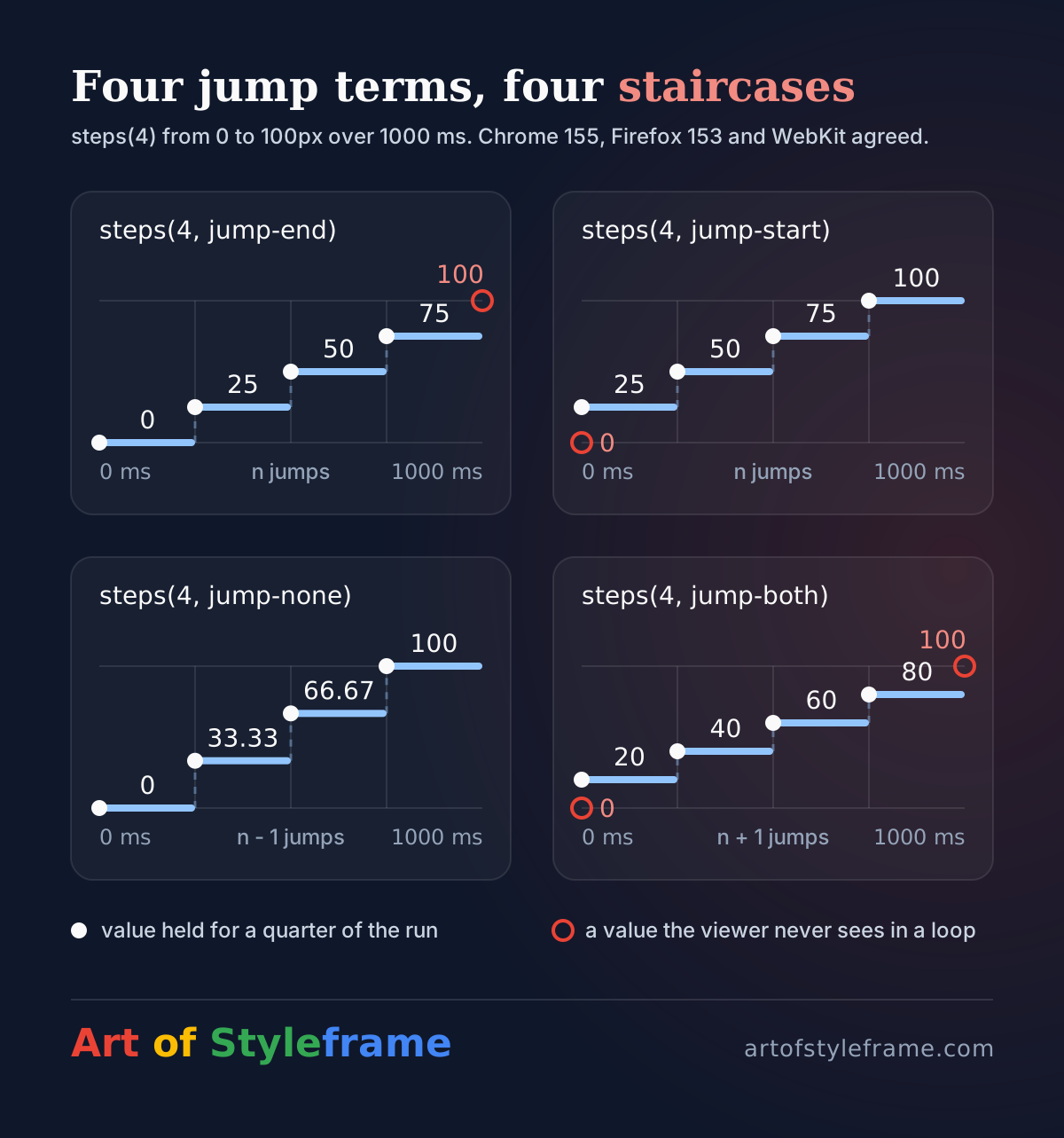
Where does the dot sit when the lane starts? And where does it sit just before it loops? Those are the two questions the jump term answers, and nobody learns them from the syntax. The CSS Easing spec defines the output as the current step divided by a count of jumps, and the jump count changes with the term: n for jump-start and jump-end, n - 1 for jump-none, n + 1 for jump-both. start and end are aliases for jump-start and jump-end, and the spec lists step-start and step-end as steps(1, start) and steps(1, end).
To check the algorithm against reality, I set up one pause-able animation per timing function, moved its currentTime to chosen instants and read the computed left back. The environment: Chrome 155.0.8059.80, Firefox 153.0 and a WebKit build with a Safari 26.6 user agent, all driven through Playwright on macOS on 2026-10-17. Here's steps(4) moving 0 to 100px over 1000 ms:
| Time | jump-end | jump-start | jump-none | jump-both |
|---|---|---|---|---|
| 0 ms | 0 | 25 | 0 | 20 |
| 249 ms | 0 | 25 | 0 | 20 |
| 250 ms | 25 | 50 | 33.33 | 40 |
| 499 ms | 25 | 50 | 33.33 | 40 |
| 500 ms | 50 | 75 | 66.67 | 60 |
| 749 ms | 50 | 75 | 66.67 | 60 |
| 750 ms | 75 | 100 | 100 | 80 |
| 999 ms | 75 | 100 | 100 | 80 |
All three engines printed those numbers, character for character. Read the columns as the set of states a viewer ever sees in a loop. jump-end, the default: 0, 25, 50, 75. The 100 never appears, and that's what makes it right for a looping sprite. jump-start: 25, 50, 75, 100. The resting position is gone. jump-none: 0, 33.3, 66.7, 100, so both ends are visible and the steps are 33.3 apart, not 25. jump-both: 20, 40, 60, 80, neither end.
So four steps can mean four visible states in every term, but never the same four. The "four" in the name counts intervals, and the jumps live on the boundaries.
Why Does a One-Shot Sprite Vanish on Its Last Frame?
The bottom row of the preview is a six-tile strip behind a one-tile window. Three versions: a loop, a one-shot that ends blank, and a one-shot that ends on tile 6.
Nothing is wrong with the first one. A six-frame loop wants steps(6) and a translate to the full width of the strip:
@keyframes strip-loop { to { translate: -240px 0; } }
.s1 { animation: strip-loop 1.2s steps(6) infinite; }
In Chrome 155 I sampled the middle of each sixth of the duration on the preview's strip (six 40px tiles) and got 0, -40, -80, -120, -160 and -200px. Six distinct frames, each held for a sixth of the time, and the -240px target is never displayed because the loop restarts the instant it would be. That's jump-end behaving exactly as designed.
Now make it a one-shot with animation-fill-mode: forwards and keep everything else. The animation finishes, the element is held on its final keyframe, and the final keyframe is -240px. At 1000 ms the computed translate read -240px, and it stayed there at 1500 ms. The window is now looking at empty space one tile past the end of the strip. This is the second box in the preview, and it's blank after a second and a bit.
The fix isn't obvious until you look at the table above. Which term shows both the first and the last value, for equal time? jump-none. Aim the keyframe at the last tile's offset instead of the strip's width, and let it jump in between:
@keyframes strip-once { to { translate: -200px 0; } }   /* the 40px version: tile 6 */
.s3 { animation: strip-once 1.2s steps(6, jump-none) forwards; }
The same pattern, steps(6, jump-none) to -200px, gave 0, -40, -80, -120, -160 and -200px at the middle of each sixth, and held -200px at 999, 1000 and 1500 ms. Six frames, equal durations, ends on the last one.
One restriction trips people up. steps(1, jump-none) is invalid, since jump-none needs a count of at least 2 (MDN and the spec agree, and CSS.supports() returned false for it in Chrome, Firefox and WebKit). The spec's jump count for jump-none is n - 1, so one step would mean zero jumps, and the output is a step number divided by that count.
A looping sprite wants steps(N) to the full width. A one-shot wants steps(N, jump-none) to the last tile. Mixing them is how the last frame disappears.
How Many Steps Do Three Keyframes Get?
Here's the other place a count lies. steps(n) is a timing function, and a timing function applies to each interval between keyframes, not to the animation as a whole. MDN's own example is three segments with steps(2) giving six steps in total.
I tried the smallest case that shows it. Three keyframes at 0%, 50% and 100% moving 0, 100 and 200px, with animation-timing-function: steps(2) over 1000 ms. I sampled twelve instants and the element held exactly four positions: 0, 50, 100 and 150px. Two intervals, two steps each, four positions. All three engines.
That matters the moment you add a middle keyframe to a stepped animation to hold a pose. You've doubled your frame count and probably didn't mean to. If the total is what you care about, divide the steps by the number of intervals, or put the timing function on the keyframes that need it and leave the others alone.
What Does animation-direction Do to Your Easing?
The two amber and green dots in the preview use the same ease-in and travel the same 180px in 1.6 seconds per leg. They go out together. Do they come back together?
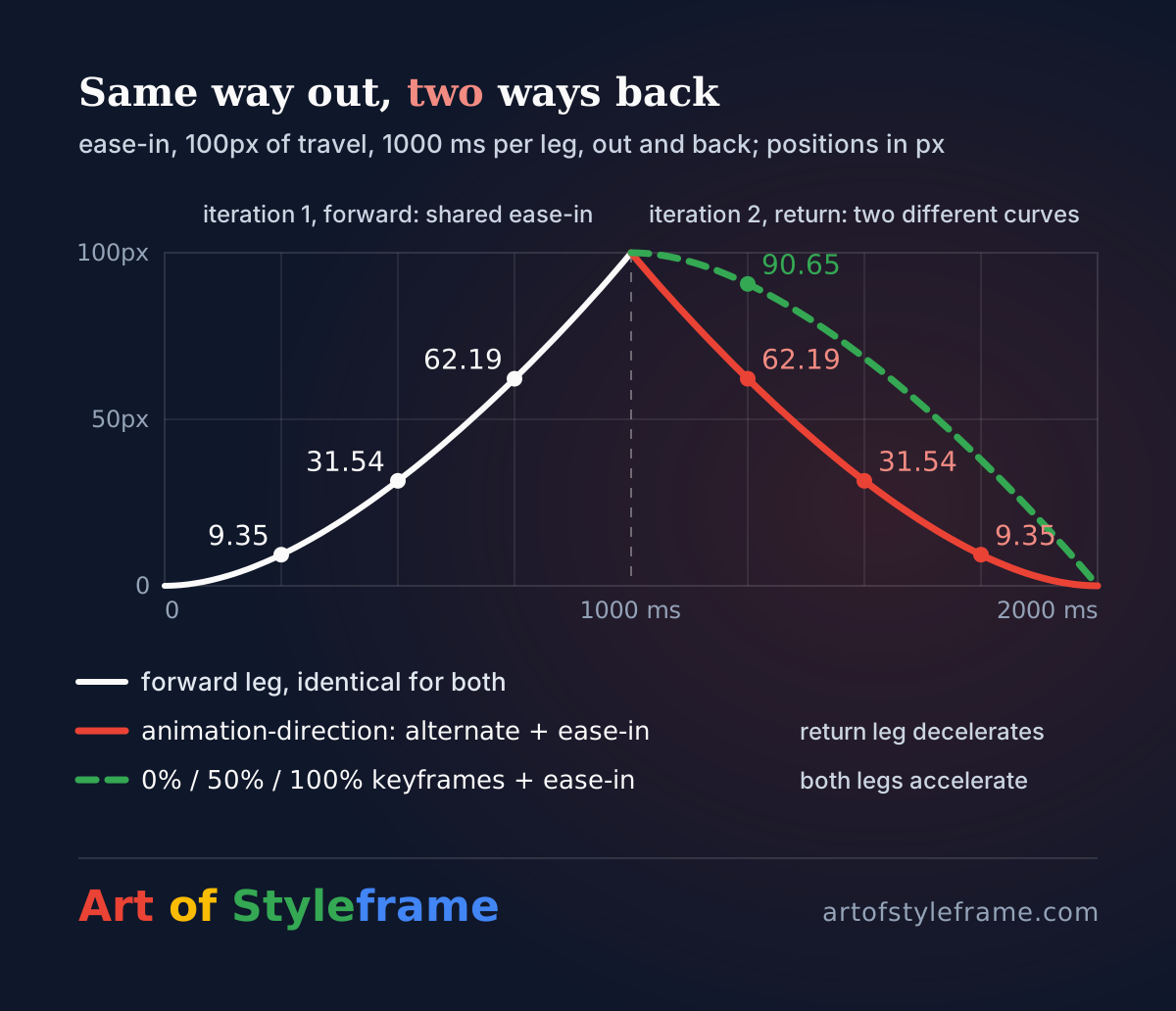
No. Look at the first moments of the return. The amber dot, which uses animation-direction: alternate, leaves the far end quickly and slows into the start. The green dot, which uses three keyframes, leaves the far end slowly and speeds up. MDN is explicit about the first: when an animation plays in reverse, easing functions are reversed too, and an ease-in becomes an ease-out.
I measured it. ease-in over 1000 ms, 100px of travel, three engines:
| Instant | Position, forward leg | Position, return leg of alternate |
|---|---|---|
| 250 ms into the leg | 9.35px | 62.19px (37.81px travelled) |
| 500 ms into the leg | 31.54px | 31.54px |
| 750 ms into the leg | 62.19px | 9.35px |
Read the first row sideways. On the way out, a quarter of the time buys 9.35px. On the way back, a quarter of the time buys 37.81px, which is exactly what the last quarter of the outbound leg bought. The return leg is the outbound curve played backwards in time. And in the second variant, the three-keyframe yoyo with one ease-in applied per interval, 250 ms into the return leg the dot was at 90.65px, which is 9.35px travelled. Same curve, accelerating on both legs.
Neither is wrong, and I'm not going to claim one feels better, since I didn't test people. They're different motions, and the choice has to be made. A symmetric curve such as ease-in-out makes the question vanish, because it's its own mirror image. An asymmetric one, an ease-out on an arrival, will come back as an ease-in, and a departing element that starts slowly is the opposite of what an exit usually wants. If a piece of UI moves out and back and the two legs need the same character, write the keyframes and set the curve once. If you want a mirrored return, alternate gives it to you for free.
The same applies to animation-direction: reverse. A fade-in authored with ease-out and played in reverse fades out with ease-in, which may or may not be the exit you'd have authored by hand. CSS transitions don't mirror at all: they reverse from the curve's opening.
Do Browsers Agree on the Numbers?
The reason I bothered with three engines is that "deep dive" articles about easing tend to compare curves on a chart and stop. Does a Firefox user see the same motion? For the keywords and the one overshoot curve from the spring article, to within a rounding error, yes.
| Timing function, 100px, 1000 ms | At | Chrome 155 | Firefox 153 | WebKit (Safari 26.6 UA) |
|---|---|---|---|---|
ease | 250 ms | 40.85 | 40.85 | 40.85 |
ease-in | 750 ms | 62.19 | 62.18 | 62.19 |
ease-out | 100 ms | 16.06 | 16.05 | 16.06 |
ease-in-out | 500 ms | 50 | 50 | 50 |
cubic-bezier(0.34, 1.56, 0.64, 1) | 500 ms | 108.74 | 108.73 | 108.74 |
The largest difference anywhere in my samples was 0.01px, in Firefox, which solves the bezier a hair differently. On a 100px travel that's one hundredth of a pixel, far below what any display resolves. And every steps() value matched exactly, which is what you'd expect from arithmetic that is a floor and a division. I'd treat the curve mathematics as settled across current engines. What's left to differ is support for new syntax, not the maths of old syntax.
The Playwright builds aren't what your visitors install, and I didn't test Chrome on Windows or Android. It's one machine and one afternoon. The honest claim is narrow: current Chromium, Gecko and WebKit agree on these functions, as sampled, on this one.
The method is short enough to print, and it works for any timing function you doubt:
const el = document.querySelector('.dot');
const anim = el.getAnimations()[0];     // the CSS animation, already running
anim.pause();
for (const t of [0, 250, 500, 750, 1000]) {
  anim.currentTime = t;                 // jump to an instant
  console.log(t, getComputedStyle(el).translate);
}
When Is a Stepped or Reversed Curve the Right Choice?
My opinion, and plenty of motion designers will disagree: steps() is for state, not for style. Sprite frames, a counter that ticks, a typed-out label, a progress meter that should read in whole blocks. Reaching for it to make smooth motion look "retro" or "low frame rate" is a look, and it's a fine look, but it makes a different promise to the person watching. A stepped slide is a sequence of discrete jumps, and every jump is a change the eye has to catch up with. If the same element sits in an interface people use all day, I'd keep the steps for content that is actually discrete. For the guard rails, the reduced-motion piece covers what to do when someone's system asks for less movement, and stepped animation isn't exempt from it.
The scroll-driven guide touches steps(4, jump-end) in one line, for a label that ticks through four values on a scroll timeline. The behaviour is the same there, but the clock is the scrollbar, and that piece is the place for it.
For reversed easing, my rule is simpler. If the animation has a rest state and an active state, and the return should feel like its own motion, author the return as its own keyframes. Use alternate only when the curve is symmetric or when a mirrored feel is the goal. Everything else is a surprise waiting for a design review.
Summary
steps(n) takes a jump term that decides which values are ever shown. For steps(4) over 100px, sampled identically in Chrome 155.0.8059.80, Firefox 153.0 and a WebKit build with a Safari 26.6 user agent: jump-end holds 0, 25, 50 and 75; jump-start holds 25, 50, 75 and 100; jump-none holds 0, 33.33, 66.67 and 100; jump-both holds 20, 40, 60 and 80. In the spec's algorithm the jump count is n for jump-start and jump-end, n - 1 for jump-none and n + 1 for jump-both, and jump-none needs a count of at least 2. A looping sprite wants steps(N) to the full strip width; a one-shot with forwards fill wants steps(N, jump-none) to the last tile's offset, because the default term ends on the full width, past the strip. The step count applies per keyframe interval, so two intervals of steps(2) gave four positions. Reversed playback reverses the easing: ease-in over 1000 ms covered 9.35px in its first quarter going out and 37.81px in the first quarter of the alternate return, while a 0%, 50%, 100% keyframe version covered 9.35px both ways. The keyword curves and cubic-bezier(0.34, 1.56, 0.64, 1) agreed across the three engines to within 0.01px on 100px.