My first measurement of this was wrong, and the way it was wrong is the interesting part. I sampled the box's position on every frame, took two neighbouring samples, divided by the gap, and got numbers that looked sensible. Then I paused the animation at an exact timestamp instead, read the position 1 ms either side, and the ease-out reversal came out at 0.843 px/ms against 0.742 from the frame deltas. About 12 percent low, just from sampling.
So what was I measuring? The moment a hover effect gets interrupted, which is the one moment nobody previews. Every easing demo on the web plays a transition from start to finish, in a lab, with nobody touching anything. Real pointers don't wait. They sweep across a card on the way to somewhere else and leave after 90 ms.
Short answer: When you reverse a CSS transition mid-flight, the browser plays a scaled-down copy of the whole easing curve back to the start. The return therefore opens with the curve's opening. A curve that starts steeply, like ease-out or Material's emphasized decelerate, turns around instantly and fast. A curve that starts from rest coasts. The moment of interruption barely matters.
This is the missing half of the easing curves guide, and it unpacks one sentence in the spring teardown, the one saying CSS reverses a transition by shortening it. I wanted the numbers behind that sentence.
What Happens When You Change Your Mind Halfway Through a Transition?
The preview right under this section has three lanes. Each box moves 200 px over 400 ms when you hover its lane, and each uses a different curve. Sweep the pointer in and out of a lane inside roughly 100 ms, then do it on the next lane. Don't judge which curve you like. Watch what the box does at the turn.
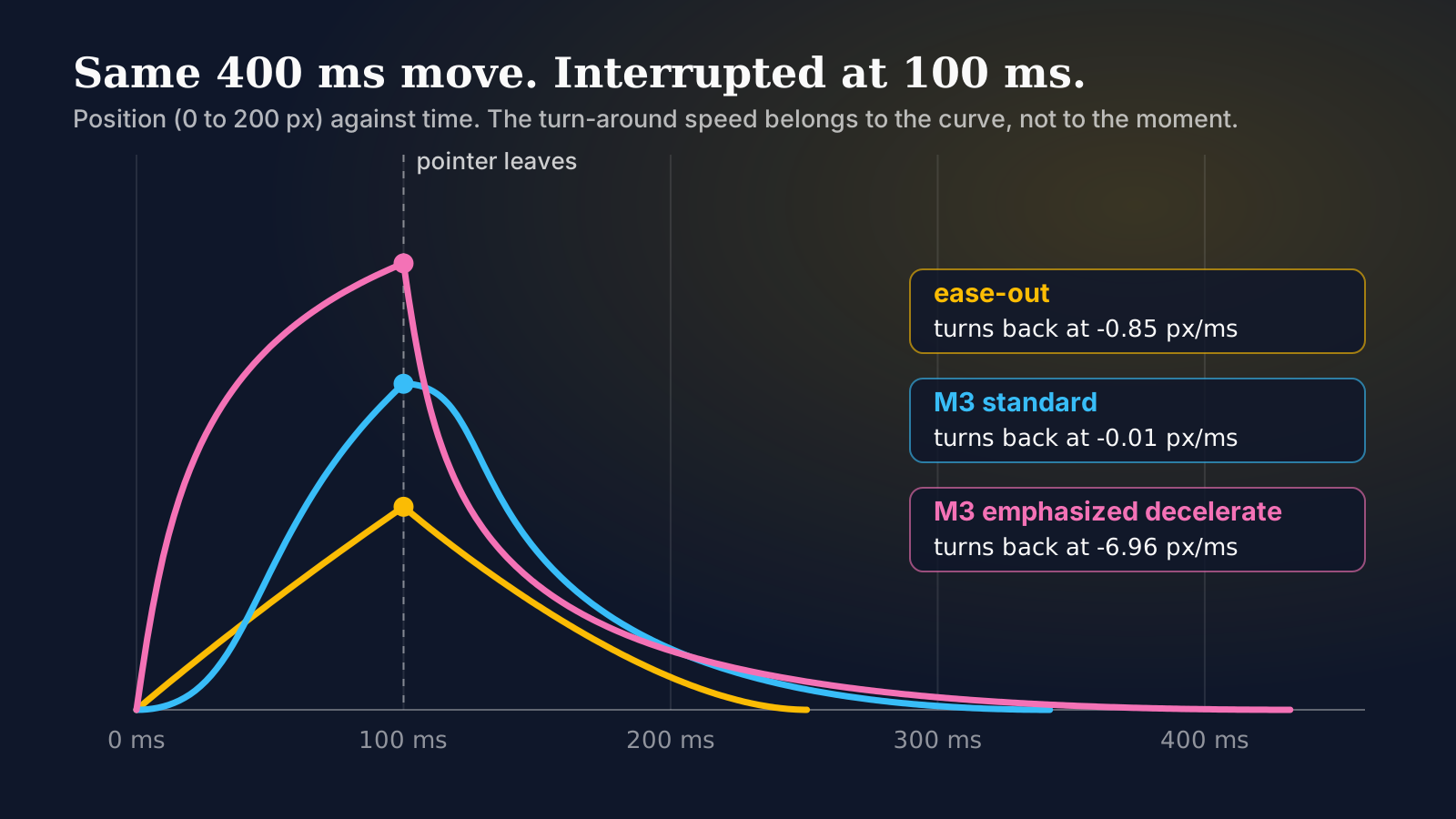
By the numbers further down, the amber lane (plain ease-out) should turn back briskly, the blue one (Material 3's standard curve) should coast home, and the pink one (Material's emphasized decelerate) should get yanked toward the start. Trust your own eyes over my prose. These are the declarations running in the preview, and they're the only difference between the lanes:
.l1 .box { transition: transform 400ms ease-out; }
.l2 .box { transition: transform 400ms cubic-bezier(0.2, 0, 0, 1); }
.l3 .box { transition: transform 400ms cubic-bezier(0.05, 0.7, 0.1, 1); }
.lane:hover .box, .lane:focus-visible .box { transform: translateX(200px); }
The curve values are copied from the tokens file material-web ships (v0_192): easing-standard is cubic-bezier(0.2, 0, 0, 1) and easing-emphasized-decelerate is cubic-bezier(0.05, 0.7, 0.1, 1). If you want to feel it on a keyboard instead of a mouse, each lane takes focus, and focus triggers the same move. Play with it first. Everything after it explains what you just saw.
How Does the Browser Shorten the Return Trip?
The CSS Transitions spec has a case for exactly this. When a running transition is told to head back to where it started, the browser cancels it and starts a new one from the current value. The new duration isn't the declared one. It's the declared duration multiplied by a reversing shortening factor, which is built from the old transition's eased output at that instant. For a first reversal the old factor is 1, so the new one is just that eased output, clamped to the range 0 to 1.
Eased output, not elapsed time. That detail matters, because on a curve that starts fast the box has travelled much further than the clock suggests.
I checked this in Chromium 156.0.8078.4 through Playwright, reading the new transition's duration from getAnimations() the moment the class came off. A 200 px move, 400 ms declared:
| Curve | Interrupted at | Box at | Return took | 400 x (px / 200) |
|---|---|---|---|---|
| ease | 100 ms | 81.7 px | 163.5 ms | 163.4 ms |
| ease | 200 ms | 160.5 px | 321.0 ms | 321.0 ms |
| ease-out | 200 ms | 137.0 px | 273.9 ms | 274.0 ms |
| ease-in | 100 ms | 18.7 px | 37.4 ms | 37.4 ms |
| ease-in | 217 ms | 72.3 px | 144.5 ms | 144.6 ms |
The prediction in the last column, which is the declared duration times how far the box had got, lands within a tenth of a millisecond every time. So the browser isn't doing anything mysterious. It's doing what the spec says, and the spec's rule is simple enough to do in your head: leave at 40 percent of the way, and the way back takes 40 percent of the time.
One row breaks the pattern, and it's the one worth knowing. Try cubic-bezier(0.3, 0.8, 0.3, 2.3), the overshoot curve from the easing guide, interrupted at 117, 217 and 300 ms. In each case the box was past its 200 px target (222.6, 302.0 and 276.9 px), so the eased output was above 1. The clamp pins the factor to 1, and the return took the full 400 ms every time, measured exactly. While the box is beyond its target, the return never shortens.
Why Does the Return Open With the Curve's Opening?
Here's the part I didn't expect to be this tidy. Take the shortening rule and follow it through. The box has travelled a fraction p of the distance D, so the way back is p x D long. The return takes p x T, where T is the declared duration. The new transition plays the entire easing curve, from its own start, across that shorter trip. It's the full curve in miniature.
Which means its opening slope is the curve's opening slope. Write that slope as s0, the derivative at t = 0. The speed at the first instant of the return is s0 x (p x D) / (p x T). The p cancels. Everything about where you were interrupted drops out, and what's left is:
reversal start speed = s0 x D / T
The initial slope times the transition's average speed. For a cubic-bezier with x1 above zero, s0 is simply y1 divided by x1. When x1 is zero and y1 is zero, it's y2 divided by x2.
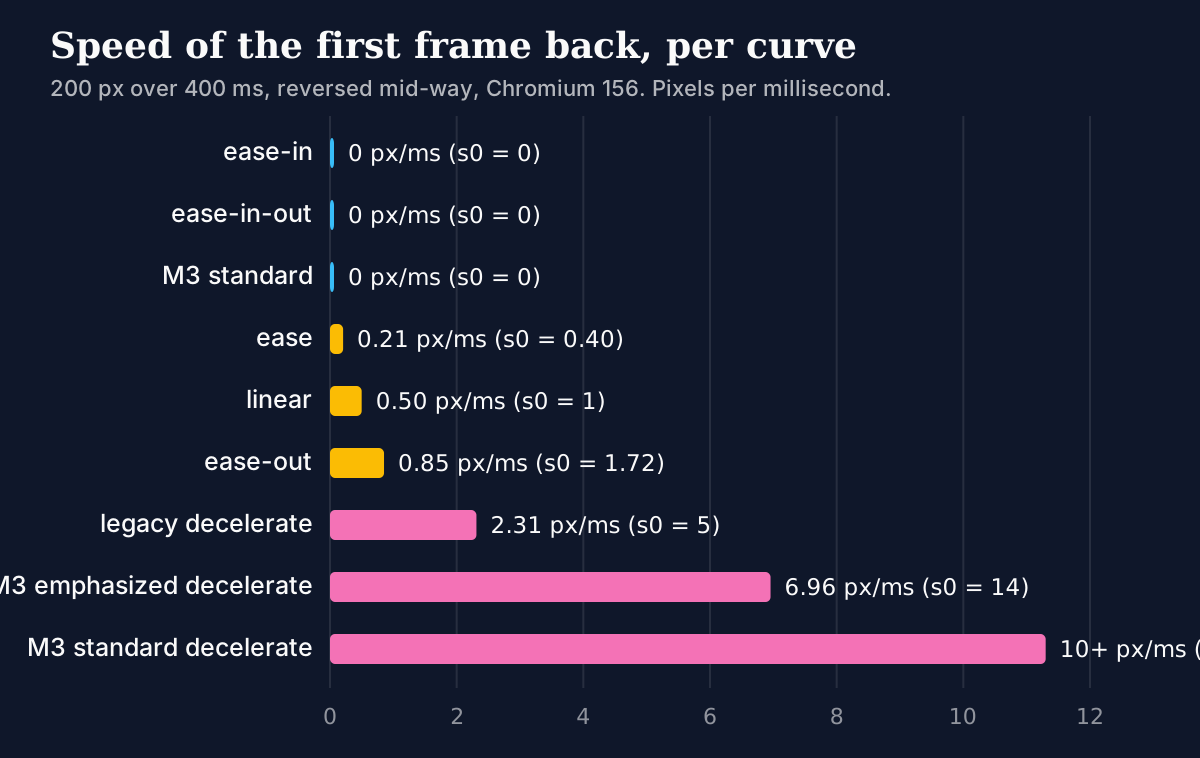
I tested that against a dozen curves at two or three interruption points each, pausing the transition at an exact timestamp and reading the position at 0 ms and 0.5 ms of the new one. The move is 200 px over 400 ms, so D / T is 0.5 px/ms, and the prediction is half of s0:
| Curve | s0 | Predicted | Measured at 60, 100, 200 ms cut |
|---|---|---|---|
| ease-in, ease-in-out | 0 | 0 | 0.03, 0.01, 0.00 |
| cubic-bezier(0.2, 0, 0, 1) | 0 | 0 | 0.02, 0.01, 0.01 |
| ease | 0.40 | 0.200 | 0.216, 0.207, 0.204 |
| linear | 1 | 0.500 | 0.500 |
| ease-out | 1.72 | 0.862 | 0.850, 0.853, 0.856 |
| cubic-bezier(0, 0, 0.2, 1) | 5 | 2.500 | 2.278, 2.312, 2.342 |
| cubic-bezier(0.05, 0.7, 0.1, 1) | 14 | 7.000 | 6.948, 6.956, 6.960 |
All speeds are px/ms, magnitudes only, since every one of them points back toward the start. The measured values wobble in the second decimal because the speed is still changing inside my half-millisecond window. The prediction holds to within about 10 percent even on the steep ones, and the cut point makes no visible difference to the answer, which is what the algebra predicted: the interruption point cancels out.
The emphasized decelerate row deserves a second look. At the instant before the turn, in the 100 ms case, the pink box was moving forward at 0.41 px/ms. In the first instant after the turn it's moving backward at about 7. That's seventeen times faster, in the opposite direction, with nothing in between. A physical object can't do that. A cheap UI can, and a cheap UI shows it.
A hover effect doesn't reverse its curve, it replays it from the top, so the way you open a transition is the way you'll turn it around.
Which Curves Are Safe to Turn Around?
Sort by s0. Zero is the safest because the return starts from rest and accelerates. Anything with y1 equal to zero qualifies, which covers ease-in, ease-in-out, the Material 3 standard and emphasized-accelerate tokens, and any curve written as cubic-bezier(x, 0, ...). The box slows to a near stop at the turn and then picks up speed. It looks considered.
Next comes ease, at 0.4. Mild. After that the keywords get dangerous in a way their names hide: ease-out at 1.72 is the default advice for anything that arrives, and arrival is exactly the case a pointer interrupts. Material's legacy decelerate, cubic-bezier(0, 0, 0.2, 1), is 5. The emphasized decelerate token is 14. And cubic-bezier(0, 0, 0, 1), which the same token file calls easing-standard-decelerate, starts vertically: its slope is infinite, and I stopped at 10 px/ms only because that's where my half-millisecond window ended.
Here's my rule, and it's an opinion you can argue with: keep s0 at or below 1 on anything the pointer can leave mid-way. At 1 the return starts exactly as fast as the transition's average speed. Above it, the turn-around is quicker than the average speed, and the eye reads a jerk. Under it, you get a gentle reversal for free. I'd go further and ban the emphasized decelerate token from hover states altogether, because a 17x lurch on a 400 ms move is not an "emphasis" anyone asked for.
Can you keep the shape and lose the lurch? Yes, by touching only y1. I took cubic-bezier(0.05, 0.7, 0.1, 1) and set the 0.7 to 0, giving cubic-bezier(0.05, 0, 0.1, 1). The reversal speed at the same 100 ms cut dropped from 6.96 px/ms to 0.13. Set it to 0.2 and it came out at 2.07, which matches the prediction of 2.0. The curve still decelerates hard into its destination. It just doesn't start with a shove.
That's why the hint in the preview tells you to change the pink lane's 0.7 to 0. It's the cheapest experiment in this article.
Which Declaration Runs on the Way Back?
The new one. The reversing transition reads its transition-* values from the style the element is heading toward, the after-change style. The spec adds that a transition which is already running carries on with the values it started with, so the rule is really "whoever is arriving sets the terms."
For a hover card that's a useful trick, and also a trap. The usual pattern puts the long, soft transition on the base rule and the quick one on :hover:
.card {
  transition: transform 400ms cubic-bezier(0.2, 0, 0, 1);
}
.card:hover {
  transition: transform 150ms cubic-bezier(0.2, 0, 0, 1);
  transform: translateX(200px);
}
Enter is quick, exit is lazy, which most people want. But it means the exit you wrote, 400 ms, is a ceiling. I tested a variant with a 150 ms ease-out enter and a 400 ms ease-in exit, and pulled the pointer out at different moments of the enter:
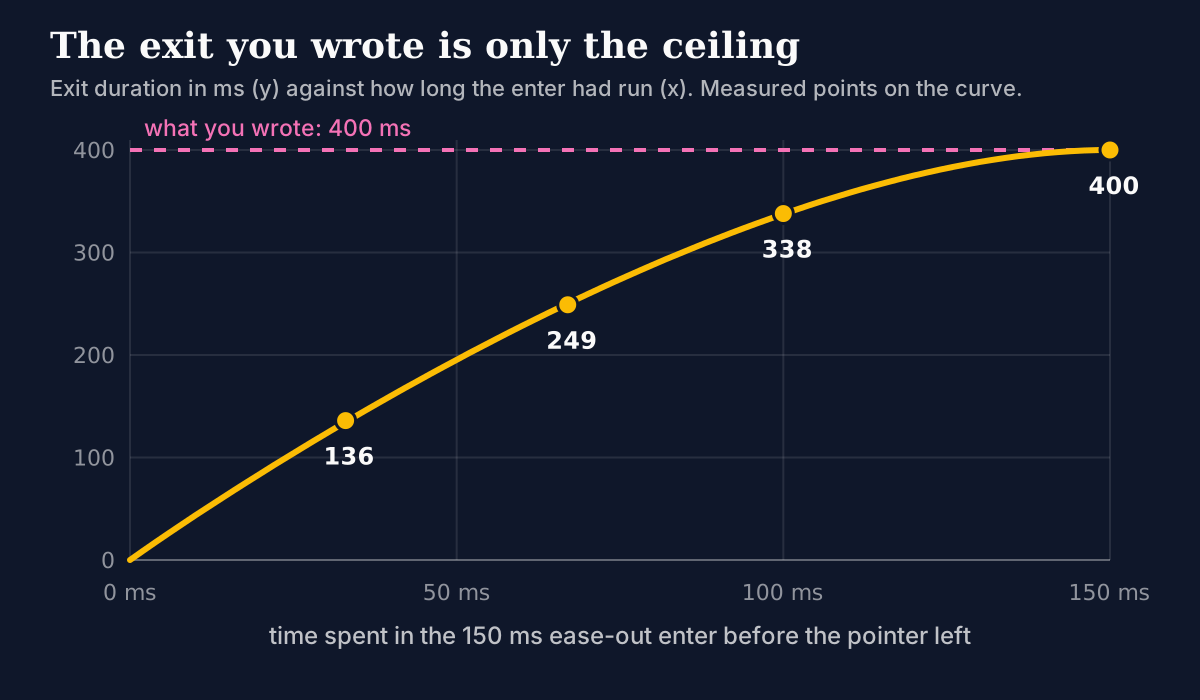
Leave after 33 ms and the exit takes 136 ms. After 67 ms, 249. After 100 ms, 338. Only a completed enter earns the full 400. A flick across a menu of ten items therefore produces ten fast partial exits, not ten lazy ones, and if your design review approved "400 ms exits" from a single hover in a static mock, it approved something the browser won't ship.
The other direction bites harder. Re-enter the card while it's still leaving, and the new transition runs on the :hover values, so the 150 ms ease-out governs the return to the hovered state. In my test, with a 400 ms ease-in exit interrupted at 100 ms, the box was drifting back at 0.34 px/ms. Then the pointer re-entered, and the 150 ms ease-out shot it forward at 2.17 px/ms, in a 14 ms transition, for 18.7 px. The same experiment with cubic-bezier(0.2, 0, 0, 1) on both rules gave 0.13 px/ms and a 91 ms transition. One of those feels like a card. The other feels like a camera shutter.
So the entering curve needs a gentle start too, not just the leaving one. On a dense table full of micro-interactions, where pointers cross rows constantly, that's the difference between rows that ripple and rows that twitch.
Does linear() Follow the Same Rule?
It does, and it was the cleanest check of the lot. With linear(), the opening slope is just the first segment's rise over its run. linear(0, 0.5 20%, 1) climbs 0.5 in the first 20 percent, so s0 is 2.5 and the predicted reversal speed is 1.25 px/ms. I measured 1.250 at 60, 100 and 200 ms. Not approximately, to the third decimal.
A spring sampled into linear() therefore reverses according to how its first stops climb, and the return replays the whole spring, wobbles included, squeezed into a shorter time. I didn't measure a sampled spring here. The teardown linked at the top is right that a spring you can interrupt needs JavaScript, where velocity carries over.
The one place the rule bent was interruption during an overshoot. linear(0, 0.9 30%, 1.1 60%, 1) cut at 200 ms had eased progress above 1, the clamp kicked in, the return took the full 400 ms, but the distance back was 3 percent more than the clamp assumed, so the measured speed was 1.55 against a predicted 1.50. Same story as the bezier overshoot above: clamped factor, full duration, the algebra no longer cancels.
MDN lists linear() as available across browsers since December 2023, and cubic-bezier() since July 2015. That's about the syntax, not about the reversal behaviour.
What Did I Not Test, and Where Does CSS Stop?
Plenty. Everything above comes from one engine, Chromium 156.0.8078.4, driven by Playwright 1.64.1. The Firefox and WebKit builds installed on this machine didn't match that Playwright's expected revisions, so I didn't measure them, and I'd rather say so than assume. The spec text is what the other engines are supposed to follow, and the shortening rule is in it, but supposed-to is not measured. I also only tested transform on a single axis, 200 px over 400 ms. Other properties interpolate the same way in principle. I haven't confirmed that.
And a hard limit sits underneath all of it. Nothing in this algorithm carries velocity. A reversing CSS transition starts a new curve from rest in its own frame, scaled to fit. The sign flip I measured, from minus 0.34 to plus 2.17 px/ms, is the visible edge of that. If the element is something users throw around, like a sheet, a card in a swipe stack or a drag handle, you want a real spring that remembers how fast it was going. That's what GSAP and Motion sell, and the Framer Motion guide covers the API.
Reduced motion changes how much of this you can see, not whether it exists. If you cut durations for people who ask for it, as in the reduce-not-remove patterns, the shortening factor still applies. By the formula, a shorter T raises D / T, so the same curve turns around faster in px/ms on a shorter transition. I haven't measured that case.
Summary
When a CSS transition is interrupted and heads back to where it started, the browser plays a scaled-down copy of the whole easing curve, with a duration equal to the declared one times the eased progress already made. In Chromium 156 that prediction matched the measured return duration to within 0.1 ms on every non-overshoot curve tested. Because the return is the full curve in miniature, it starts at the curve's initial slope s0 times the average speed D / T, whatever the interruption point: 0.85 px/ms for ease-out on a 200 px, 400 ms move, about 7 for Material's emphasized decelerate, near zero for ease-in, ease-in-out and the standard curve. The values come from the style being entered, so a 150 ms enter interrupted at 33 ms produced a 136 ms exit instead of the declared 400. linear() obeys the same rule, and overshoot curves clamp to a full-length return. Keep s0 at or below 1 for anything a pointer can leave halfway, and reach for JavaScript when the element has to remember its speed.