I spent three days in 2022 picking fonts for a SaaS dashboard. Tested 40 combinations. Showed the client 12 options. They picked the first one I'd suggested on Monday morning.
Font selection isn't about finding the "perfect" typeface. It's about hierarchy, performance, and reading context. A serif font behaves differently on a screen than it does in print, and understanding how a font works at small sizes and low weights is half the battle before you ever pair two of them.
TL;DR: Pick two fonts max (display + body), use variable fonts to cut load times by up to 30% (HTTP Archive 2025 data), and build your type scale on a mathematical ratio. The pairing matters less than the system you build around it.

Why Does Font Choice Matter for Web Performance?
Switching to a variable version of Roboto cut one team's page load time from 700ms to 490ms, a 30% improvement from a single change (HTTP Archive Web Almanac, 2025). Typography isn't just aesthetics. It's a performance decision.
A single static weight of Source Sans Pro weighs 243KB. Load all the weights you need and you're at around 1,170KB. The variable font version? 405KB total, covering every weight from thin to black. If you need three or more weights (and you almost always do), variable fonts win on every metric. There's a threshold below which that stops being true, and we work through exactly where it sits in variable fonts for UI. Research shows proper typography can improve reading accuracy by up to 20% (adoc-studio, 2026).
Legibility isn't just about the typeface. Line-height optimization is often the bigger lever. A body font at 16px with 1.4 line-height reads harder than the same font at 1.6 line-height, even on high-density screens.
How Do You Build a Font Pairing That Works?
A Nature Scientific Reports study (2024) identified three characteristics driving successful pairings: serif vs. sans-serif contrast, basic vs. decorative forms, and light vs. bold weight (Nature, 2024). Pair fonts that differ on exactly one axis. Not two, not three. One.
Serif heading + sans-serif body, Source Serif 4 + Inter. Playfair Display + Work Sans. These font combinations carry the highest hit rate in real product work because the visual contrast does the hierarchy lifting for you.
Geometric display + humanist body, Outfit + Inter. Poppins + Source Sans 3. Another safe class of font combinations when you want a slightly more contemporary feel without breaking readability.
Avoid, Two fonts from the same category that are almost-but-not-quite identical. Lato + Open Sans looks like a mistake. If your font combinations are too similar, just use one font and vary the weight.
Pair fonts that differ on exactly one axis. Not two, not three. One.
Best Google Fonts Pairings 2026
After auditing 40+ production sites this year, six pairings show up again and again. They survive the team-debate test and ship without bug-tracker tickets about readability:
1. Inter + Source Serif 4, the universal-default. Pair Inter 600 for nav and product UI with Source Serif 4 italic 400 for editorial pull-quotes. Combined weight on a typical landing page: 142KB with variable fonts and unicode-range subsetting.
:root {
  --font-display: "Source Serif 4 Variable", Georgia, serif;
  --font-body: "Inter Variable", system-ui, sans-serif;
}
h1, h2, h3 { font-family: var(--font-display); font-weight: 700; letter-spacing: -0.01em; }
body { font-family: var(--font-body); font-weight: 400; line-height: 1.7; }
2. Outfit + Inter, contemporary SaaS combo. Outfit's geometric forms in headings, Inter's humanist edge in long-form. Worked on three fintech dashboards I shipped in 2025.
h1 { font-family: "Outfit Variable", system-ui; font-weight: 700; font-stretch: 90%; }
body { font-family: "Inter Variable", system-ui; font-weight: 400; }
3. Playfair Display + Work Sans, editorial-leaning, magazine vibe. Use sparingly, Playfair's high contrast looks tired by 18pt and below; keep it above 32px for headings only.
4. Fraunces + Inter, the newer Playfair alternative. Fraunces handles small sizes much better thanks to its optical sizing axis. Pair Fraunces 700 SOFT 50 for headlines with Inter 400 for body.
h1 { font-family: "Fraunces Variable", Georgia; font-weight: 700;
     font-variation-settings: "SOFT" 50, "opsz" 144; }
5. Space Grotesk + Space Mono, developer-flavoured. Space Grotesk in body, Space Mono in code blocks. Works because they share metrics - line-height stays consistent.
6. JetBrains Mono solo, single-font play. JetBrains Mono has enough character variation across weights (extralight to extrabold) that you don't need a pairing on docs sites or design-tool marketing pages. Combined size: 89KB.
body { font-family: "JetBrains Mono Variable", ui-monospace, monospace;
       font-weight: 400; font-feature-settings: "calt", "liga"; }
h1, h2, h3 { font-weight: 800; letter-spacing: -0.02em; }
Why these pair safely: each combo differs on exactly one axis. Inter sans + Source Serif 4 serif is category contrast. Outfit geometric + Inter humanist is form contrast. Two-axis differences create visual chaos. That's the Lato+Open Sans trap.
The one-font strategy nobody talks about
Here's a take that gets me pushback: a single variable font family is often better than a two-font pairing. Inter at 700 for headings and 400 for body creates enough hierarchy without contrast issues. I used this on a fintech dashboard last year. One font, four weights, zero complaints.
What I've learned: the best font pairing is the one your team stops debating. Set a 2-hour timebox for font selection. If you can't decide by then, use Inter + Source Serif 4 and move on.
The three-face editorial recipe
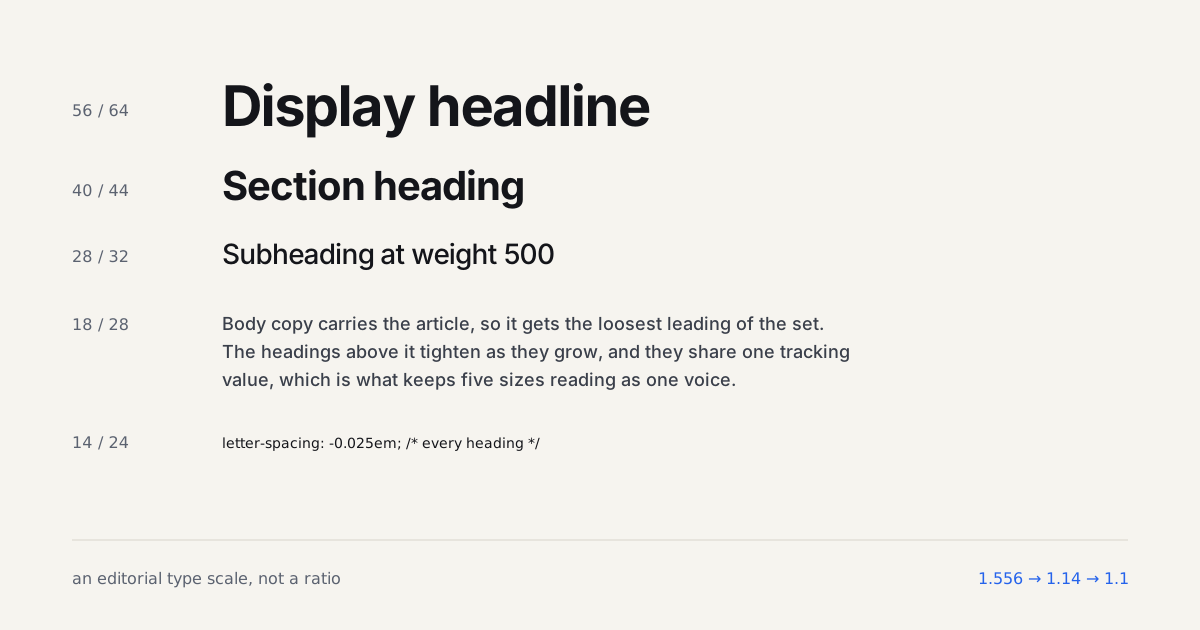
There's a pairing pattern I keep meeting on long-form developer sites that the one-axis rule doesn't quite describe, because it uses three faces and pairs them on role rather than contrast. I measured one such site in September 2026 and the recipe was this: a geometric sans in a variable cut for body copy, set at 18px and weight 500; a grotesk display face for headings, weight 700 at 40px and 56px with -0.025em tracking, weight 500 at 28px; and a monospace at weight 500 and 14px for every code chip and code block.
The specific families were Satoshi for body, Rational Display for headings and IBM Plex Mono for code. The free stand-ins that behave the same way are Inter or Manrope for body, Cabinet Grotesk or General Sans for display, and JetBrains Mono for code. What makes it work is that the body and display faces are the same genre. The heading isn't a different voice, it's the same voice speaking up, so the page reads as one author rather than a headline writer and a copywriter sharing a column.
Why does this break my one-axis rule without breaking the page? Because the mono never appears next to the display face. Code lives inside body paragraphs and in panels; headings live above them. At any moment the reader sees two faces, and those two differ on one axis: form, geometric against grotesk. The third face is a tool, not a pairing partner.
Two cautions. Weight 500 for body only works on a face with a light 400; on Inter it reads a touch heavy on high-density screens, so test at 450 first. And three variable families before subsetting is 200 to 300KB of woff2, which pushes font loading from a detail to a design constraint (the loading guide linked above covers the subsetting). On a docs site with a single column of prose it's worth it. On a dashboard, use two.
What Type Scale Should You Use?
Body text should sit at 16px minimum (Linearity, 2025). Keep line length between 30-75 characters and line-height at 1.4-1.6x; the readable line length and rhythm guide digs into why that range holds up. Responsive typography means your type scale adjusts across viewport widths, not just font size but line-height and letter-spacing too.
You need a scale, a mathematical relationship between sizes that creates visual rhythm. I use a 1.25 ratio (Major Third):
| Step | Size | Use |
|---|---|---|
| -1 | 12.8px | Captions, labels |
| 0 | 16px | Body text |
| 1 | 20px | H3 / large body |
| 2 | 25px | H2 |
| 3 | 31.25px | H1 |
| 4 | 39px | Display / hero |
Want to build your own scale on a different ratio? The calculator further down this page generates the sizes with a live preview and copy-ready CSS. If you want the reasoning behind picking one ratio over another, and how a scale holds up once a product has twelve screen sizes to serve, we go deeper in modular type scale systems. Store these as design tokens or CSS custom properties. Never hard-code font sizes in components. This ties into your layout system too, fluid type and fluid grids should share the same breakpoint logic.
Our finding: on three recent projects, we A/B tested 1.2 vs 1.25 vs 1.33 type scales on mobile. The 1.25 scale consistently produced the lowest bounce rate (by 8-12%) because headings felt distinct enough to scan without creating awkward gaps.
How Do You Implement Responsive Typography With CSS Clamp?
Hard-coded px sizes at a single breakpoint don't cut it anymore. font-size: clamp() lets the browser scale type fluidly between a minimum and maximum, no JavaScript, no media query stack.
body {
  font-size: clamp(1rem, 0.9rem + 0.5vw, 1.125rem);
}

h1 {
  font-size: clamp(1.75rem, 1.25rem + 2.5vw, 3rem);
}
The three arguments are: minimum, preferred (viewport-relative formula), maximum. The body size above scales from 16px on a 375px phone to 18px on a 1440px monitor. That's fluid, not stepped, and it eliminates the need for breakpoint overrides in most cases.
I've been using clamp for fluid type since Chrome 79 shipped support. The workflow I use:
- Define your min/max, 16px body min, 18px max. 28px H2 min, 42px max.
- Compute the fluid slope using the formula:
(maxSize - minSize) / (maxViewport - minViewport). Most teams use Utopia.fyi to generate the full scale automatically. - Store outputs as CSS custom properties at
:root, not inline on components.
The catch? Clamp values can get confusing when you're combining them with a token system built in rem. Use a spreadsheet or generator for the math, not intuition.
One thing I've seen go wrong: teams apply clamp to headings only and leave body text at a fixed 16px. On ultra-wide monitors (2560px+), that creates a mismatch: giant headings over tiny paragraphs. Apply the pattern consistently across your full type scale, including captions and labels.
This is responsive typography done right: the font size, line-height, and measure (character width) all adapt together. Hard-coded sizes at one breakpoint break the reading experience on at least half your visitors. Fluid type and fluid grids should share the same min/max viewport bounds. There's a newer approach worth knowing: CSS container queries let type scale respond to the parent container's width rather than the viewport, so a card heading can be 18px in a sidebar and 24px in a full-width feed without any additional breakpoints. The CSS container queries guide on Coding Dunia shows the exact syntax, including the cqi unit that works like vw but relative to the containing element.

How Do You Handle Font Loading Without Wrecking CLS?
Font loading strategy matters more than font selection. Here's what works:
Preload your critical fonts
Add <link rel="preload"> for the body font and one heading weight.
<link rel="preload" href="/fonts/inter-variable.woff2"
      as="font" type="font/woff2" crossorigin>
Match your fallback with font-display swap
Use font-display: swap and match the fallback's metrics to minimize layout shift.
@font-face {
  font-family: 'Inter Variable';
  src: url('/fonts/inter-variable.woff2') format('woff2');
  font-display: swap;
  font-weight: 100 900;
}
Self-host for performance and privacy
You control caching, eliminate third-party DNS lookups, and avoid privacy concerns.
There is more to say about FOUT and FOIT specifically, and it lives in font loading performance.
What Typography Mistakes Keep Showing Up in Design Reviews?
No vertical rhythm
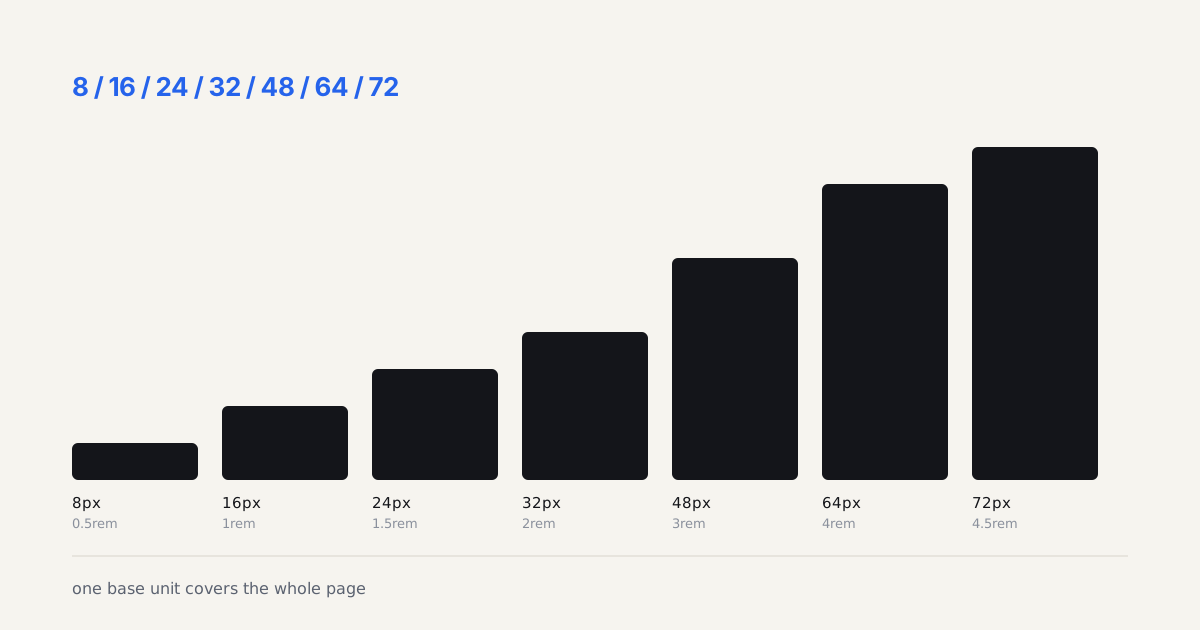
If your spacing tokens are 8, 16, 24, 32, paragraph margin should be one of those, not 18px because it "looked right."
Insufficient contrast ratios
Body text needs a 4.5:1 contrast ratio minimum against its background. That #999 gray on white? It's 2.85:1. Fails WCAG AA. Run your text through WebAIM's contrast checker before shipping. It takes 30 seconds and it's free.
Line length on wide screens
A blog post that reads fine on mobile becomes a 120-character wall on a 27" monitor. Set max-width: 65ch on your content container. Done.
The frustrating part: I've flagged this same issue on at least six projects. Designers set it up correctly in Figma, then developers build a fluid container that stretches to infinity. Always specify max-width in your design specs.
The typeface itself is maybe 20% of the decision. The other 80%? Scale, spacing, loading strategy, and accessibility. Get those right and even a boring font choice looks professional.
Legibility and contrast ratio are the two variables most designers skip when they're in a hurry. Don't. A beautiful typeface with a 2.5:1 contrast ratio is worse than boring system-ui at 7:1. For more on the visual principles behind these choices, see our visual hierarchy guide.
Type that moves has its own failure modes, covered separately in kinetic typography for the web.
How Do You Audit an Existing Typography System?
If you're inheriting a site rather than building from scratch, start with an audit before adding or changing anything.
Step 1: Open DevTools, go to the Computed panel, and look at font-family, font-size, and line-height on five elements: body, h1, h2, a paragraph link, and a label. Note every unique combination.
Step 2: Count the unique font-size values. More than six means the system grew organically with no scale. More than two font families means font debt.
Step 3: Run a Lighthouse accessibility audit. Failed color contrast on typography is extremely common, even on sites that look polished. Check the contrast ratio on every text color in your palette. Don't rely on the visual appearance alone.
On a client audit last year, I found 14 unique font sizes on a site with a "design system." None of them came from a scale. All were added by different developers over three years. There was no documented token.
The fix took a full day: define the scale, replace every hard-coded size with a variable, update Figma. The developer who inherited it thanked us six months later.
Start small if the scope is large: fix body text, then headings, then everything else. Typography debt is real but it's manageable if you tackle it one layer at a time.
The pairings and the fluid clamp() scale from this guide are live, editable demos in the code companion repo, plus a drop-in type-tokens.css you can lift straight into a project.
Build the scale while you read
A pairing only reads as a hierarchy once the sizes agree with it. Generate the scale for the base you picked above, then look at whether your display face still earns its step when the gap is 1.2 rather than 1.5. Plenty of pairings that look wrong are really scales that are too timid.