Call it box soup: an article where the TL;DR is a rounded card with a blue left border, the tip is a rounded card with a yellow left border, the author bio is a rounded card with a grey border, and the related posts are rounded cards with shadows. Five boxes, five borders, zero hierarchy.
The cure isn't fewer highlight elements. Articles need them. It's giving each one a single, different means of emphasis and then leaving it alone.
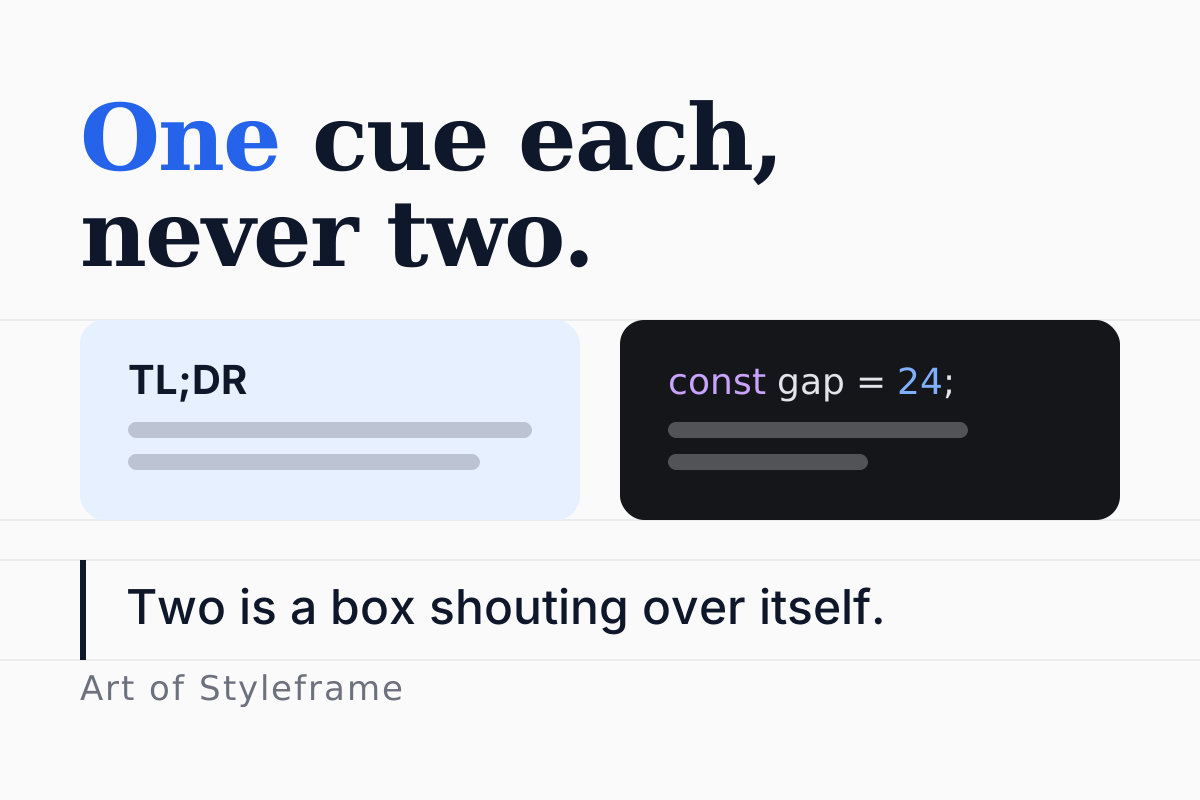
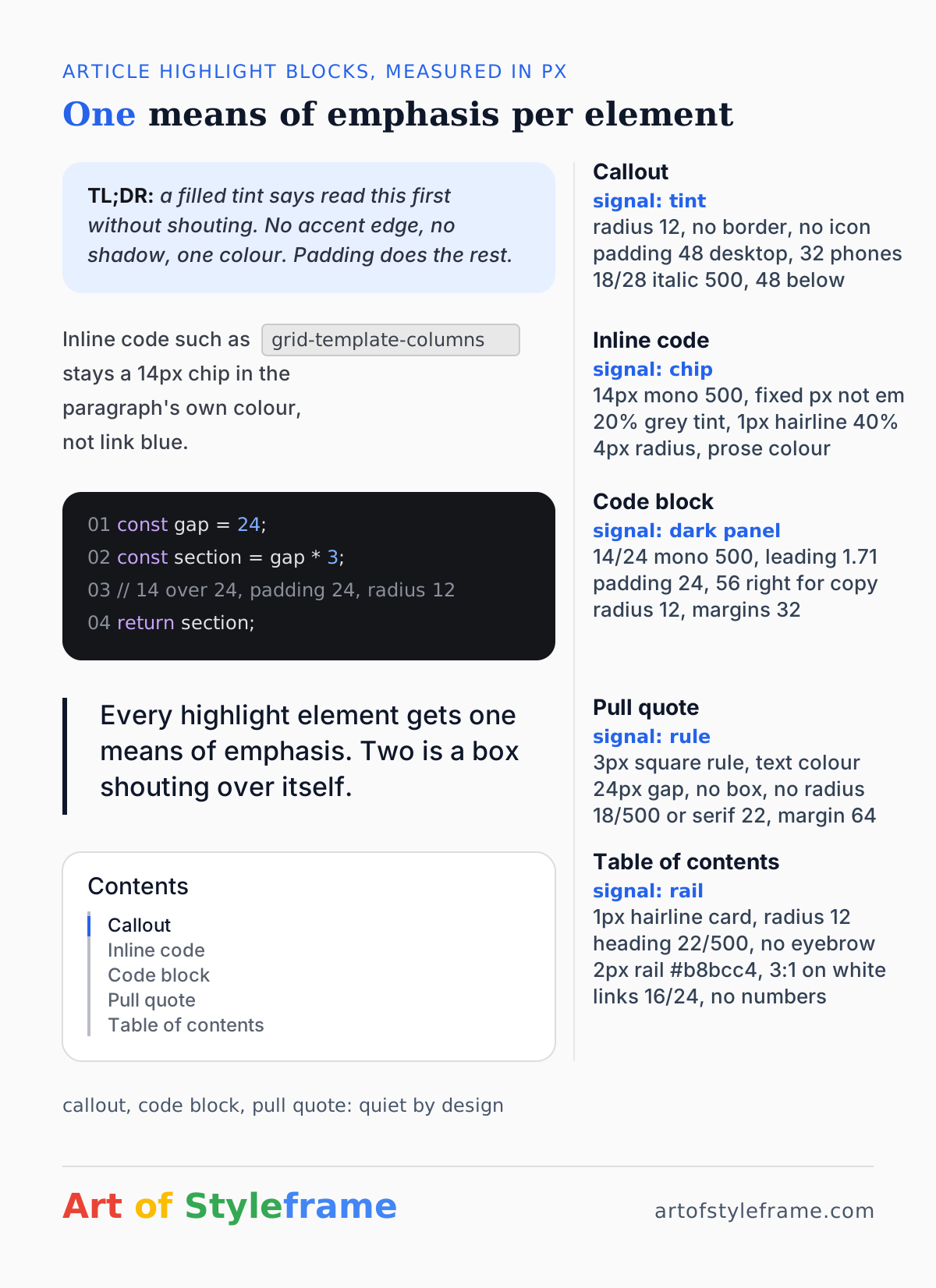
TL;DR: A callout is a filled tint with a plain 12px radius and no accent edge. Inline code is a 14px mono chip on a faint tint. A code block is a dark panel with 24px padding and the same 12px radius. A pull quote is a square-cornered 3px rule and no box. A table of contents is a card with a 2px rail. One signal each, measured on a page that reads well, and none of them borrowed from another.

Why Do Highlight Blocks Turn Into Soup?
Because each one was designed alone. The person who styled the TL;DR box never saw the FAQ block, and the FAQ block was added a year after the author card, and all three reached for the same three tools: a border, a radius and a background. Put them on one page and they cancel out. When everything is boxed, nothing is.
There's a second cause, and it's newer. Since 2023 a huge share of front-end templates have been generated, and generators converge on one shape: rounded-xl border-l-4 border-blue-500 bg-blue-50. A thick coloured edge, a soft tint, and the tell that gives it away every time, the rounded corner where the accent edge meets the box. Humans setting type rarely drew that corner. Now it's everywhere, and readers who've seen it a hundred times file your page as template before they've read a sentence. Our visual hierarchy guide covers the general principle; this article is about what to do instead, block by block.
What Should a Callout Look Like?
The measured page used exactly one callout style, for its TL;DR and for one key insight per article. Here it is, in numbers.
| Property | Value |
|---|---|
| Background | a pale tint of the brand colour |
| Border | none |
| Radius | 12px |
| Padding | 48px on desktop, 32px on phones |
| Type | 18px over 28px, italic, weight 500 |
| Label | bold, upright, inline: "TL;DR:" |
| Margin below | 48px |
Notice what's missing. No border at all, not on the left, not around. No icon. No shadow. The tint is the whole signal, and because the padding is generous, 48px, the box has presence without needing a second device. The italic does something subtle too: it marks the text as a different voice, a summary spoken over the article rather than part of it.
Is 48px of padding a lot? On a 628px column it eats 96px of width and leaves 532px for text, which is about 57 characters per line at 18px. That's the low end of the comfortable measure range, and it's the right end for a block you want read slowly. Halve the padding and the callout starts to look like a paragraph somebody painted.
The one constraint the tint has to satisfy is contrast. Slate text at #2b3140 on a #e7f0ff field measures about 10.7:1, comfortably past the 4.5:1 that WCAG asks of body text (W3C WAI, 2026). Darken the tint toward the brand colour for drama and you'll cross that line before the box looks dramatic, which is a good argument for keeping tints in the 90 to 95 percent lightness range and letting padding do the emphasis.
How Should Inline Code Sit Inside a Sentence?
Inline code is the most frequent highlight element on a technical page and the one most often set wrong. The usual mistake is font-size: 0.875em, which looks right in a paragraph and then produces a 35px code chip inside a 40px heading.
The measured page used a fixed size: 14px monospace at weight 500, inside 18px prose. The chip has a 20 percent grey background, a 1px hairline at 40 percent grey, 4px of horizontal padding and a 4px radius. The text colour is the paragraph's own colour, not a link blue and not the brand.
That last decision is the important one. A code chip in the brand colour looks clickable. Readers hover it, nothing happens, and a small piece of trust leaves the room. Keeping the chip in the text colour says "this is an object in the sentence," which is what it is.
A code chip in the link colour is a promise the page can't keep. Readers hover it, nothing happens, and a little trust walks out.
Why the fixed pixel size rather than em? Because inline code shows up in headings, in list items, in table cells and in the table of contents, and the long-form type scale around it ranges from 14 to 56px. A chip that scales with its container will be right in exactly one of those places. A chip fixed at 14px is a chip everywhere, and monospace at 14 stays legible down to the smallest context it appears in.

What Makes a Code Block a Panel Rather Than a Paragraph?
The block is where the dark theme lives, and the measurements are simple: 14px mono over a 24px line, weight 500, 24px padding on top, bottom and left, 56px on the right to leave room for a copy button, 12px radius, 32px margin above and below. The background is a near-black rather than pure black, which keeps the syntax colours from vibrating.
Three details do most of the work.
The 24px line height is 1.71, far looser than the 1.4 to 1.5 most code editors default to. Code in an article is read, not scanned, and the extra leading is what lets a reader find the line the prose just mentioned. The pre element preserves whitespace by definition (WHATWG, 2026), so every line break in the listing is a real line and the leading counts.
The 32px margins are one step larger than the paragraph gap of 24. A code block is a visual object and needs more separation from prose than prose needs from itself. Set the margin to 24 and the panel looks glued to the sentence above it. Our spacing scale article has the full set of distances this sits inside.
And the radius matches the callout. Both are 12px. This is the quiet consistency that makes a page feel like one system: the dark panel and the light callout are the same shape in different colours, so the reader learns one silhouette for "block that isn't a paragraph."
A code block with a 6px radius on a page whose cards have 12px feels slightly cheap, and it's hard to say why until you put the two numbers side by side. Check radii first when auditing a template.
How Do You Set a Pull Quote Without a Box?
Once the callout owns the filled tint, the pull quote can't have one. The measured page's approach, and the one I've settled on for every long-form project since, is the opposite device: a square-cornered rule and nothing else.
Three pixels of solid rule on the left, in the text colour rather than the brand, 24px of padding between the rule and the words, no background, no radius, and the type stepped up to 18px at weight 500 or, on pages with a serif display face, set in that face at 22px. The margin above and below is 64px, two steps larger than the paragraph gap, because a pull quote is a pause.
The square corners aren't fussiness. A rule with rounded ends is a pill, and a pill next to a rounded box says "these are the same kind of thing." Square ends say "this is a line, that is a box," and the reader's eye files them separately without being told. If your design system only has rounded radii, this is the one place to add a zero.
What about the quotation glyph? Skip it. The rule already says quote. The big decorative quote mark is another second signal, and it dates a page to a specific era of blog templates faster than any font choice.
What Does a Quiet Table of Contents Look Like?
A table of contents is a highlight block too, and the boxed-with-numbers version most sites ship is the worst offender in my soup folder: a rounded card, a numbered list, hairlines between items, and a coloured counter on every row. Four signals for a list of links.
The measured version: a card with a 1px hairline border and the 12px radius, a heading at 22px in weight 500 rather than an uppercase eyebrow, and the list of links sitting against a 2px vertical rail in a neutral grey. No numbers, no dividers. Link text at 16px over 24px in a muted colour, with the current section in the full text colour. The rail is the one device, and it doubles as a progress indicator if you tint the segment beside the active heading.
The 2px rail needs to clear the non-text contrast requirement of 3:1 against the card background (W3C WAI, 2026), which a mid-grey at #b8bcc4 on white just does. Lighter greys look elegant and fail.
How Do You Check a Page for Soup?
Take a screenshot of a whole article at 50 percent zoom and count the rectangles. Not the content, just the shapes: anything with a background, a border or a shadow that isn't an image. A disciplined article page counts four: the callout, the code panels, the TOC card and the cards in the related grid, each with a different single signal. A page that has turned to soup runs to nine or more, often with several different accent-border colours on one screen.
Then check radii. Every rectangle on the page should share one radius, or share one of two: a large one for panels and a small one for chips. Three or more radii on a page is a template assembled from parts, and readers feel it even when they can't name it.
Finally, list each block's means of emphasis in one word: tint, rule, border, shadow, weight, size. If two block types share a word, one of them has to change. The dark mode variant of the same page is a good stress test, because tints and shadows both weaken on dark backgrounds and the blocks that were leaning on them start to disappear.
None of this is hard. It's a page of numbers and a rule of one. The hard part is resisting the second signal when the first one feels too plain, and the answer to that is padding, every time. Give the block room and it won't need a border to be seen.
Check a pair before you argue about it
A tinted callout is only quiet if the text inside it still passes. The pair below is the measured callout: slate text on a pale blue field, and it clears AA for body text with room to spare. Swap in your own tint and watch the ratio; the moment you darken the field for more drama, the 4.5:1 line is the first thing to go.