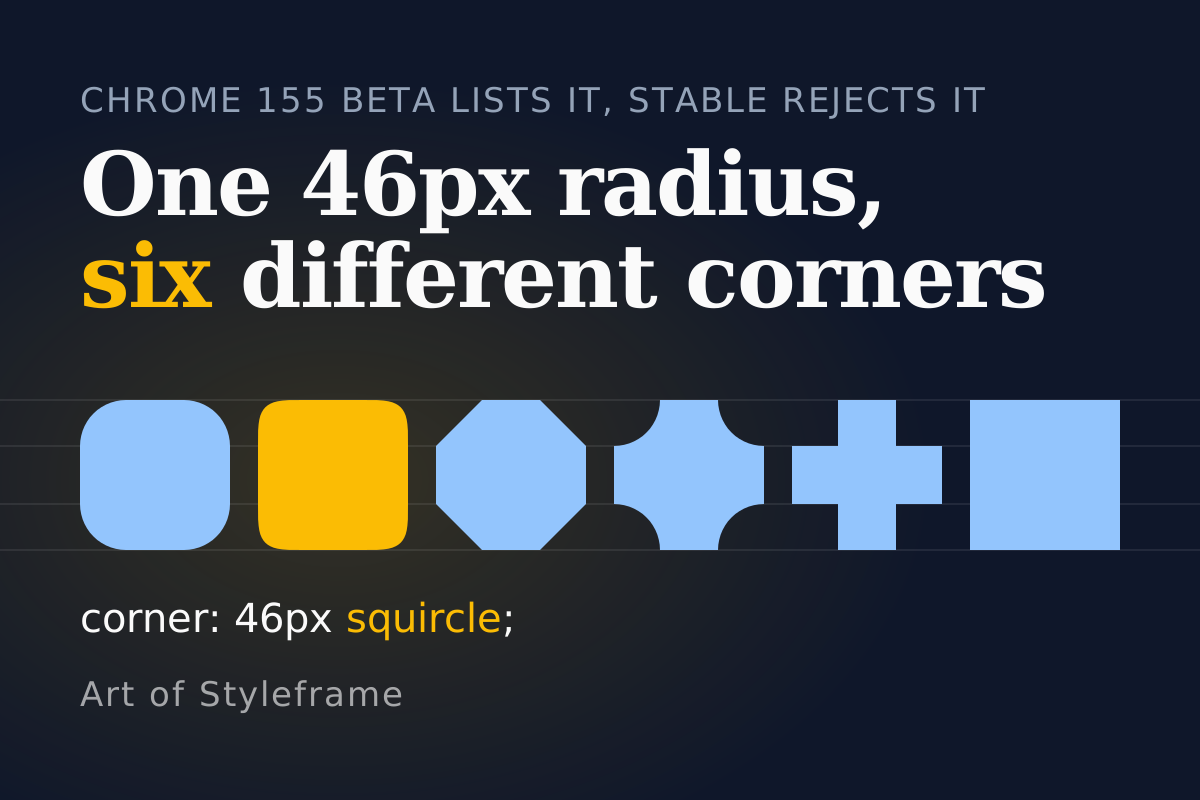
The beta post says Chrome 155 implements a CSS corner shorthand. I opened Chrome 155 to try it, typed corner: 20px squircle, and the browser threw the declaration away.
Both facts are true, and the gap between them is the useful part. A feature that sits in a beta announcement is not a feature your users have, and a beta post, an Intent to Ship and a release-notes page are three documents that can disagree about one property for a month. This one does. So here's the paper trail, the parse table I got from a real Chrome 155, and a way to use squircle corners today that doesn't wait for any of it.
Short answer: The
cornershorthand setsborder-radiusandcorner-shapein one declaration, per corner or per edge. The Chrome 155 beta post lists it, the Intent to Ship targets Chrome 156, and stable 155.0.8059.80 does not parse it without an experimental flag. The longhandcorner-shapehas worked in Chrome and Edge since 139, so ship that with an@supportsguard and treat the shorthand as a later tidy-up.
What Does a Squircle Do to the Same Radius?
Look at the preview first. Card one is a plain 24px radius. Card two keeps the 24px and swaps the curve to squircle. Card three is the squircle sized up to 44px, written with the shorthand where your browser has it and with two longhands where it doesn't.
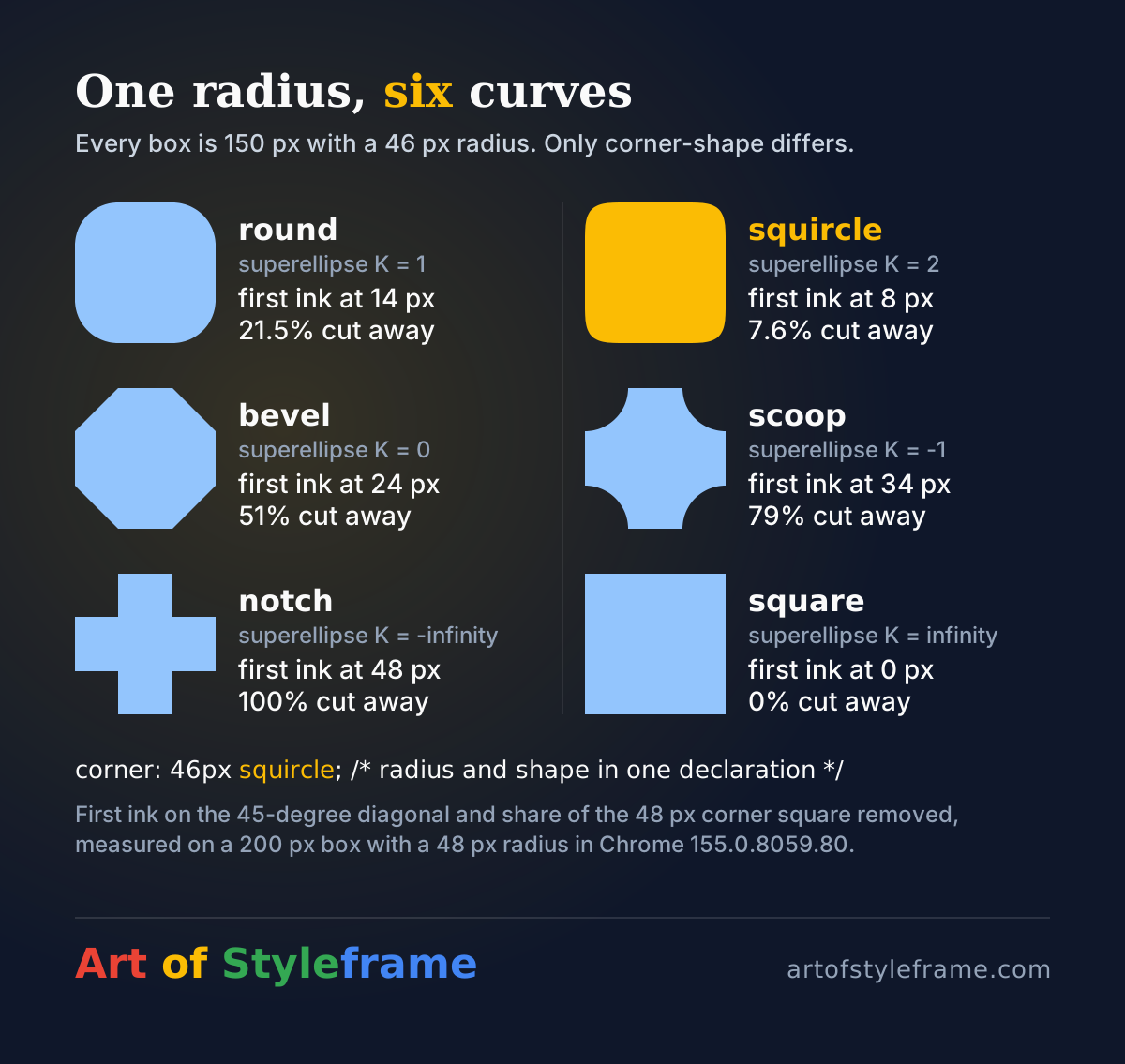
Card two looks sharper than card one, doesn't it? It is. A squircle is a superellipse with an exponent of 4, and squircle in CSS is exactly superellipse(2) (the CSS Borders spec and MDN agree on that). The spec defines superellipse(K) with an exponent of 2 to the power K, so K of 1 is the ordinary ellipse, K of 0 is a straight diagonal and K of infinity is a square corner. Squircle sits one notch squarer than round, which means it hugs the box edges longer and turns later.
I wanted numbers for that, not a feeling. In Chrome 155.0.8059.80 I rendered a 200px black box on white with a 48px radius, changed only corner-shape, and scanned the pixels from the sharp corner along the 45-degree diagonal. The script is thirty lines of Playwright; the page was border-radius: 48px; corner-shape: <keyword>.
| corner-shape | First ink on the diagonal, px from each edge | Share of the 48px corner square cut away |
|---|---|---|
| round | 14 | 21.5% |
| squircle | 8 | 7.6% |
| bevel | 24 | 51% |
| scoop | 34 | 79% |
| notch | 48 | 100% |
| square | 0 | 0% |
Round matches the textbook figure, 1 minus pi over 4, which is 21.46%. Squircle comes out at 7.6% against a calculated 7.3%, and the gap is anti-aliasing on a small box. So at the same radius, a squircle removes about a third of what a round corner removes. Put it on a button next to a round one and the squircle reads as a tighter corner even though the number in the stylesheet is identical.
That's the trap in the "swap the keyword" advice. Which radius do you pick instead? I repeated the measurement at 4x pixel density to get sub-pixel precision, comparing a 24px round corner against squircles of several sizes.
| Corner | Diagonal inset, px per edge | Corner area removed, px squared |
|---|---|---|
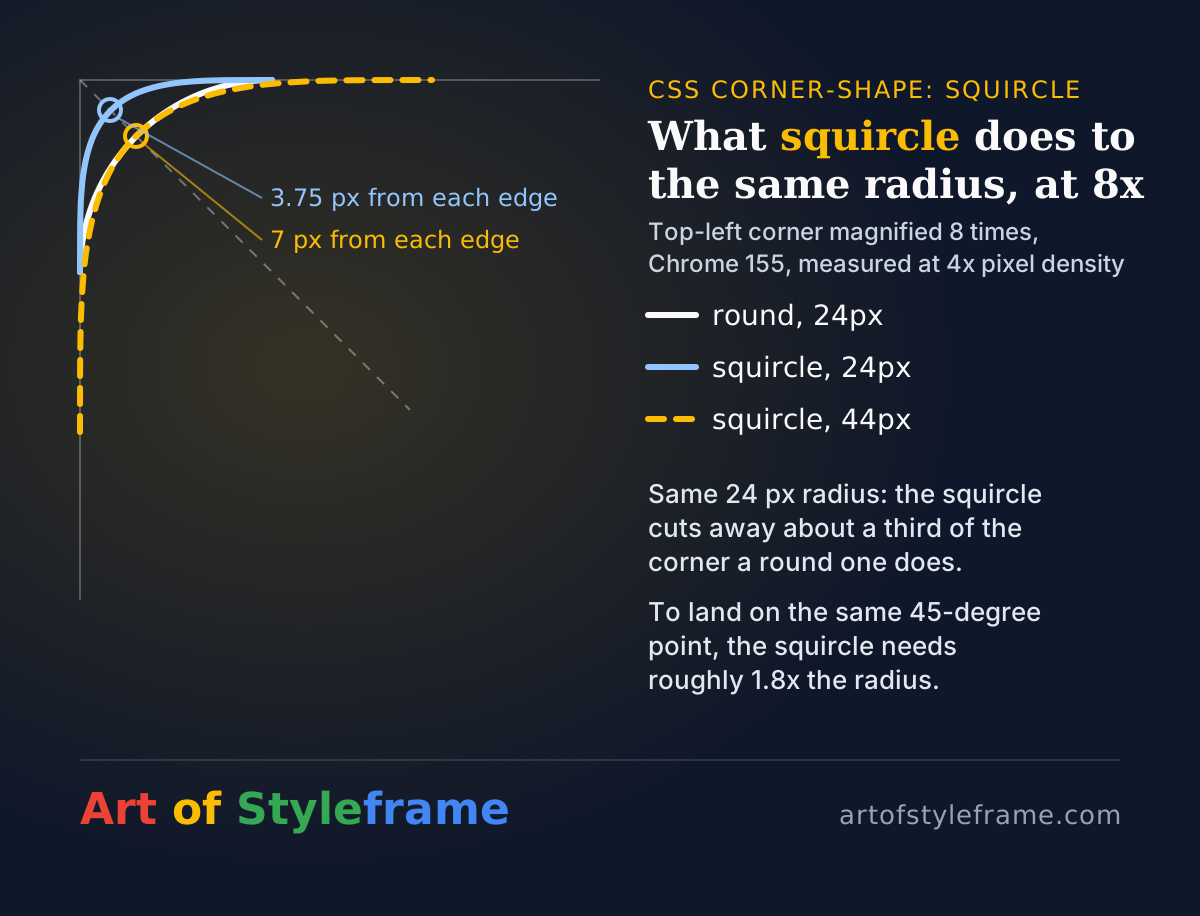
| round, 24px | 7.0 | 123.4 |
| squircle, 24px | 3.75 | 43.4 |
| squircle, 41px | 6.5 | 123.9 |
| squircle, 44px | 7.0 | 142.7 |
A 41px squircle removes the same area as the 24px round corner, and a 44px squircle puts the 45-degree point in the same place. That's a ratio of 1.7 to 1.8 depending on which of the two your eye weighs. If you're matching an existing design, scale the radius by about 1.75 and check it against the old one, don't copy the number across.
Is the corner Shorthand in Chrome 155 or in 156?
I read the paper trail, and it doesn't line up.
| Source | Date | What it says about the shorthand |
|---|---|---|
| Chrome 155 beta post | Sep 16, 2026 | Listed under "CSS and UI": a corner shorthand plus per-corner and edge shorthands that set radius and shape together, with corners kept as a compat alias. No code sample, no mention of a flag |
| Intent to Ship on blink-dev | Sep 18, 2026 | Milestone "Shipping on desktop 156", same for Android, WebView and iOS. Gecko position positive, WebKit position positive. Finch feature name CSSCornersShorthand |
| Review replies on the same thread | Sep 21 to 28 | Questions about WebKit's real status, which was corrected to "in development", then LGTM1 and LGTM2 on Sep 28 |
| Chrome Platform Status, release notes 155 | scheduled stable Oct 6, 2026 | CSS section lists symbols(), text-decoration-skip-spaces and margin-trim. No corner entry |
| Chrome Platform Status, release notes 156 | scheduled stable Oct 20, 2026 | CSS section lists the navigation-source pseudo-class, random(), single-axis scroll containers and scroll-snap-type: pair. No corner entry either |
I'm not claiming anybody got it wrong. A beta post describes what's in the beta build, and a build can carry code that isn't enabled by default yet. The intent was filed two days after the post and asks for approval to enable it in 156. Both can be honest. The release-notes pages are the odd ones out, and they're a preview, so they may simply be unfinished.
What I can add is the one thing a document can't. On 2026-10-17 I launched stable Chrome 155.0.8059.80 on macOS and asked it directly.
CSS.supports('corner: 20px squircle');          // false
CSS.supports('corner-top-left: 20px squircle'); // false
CSS.supports('corner-shape: squircle');         // true
Then I relaunched with --enable-experimental-web-platform-features and both shorthands returned true. The same flag turned the shorthand on in a Chrome 151 build I had lying around. So the code is there and it's gated, which fits an intent that hasn't been enabled yet. My reading: the headline "Chrome 155 ships the corner shorthand" is wrong for stable users, and "Chrome 156 ships it" is a forecast until the 156 release notes list it. If you're writing it into a design system today, write @supports.
What Does corner Accept, and What Does It Refuse?
The spec's grammar for corner is a corner-shape value combined with a border-radius value, in either order, and it says the shorthand sets all of the corner-*-shape and border-*-radius longhands together. That's a loose description. The flagged build is stricter, and I'd rather give you what parsed than what the grammar suggests.
I fed it nineteen declarations and read back the computed longhands.
| Declaration | Parsed | Result |
|---|---|---|
corner: 20px squircle | yes | 20px radius and squircle on all four corners |
corner: squircle 20px | yes | identical, order is free |
corner: 20px | no | a radius alone is rejected |
corner: squircle | no | a shape alone is rejected |
corner: 20px 8px notch | yes | every corner gets a 20px by 8px elliptical radius |
corner: 20px 8px 4px 2px | no | it's not the four-corner list border-radius takes |
corner: 30px / 10px scoop | no | no slash syntax |
corner: 12px superellipse(3) | yes | superellipse() is accepted |
corner-top-left: 20px squircle | yes | one corner only |
corner-top: 20px squircle | yes | top-left and top-right |
corner-top: squircle | no | an edge shorthand needs the radius too |
corner-block-start: 20px squircle | yes | same as corner-top in horizontal writing |
corners: 20px squircle | no | the compat alias did not parse, even with the flag on |
Two surprises in there. The first is that corner: 20px 8px is a horizontal and a vertical radius for each corner, not a per-corner list. If you reach for corner to give four corners four different radii, it can't. You'd write the four values on border-radius and set the shape on corner-shape, or use the per-corner shorthands one at a time. The second is that corner wants both halves every time. The spec grammar joins its two parts with a double bar, which on its face allows either alone, so this is either a deliberate tightening or a gap between draft and implementation. I don't know which, and it could change before 156.
The corners alias is the third oddity. Both the beta post and the intent say it's retained as a compat alias, and in this build it wasn't recognized at all. A guidance issue in Chrome's modern-web-guidance repository, which I read, recommends writing corner rather than the alias, and that's the safer bet whatever the alias ends up doing.
What does one declaration buy you over two? I rendered both in the flagged build and compared screenshots byte for byte.
.sheet { corner-top: 32px squircle; }

/* is the same picture as */
.sheet {
  border-top-left-radius: 32px;
  border-top-right-radius: 32px;
  corner-top-shape: squircle;
}
Identical, for the edge version and for corner: 44px squircle against border-radius: 44px; corner-shape: squircle. The shorthand is bookkeeping and adds no rendering power, which is how the intent thread describes WebKit's position too: the shorthands add no new rendering capability. For a bottom sheet with squared bottom corners it turns three declarations into one. For a uniform card it saves a single line.
Which Browsers Parse Any of This Today?
I asked three engines the same question, because a support table copied from somewhere else is how people end up shipping on a guess.
| Engine and build | corner-shape | corner shorthand |
|---|---|---|
| Chrome 155.0.8059.80, default | yes | no |
| Chrome 155.0.8059.80, experimental web platform features | yes | yes, corners alias no |
| Chrome 151 (Chrome for Testing), experimental flag | yes | yes |
| Firefox 153.0 (Playwright build) | no | no |
| WebKit with a Safari 26.6 user agent (Playwright build) | no | no |
Those last two are test builds, not the Safari or Firefox your visitors run, but they're current engines answering CSS.supports() honestly. They line up with Can I use, whose MDN-derived page lists Chrome and Edge from 139, nothing stable in Safari, and Technology Preview only for WebKit. Chrome's own 139 beta notes introduced corner shaping in June 2025. On the WebKit side, our Safari Technology Preview 251 coverage saw corner-shape appear in a preview, and the later 252 notes recorded an interpolation fix for it. Preview builds, then, and not something to design a launch around.
That makes corner-shape a Chromium-only enhancement for now. What happens in the rest? The browser ignores the property, and the card keeps its border-radius, which is a perfectly good card. That's the right failure mode, and it's the reason I'd ship this.
How Do You Ship Squircles Without Waiting?
Three layers, in order of how much you trust them.
.card {
  border-radius: 24px;                 /* every browser */
}

@supports (corner-shape: squircle) {
  .card {
    border-radius: 44px;               /* same visual weight as 24px round */
    corner-shape: squircle;
  }
}

/* When the shorthand reaches stable, this block replaces the two lines above. */
@supports (corner: 1px squircle) {
  .card {
    corner: 44px squircle;
  }
}
The middle block carries the number that matters. A visitor on Firefox gets 24px of round, a visitor on Chrome gets 44px of squircle, and by the table above those two corners occupy nearly the same footprint. If you instead keep one radius and add corner-shape on top, Chrome users see a visibly tighter corner than everyone else, and a design review on a Chrome-only laptop will approve a radius nobody else sees.
The third block is optional and harmless. An engine that doesn't know the shorthand fails the @supports test and skips the block, so it costs nothing at runtime. I'd still wait to delete the longhands. The shorthand's behavior around the lone-radius case and the alias may move before stable.
Keep the radius in a token. A single --radius-card has to become two values behind a feature query, and that's easier when the design tokens already carry radius as a named step instead of a number scattered across forty components.
A squircle at the same radius is a sharper corner. Resize it, don't just rename it.
Where Does a Squircle Belong, and Where Doesn't It?
My view, and you're free to disagree: squircles pay off on large, repeated surfaces and are wasted on small ones. A 44px radius on a card, a sheet or an avatar frame is where the longer, flatter curve is visible. At 12px the two curves differ by roughly 1.6px per edge at the diagonal (0.134 times the radius, from the figures above), and below that it shrinks further. Nobody will see it, and you'll have paid in feature queries.
Three limits worth knowing before you apply it everywhere.
Content doesn't follow the curve. MDN notes that the corner shape affects the background, border, outline, shadow, overflow clipping and backdrop filter, while content is laid out against the original box. Text can still extend into a shaped-away corner. For a squircle that's a hair of overlap. For the other keywords the table above is blunt: a notch removes the entire corner square, and a scoop removes 79% of it. If you're putting text near a scooped corner, your padding has to be at least the radius.
Opposite radii can collide. The spec's own example is two 80% radii on opposite corners, which would overlap, and the browser reduces them to fit. A sheet with big top corners and small bottom ones is fine; a tab bar with large radii on a short box will get clamped, and you won't see an error.
Don't mix shape families on one surface without a reason. A squircle card holding a round-cornered image and a bevelled badge looks like three design systems arguing. If you're laying out a card grid, pick the corner shape once, at the token level, and let every card inherit it.
A new capability isn't an argument for using it everywhere. Squircles earn their place on the three or four surfaces people look at longest.
Summary
The corner shorthand sets border-radius and corner-shape together, with per-corner and per-edge siblings such as corner-top-left and corner-top. Chrome's 155 beta post of September 16, 2026 lists it; the Intent to Ship of September 18 targets 156; the release notes for 155 and 156 list neither, and stable Chrome 155.0.8059.80 returns false for CSS.supports('corner: 20px squircle') unless experimental web platform features are on. In that flagged build corner required both a radius and a shape, took one horizontal and vertical radius pair for all four corners, rejected slash syntax and did not recognize the corners alias, and it rendered pixel-identical to the longhands. The longhand corner-shape works in Chrome and Edge from 139 and was absent from the Firefox 153 and Safari 26.6 engine builds I tested. At the same radius a squircle removes about a third of the corner area a round one does, so a 24px round corner matches a squircle of roughly 41 to 44px. Ship a plain radius, raise it inside @supports (corner-shape: squircle), and keep the shorthand behind its own check until a stable release lists it.