Five Safari Technology Preview builds shipped between July 29 and September 23, 2026, numbered 249 to 253, and four more came before them, 245 to 248. Read their Animations sections back to back and the headline isn't a shiny new property. It's a rule change you can't see in any single line: how an element finds a named scroll timeline. Builds 245 to 248 came earlier and carry no animation headline at all; what they do hold is in a section further down. Build 249's wider CSS list, including @function and if(), has its own write-up in Safari Technology Preview 249.
TL;DR: Safari Technology Preview 253 made named scroll timelines match globally, which is what the current Scroll-driven Animations editor's draft says and the opposite of the 2023 Working Draft. The rest of 249 to 253 is fixes: frame rates, accelerated size animations, sticky elements on view timelines, interpolation of
calc()and percentages. Safari 27.0 stable separately gainedevent.animation(WebKit, 2026).
A word on method, since this is a preview-build article. I haven't run STP 253 for this piece. Everything below comes from WebKit's own release notes, the spec text in both drafts, and MDN's compatibility data, and each claim names which of those it leans on. The one thing I did run is the demo below, in a Chromium 152-based browser, and I say what it did where that matters.
Named Scroll Timelines Now Match Globally
The one new animation feature in the whole run is a single line in the Safari Technology Preview 253 notes: support for "style-originated scroll timelines to match globally", so a timeline can be defined outside the animated element's hierarchy, or outside that of an element carrying timeline-scope.
Why does that matter? Because it flips what timeline-scope is for.
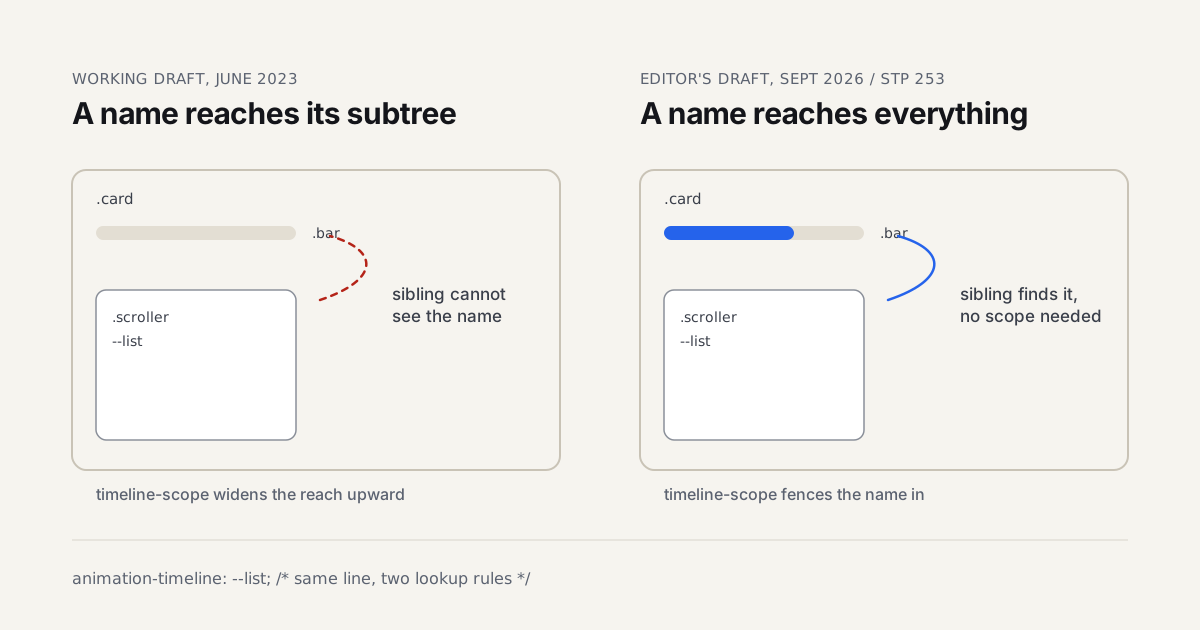
The Working Draft published on 6 June 2023 says a named timeline is referenceable by the element that declares it and that element's descendants. A progress bar sitting next to a scroller, as a sibling, can't see the scroller's timeline. timeline-scope exists in that draft to hoist the name up to a shared ancestor so siblings and cousins can reach it.
The current editor's draft, dated 25 September 2026, opens its lookup section with "Timeline names are global by default." An element can find a timeline on itself, before itself or after itself in tree order. The algorithm walks up the ancestors. At the document root it takes the last matching timeline in the whole document. timeline-scope now does the reverse job: it fences a name in, so descendants only match timelines inside that subtree.
Same property. Opposite direction.
Here is the pattern from the preview above, as an illustrative sketch rather than something I benchmarked:
.card { timeline-scope: --list; }

.bar {
  transform-origin: 0 50%;
  transform: scaleX(0);
  animation: fill auto linear both;
  animation-timeline: --list;
}

.scroller {
  overflow-y: auto;
  scroll-timeline: --list block;
}

@keyframes fill { to { transform: scaleX(1); } }
With timeline-scope on .card, each bar follows its own scroller under both drafts. Delete that one line and the two rules part ways. Under the 2023 text, neither bar is a descendant of a scroller, so neither can see a timeline and both sit at zero. Under the 2026 text, both bars climb to the document root, take the last --list in tree order, and start tracking the right-hand box. The editor's draft spells out that exact case with two component instances: both targets land on "the last one seen in flat tree order, globally."
Two smaller details in that sketch trip people up. animation-timeline comes after the animation shorthand, because MDN's compatibility notes say the shorthand resets a previously declared animation-timeline to auto. And the duration is auto, which MDN lists from Chrome 115 and Safari 18.4; Firefox's note recommends 1ms until it supports auto.
Global timeline names make scroll-driven animation easier to start and easier to break, so every component that names a timeline should fence it with timeline-scope.
The Fixes That Came With It
STP 253 didn't ship global matching alone. Six fixes in the same Animations section read like the cleanup a lookup rewrite needs:
- An animation could attach to a timeline made visible by
timeline-scopeinstead of one established by an ancestor. The ancestor now takes priority, which matches the draft's walk up the tree. - A timeline defined outside a
timeline-scopefence could stay active. It now yields an inactive timeline, so a fenced name with no match inside stops, rather than leaking out. - Changing a
timeline-scopevalue didn't update animations outside its hierarchy. With global lookup, adding a fence changes what outsiders see, so that one had to go. - A view timeline's animation wasn't updated when the scroll container's scrollable overflow changed. Lazy-loaded content under a view-driven reveal is the obvious victim.
- A paused and seeked animation could finish when resumed after a separate animation ran at a non-default playback rate.
- The
ViewTimelineconstructor didn't require asubject.
Filed under Performance in the same release: style resolution for elements sharing a scroll-timeline name "could block the main thread for multiple seconds." Seconds, not frames. Who reuses one timeline name across a long list? Anyone who drops a scroll-linked component into a repeating grid, and that's the line to remember. I made the longer argument about when main-thread cost is acceptable for motion elsewhere; a multi-second style pass is not one of the fine cases.
Release 249, from July 29, had already started down this road. Its three animation fixes: animation-timeline now uses the last matching timeline when several match, it can no longer match a timeline outside the nearest timeline-scope element with that name, and play() on a finite scroll-driven timeline now resets the start time. The first two are the "last in tree order" and "fence" halves of the new rule, a release early.
Before 249: Builds 245 to 248
The run starts four builds earlier than the headline, and it's quiet. None of releases 245, 246, 247 or 248 has an Animations heading in WebKit's notes. Motion shows up anyway, filed under CSS, SVG and Rendering, which is where you'd never look for it.
STP 245 (WebKit revisions 312965 to 313358) has one line a motion person could care about, and it's a regression fix: drop-shadow filters and transform: translate() were clipping nested elements. Nothing else in the notes touches animation.
STP 246 (313555 to 315033) is the busiest of the four. Four items matter for animation:
zoombecame animatable by its computed value. Safari 27.0 stable lists the same fix, so this is the preview build where it first appeared. If you want to see why that's a layout feature and not a paint trick, the motion lab in the Chrome 150 article runs it live.offset-pathnow respects the<coord-box>when blendingshape()andbasic-shapepaths. Morphing a motion path between two shapes used to ignore which box the coordinates were measured from.<animateMotion>non-path animations in SVG now apply therotateattribute.- Longer hue interpolation was fixed for the case where one input is
none.
Two additions in the same build sit next to animation rather than inside it. color-mix() accepts more than two colors, and the alpha() relative color function arrived. Both matter to motion because a color transition is only as good as the space and the stops it interpolates through. Three stops in one color-mix() means a gradient-like hold on a hover state without stacking layers.
STP 247 (314716 to 315846) lists nothing for animation. The nearest item is a scrollIntoView alignment fix, which is scrolling, not motion.
STP 248 (315567 to 316817) has two items a transition author would read twice:
- Inserting a CSS rule while a view transition is active used to make the group animation snap to its final state. It no longer does. Any page that injects a stylesheet mid-navigation, a theme switcher for one, was exposed.
- Navigating away from a render-blocked document before its first rendering opportunity no longer fires
pagerevealor starts an outbound cross-document view transition.
It also added the no-clamp option to the progress() function and forwarding of missing color components when interpolating between analogous color spaces. I'd read the second one as a quality fix: interpolating from one color space to a neighbor shouldn't invent a hue where the source had none.
Are any of these worth changing code for? Not one. They're corrections to behavior you'd have worked around, and the right response is to delete a workaround after you've confirmed the fix in a build you can run, not before.
Want to see the zoom item rather than take WebKit's word for it? Open the lab in the Chrome 150 article and switch the toggle between zoom and transform: scale(). In a browser that interpolates zoom, the neighbor card moves for one and stays put for the other. Edit the lab's values the same way you'd edit the preview at the top of this page.
Release by Release, June to September
For anyone who wants the map before the detail, this is what each build's notes list for animation.
| Release | Date | Animations section | Animation-adjacent items elsewhere |
|---|---|---|---|
| STP 245 | Jun 2026 | Nothing listed | drop-shadow plus translate() clipping regression fixed |
| STP 246 | Jun 2026 | Nothing listed | zoom animatable, offset-path coord-box blending, color-mix() with 3+ colors, alpha(), SVG animateMotion rotate |
| STP 247 | Jul 1, 2026 | Nothing listed | None |
| STP 248 | Jul 22, 2026 | Nothing listed | View transition group snap fix, pagereveal fix, progress() no-clamp |
| STP 249 | Jul 29, 2026 | 3 fixes, timeline matching and play() | view-transition-name set dynamically now creates a stacking context |
| STP 250 | Aug 13, 2026 | Nothing listed | None |
| STP 251 | Aug 26, 2026 | Nothing listed | random() and random-item(), rangeStart/rangeEnd and ViewTimelineOptions inset validation, two animateMotion fixes in SVG |
| STP 252 | Sep 11, 2026 | 6 fixes | corner-shape interpolation, offset-path honouring corner-shape, a random() caching fix |
| STP 253 | Sep 23, 2026 | 1 new feature, 6 fixes | Interpolation fixes for calc() and percentages, the timeline-name performance fix |
Release 251 is the one I covered on its own, in my STP 251 random() breakdown. Release 252 then fixed random() and random-item() with an auto caching key in the same property value producing the same number, which is exactly the kind of bug you'd expect in the first build of a new function.
So which build deserves your attention? 253 for the rule change, 252 for the fixes, and that's the whole list.
What's worth pointing out about 250 is the blank. A preview release can go by with zero animation lines, and that's normal. The notes follow what the engine team merged in a revision window, not a feature calendar.
What 252 Fixed That You Might Already See
Release 252's six animation fixes are the most likely to touch something you've shipped, because none of them depend on the new lookup rule.
Frame rate. A newly encountered animation's frame rate was being aligned with the lowest compatible frame rate instead of the highest. The note doesn't name devices, so I won't guess which displays showed it. On a high-refresh screen, that's the difference between motion that looks smooth and motion that quietly runs at a lower cadence. Can you prove it without the preview build? Not easily, which is why the fix matters more than the line length suggests.
Accelerated size animations. An animation of width or height was being accelerated incorrectly when only some keyframes had a size-dependent transform. A translate with a percentage is size-dependent, since percentages there resolve against the element's own box. If you mix size and percentage transforms across keyframes, retest.
Sticky elements on view timelines. View timeline range boundaries discarded subpixel adjustments for sticky positioned elements. A sticky header that drives its own reveal is exactly where that would show.
Keyframes with revert-layer or revert-rule. They weren't recomputed after a KeyframeEffect was copied.
Shadow DOM. scroll-timeline-name and view-timeline-name are now loosely matched across shadow tree boundaries. WebKit's note says "loosely" and doesn't elaborate, so I won't either.
Unresolved time. An unresolved current time on a progress-based timeline was being treated as a timeline boundary.
Outside the Animations heading, 252 corrected corner-shape interpolation for outset curves to match the updated spec algorithm, and made offset-path respect corner-shape when using a <coord-box> reference box. If you animate along a box edge with offset-path, the path now follows the shaped corner instead of a plain radius.
Release 253 adds three interpolation corrections filed under CSS. Interpolating a <length-percentage> from a calc() value to a plain length dropped the percentage component at 100% progress. text-decoration-thickness and text-underline-offset didn't preserve percentage values while interpolating. And fit-tolerance, the grid lanes property 252 renamed from flow-tolerance, now interpolates between length-percentages. A hover underline that animates its offset in percentages is where you'd notice that one.
What Already Reached Stable Safari 27.0
Preview builds are a forecast. Safari 27.0 is weather. Its Animations section has one new feature: an animation property on AnimationEvent and TransitionEvent, so an event handler gets the Animation object directly.

Why care about one read-only property? Because it removes a lookup you've probably written by hand. Before it, an animationend handler received a name string, and reaching the running animation meant calling getAnimations() and matching by name, which falls over when two animations share one. MDN describes the value as a CSSAnimation or null, and its compatibility data lists Chrome 151, Firefox 152 and Safari 27. A sketch of the shape, not code from a project:
card.addEventListener("animationend", (event) => {
  const anim = event.animation;
  if (anim) {
    console.log(anim.animationName, anim.playState);
  }
});
Safari 27.0's resolved animation issues are the kind that make a stylesheet behave the same in two browsers. !important declarations now override CSS animation values when a transition is also running on the same property. Identity matrix decomposition no longer generates invalid quaternions, which had produced incorrect transform animations. animation-fill-mode applies viewport units correctly after a resize. zoom is animatable by computed value. Popovers and <dialog> no longer animate incorrectly when closing with display transitions. The broader release is covered in Safari 27 Stable Shipped 83 Features.
What I'd Do With This Now
Nothing dramatic. That's the honest reading of five preview builds.
- Scope every named timeline. Put
timeline-scopeon the nearest common ancestor of every named timeline pair. It's correct under the 2023 rule and the 2026 rule, so it's the only version of your CSS that doesn't care which one a browser runs. - Treat an unscoped name as a bug. A component that names a timeline without
timeline-scopeis one. Under global lookup, the second instance on a page hijacks the first. I'd make this a lint rule in any design system that ships scroll-driven components. - Don't design around global lookup yet. The Safari 27.0 notes don't list it. In the one Chromium 152-based browser I loaded the demo in, deleting
timeline-scopefroze both bars at zero, which is the 2023 behaviour. That's one build, not a survey of Chrome channels, but it's enough to say the old rule is still out there. MDN'stimeline-scopepage is itself mid-update: its values section describes fencing, while its description paragraph still describes the descendant-only default. - Gate with
@supports (animation-timeline: scroll()), not a version check. That approach, and where scroll-driven animations sit across browsers, is in Chrome 150 for Motion Designers.
Is global-by-default the right call? For pages, I think so. Most people who write animation-timeline: --hero expect it to find --hero wherever it lives, and the 2023 rule punished that expectation with a silently frozen animation. For component libraries it's a regression in safety, because a reusable card now leaks its timeline name into the whole document unless its author remembered one extra line. Reasonable people will weigh those two differently. I'd rather have the page-author default and a lint rule than the reverse.
How to Check It Yourself
Apple distributes Safari Technology Preview as a separate app, and WebKit's 253 notes list builds for macOS Tahoe and macOS Golden Gate. Open this article in it and in your everyday browser, then make the one edit the preview's hint suggests. Which way do the two bars go? That answer tells you which lookup rule your browser runs, and it's a better test than any changelog, including this one.
For the broader case on when motion belongs in CSS at all, Motion Design for the Web is the long version.