GSAP, the JavaScript animation library that powered a decade of award-winning websites, is now completely free, every premium plugin included. That shift landed on April 30, 2025, after Webflow acquired GreenSock, and the "GSAP is paid" mental model that ranked on Google for years is now simply wrong (Webflow).
I've used GSAP since the paid-Club days, when SplitText and MorphSVG were the reason teams bought a membership. Getting all of that for nothing changed how I pick animation tech. Here's what actually changed by 2026, and what people keep getting wrong about it.
TL;DR: GSAP went completely free on April 30, 2025, after Webflow acquired GreenSock, every premium plugin included, SplitText, ScrollTrigger, MorphSVG, all of it. There's no GSAP 4; the current line is still 3.x, now at 3.13. Use native CSS scroll animations for simple opacity and transform effects, which cover about 80% of cases, and reach for GSAP when you need pinning or complex choreography.

Is GSAP free now, and what's the catch?
It's free, and the catch is small. The entire toolset, core plus every bonus plugin, costs nothing for commercial work. The one nuance: GSAP isn't MIT open source. It uses GreenSock's own "No Charge" license, which permits commercial use but bars you from reselling GSAP or building a rival animation product on it (GSAP). For anyone shipping sites and apps, that restriction never comes up. You install it, you pay zero, you move on.

Is there a GSAP 4? (No, and here's why that matters)
Let's kill this one early: there is no GSAP 4 in 2026, and none is announced. The free release coincided with GSAP 3.13, which shipped April 29, 2025, and the library has continued with point releases on the 3.x line since (GSAP). The confusion is understandable, a launch this big feels like it should carry a major version bump, but it didn't. If an AI answer or a rushed blog post cites "GSAP 4," that's your signal the source is guessing. Install 3.x. The API's stability is a feature: code from years ago still runs.
What did GSAP 3.13 actually add?
The headline is a full SplitText rewrite. It's roughly 50% smaller, adds around 14 new features, and drops the old position-absolute hack so split text reflows naturally instead of breaking layout. There's also a genuinely handy small win: you can now animate to a named CSS variable directly, like gsap.to('.target', { color: 'var(--brand)' }). If you keep colors in design tokens, that means your animations can read straight from the same variables your design system already defines.
There is no GSAP 4 in 2026. If a source cites it, the source is guessing.

Which plugins unlocked, and what do they do?
All the members-only ones. Here's the set worth knowing:
- ScrollTrigger and ScrollSmoother for scroll-driven scenes and smooth scrolling
- SplitText for per-character and per-line text animation, now rewritten
- MorphSVG and DrawSVG for shape morphing and line drawing
- Flip for animating layout changes, and Observer for unified input events
- MotionPathPlugin, Draggable, and Inertia for path and drag motion
On Webflow you toggle core and individual plugins in Site Settings; elsewhere you pull them from npm or a CDN. One migration gotcha: because SplitText dropped the position-absolute approach, text that relied on the old behavior can shift, so re-check split-text sections after upgrading.
GSAP or native CSS scroll animations in 2026?
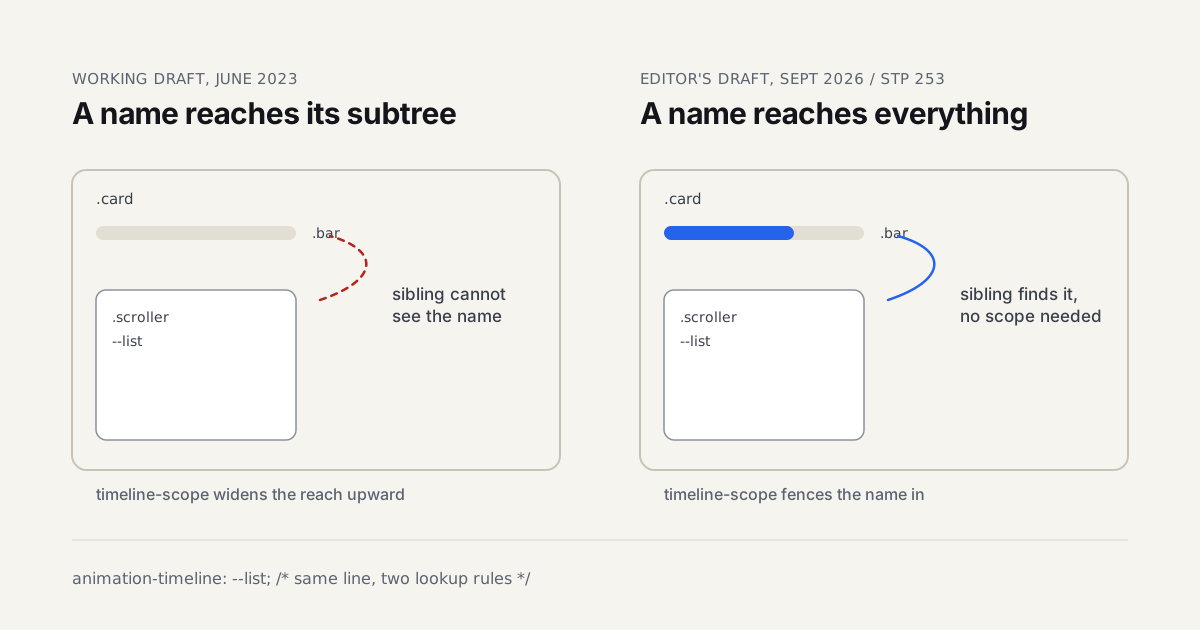
This is the real decision now that cost is off the table. Native CSS Scroll-Driven Animations (view-timeline and animation-range) run on the compositor with zero JavaScript and reached roughly 87% desktop and 71% mobile support by mid-2026. They cover simple opacity, transform, and color-on-scroll beautifully, and you should try them first. But the spec deliberately leaves out pinning, and pinning is exactly what ScrollTrigger does well (GSAP). So the line is clear: native CSS for the simple 80%, GSAP for pinning, timeline sequencing, and complex choreography. The full performance and decision breakdown lives in our CSS vs GSAP comparison.
| Factor | Native CSS Scroll Animations | GSAP |
|---|---|---|
| Cost | Free (built into the browser) | Free (No Charge license) |
| JavaScript required | None (runs on the compositor) | Yes |
| Browser support (mid-2026) | ~87% desktop / 71% mobile | Runs anywhere JS runs |
| Pinning | Not supported | Supported (ScrollTrigger) |
| Best for | Simple opacity, transform, color-on-scroll (~80%) | Pinning, timeline sequencing, complex choreography |
| Bundle weight | Zero | ~22KB core, plugins opt-in |
Does GSAP still fit a modern stack?
Yes. Core tree-shakes to around 22KB minified, and plugins are opt-in, so you ship only what you use. It's framework-agnostic across React, Vue, Svelte, Angular, and plain JS, and the official @gsap/react package gives you a useGSAP() hook that handles setup and cleanup safely. For UI designers moving into motion, GSAP is now the highest-value skill you can pick up for free, and it pairs with the tooling in our motion design tools roundup. My honest take? Removing the paywall didn't just make GSAP cheaper. It made "should we even use GSAP" a much easier yes.
There's a bundle-size argument worth addressing head-on, because it's the objection I hear most. Twenty-two kilobytes sounds heavy next to a 12KB library like Motion, and for a tiny landing page with three fade-ins, it is. But that comparison misses how projects actually grow. The moment you need a second animation pattern, then a third, then scroll choreography, the lighter library forces you to hand-roll the exact machinery GSAP already ships. I've watched teams "save" 10KB up front and then write 30KB of fragile custom timing code over the next quarter. Pick the library by the complexity you're heading toward, not the demo you're starting with. For a marketing site with real motion ambitions, GSAP's weight pays for itself in code you never have to write.