Anthropic calls Claude Opus 5.5 a model "for long-running agentic coding and knowledge work." Nothing in that line is about interface design. So why is a motion and UI blog writing about it?
Two reasons, and both are in Anthropic's own documentation rather than in anyone's launch-week hot take. The first is that Opus 5.5 reads screenshots, charts and diagrams noticeably better than Opus 5 did, which matters to anyone who reviews UI as images. The second is stranger and more useful: the prompting guide openly lists the five visual defaults the model falls back on when you ask it for a web page and give it no direction. A vendor admitting its model has a house style is rare. Designers should take the gift.
TL;DR: Opus 5.5 shipped September 22, 2026 at $4 / $20 per million tokens, 20% below Opus 5 on both. For design work the real story is vision (89.0% on Chartography, 81.8% on OSWorld 2.1) and a documented set of five frontend defaults: cream backgrounds, italic accent words, 01/02/03 labels, monospace labels, pill buttons. Name them in your prompt and it stops using them.
This is a researched piece, not a hands-on review. I haven't run Opus 5.5 against our own design files, so every capability claim below comes from Anthropic's announcement, its model docs or its prompting guide, and I say which. The screenshot cost numbers are my own arithmetic on Anthropic's published formula, which you can redo in a spreadsheet in two minutes.
What Is Claude Opus 5.5, in Plain Numbers?
The model page on Claude's developer docs lists the essentials. Released September 22, 2026. Model ID claude-opus-5-5 on the Claude API, Google Cloud, Microsoft Foundry and Claude Platform on AWS, and anthropic.claude-opus-5-5 on Amazon Bedrock. A 1M token context window, 128K tokens of output, text and images in, text out. Reliable knowledge cutoff: June 2026. Retirement: not sooner than September 22, 2027.
Here's how the price compares with its predecessor, from the "What's new" page and the model overview:
| Price per million tokens | Opus 5 | Opus 5.5 | Change |
|---|---|---|---|
| Input | $5.00 | $4.00 | -20% |
| Output | $25.00 | $20.00 | -20% |
| 5-minute cache write | $6.25 | $5.00 | -20% |
| Cache read | $0.50 | $0.20 | -60% |
| Batch input / output | $2.50 / $12.50 | $2.00 / $10.00 | -20% |
Anthropic's announcement goes further than the rate card and says that "at default settings it will cost 40% less than Opus 5 on typical workloads." The gap between 20% and 40% isn't a typo. Part of it is a cheaper token, part is a lower default effort (more on that below), and part is that the model tends to finish the same task in fewer tokens. The announcement also claims output generates "more than 30% faster than Opus 5."
Two behavior changes matter more than the price for anyone wiring Opus 5.5 into a design tool. Thinking is always on and can't be disabled, and the default effort dropped from high on Opus 5 to medium. If you used Opus 5 with thinking off to get snappy answers in a plugin, that request now returns a 400 error. The docs' advice is to lower effort instead.
Why Should an Interface Designer Care About a Coding Model?
Because a large share of interface work is looking at pictures of interfaces. Screenshots of a staging build. A flow diagram somebody drew in FigJam. A chart in a dashboard that's supposed to match its data. A before-and-after pair from a visual regression run.
That's the area where the Opus 5.5 docs make their most specific claims. From the "Prompting Claude Opus 5.5" guide, paraphrased closely: the model reads visual material more accurately than Opus 5 without extra tooling, and even at its lowest effort setting it read values off dense charts more accurately than Opus 5 did at its highest, using a small fraction of the output tokens. It's also better where meaning depends on position rather than text. The guide's own examples are exactly the questions a design reviewer asks: which boxes an arrow connects in a flowchart, what changed between two versions of a diagram, when a meeting starts and ends in a calendar screenshot.
The announcement backs that with two benchmark rows. They're the only two of its nine rows that touch visual work, so I charted just those.
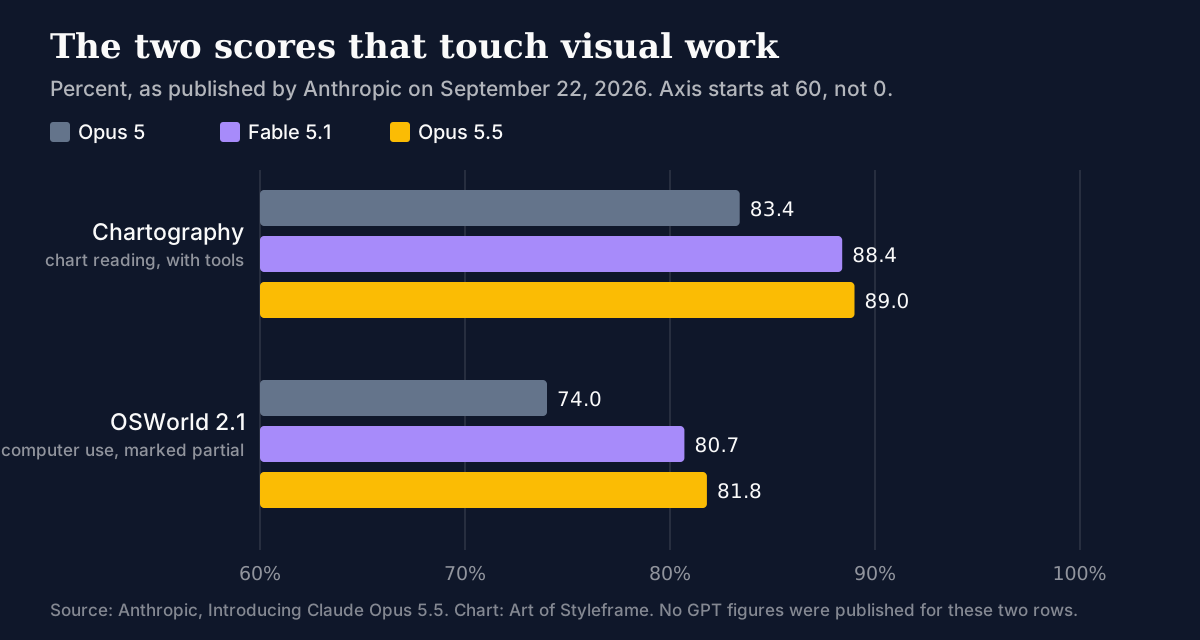
Read those carefully. On Chartography, Opus 5.5 is 5.6 points ahead of Opus 5 and only 0.6 ahead of Fable 5.1, the higher tier that Anthropic prices at $10 / $50. On OSWorld 2.1, the computer use benchmark, it's 7.8 points over Opus 5. Both rows were run with tools or marked partial, and Anthropic itself says on the same page that benchmark margins are a less reliable guide to real-world differences. I'd treat the direction as solid and the decimals as decoration.
What does "better at position" buy you in practice? Think about the review you do on a redline. Is the 16px gap between the card and the heading, or between the heading and the eyebrow? A model that reads text off an image but guesses at spatial relationships gets that wrong in a confident tone. If Anthropic's claim holds, that class of mistake should shrink. It won't vanish, and the vision docs still say plainly that "coordinate and localization outputs are approximate."
What Does One Screenshot Actually Cost?
This is the section I wish every model launch shipped with, so I worked it out myself.
The vision documentation gives the formula: Claude processes images in 28 by 28 pixel patches, one visual token each, so an image costs ceil(width / 28) x ceil(height / 28) tokens. Claude 4.7 and later models, Opus 5.5 included, sit in the high-resolution tier with a cap of 2,576 pixels on the long edge and 4,784 visual tokens. Anything bigger gets scaled down to fit.
Plug in the screen sizes designers actually capture and you get this:
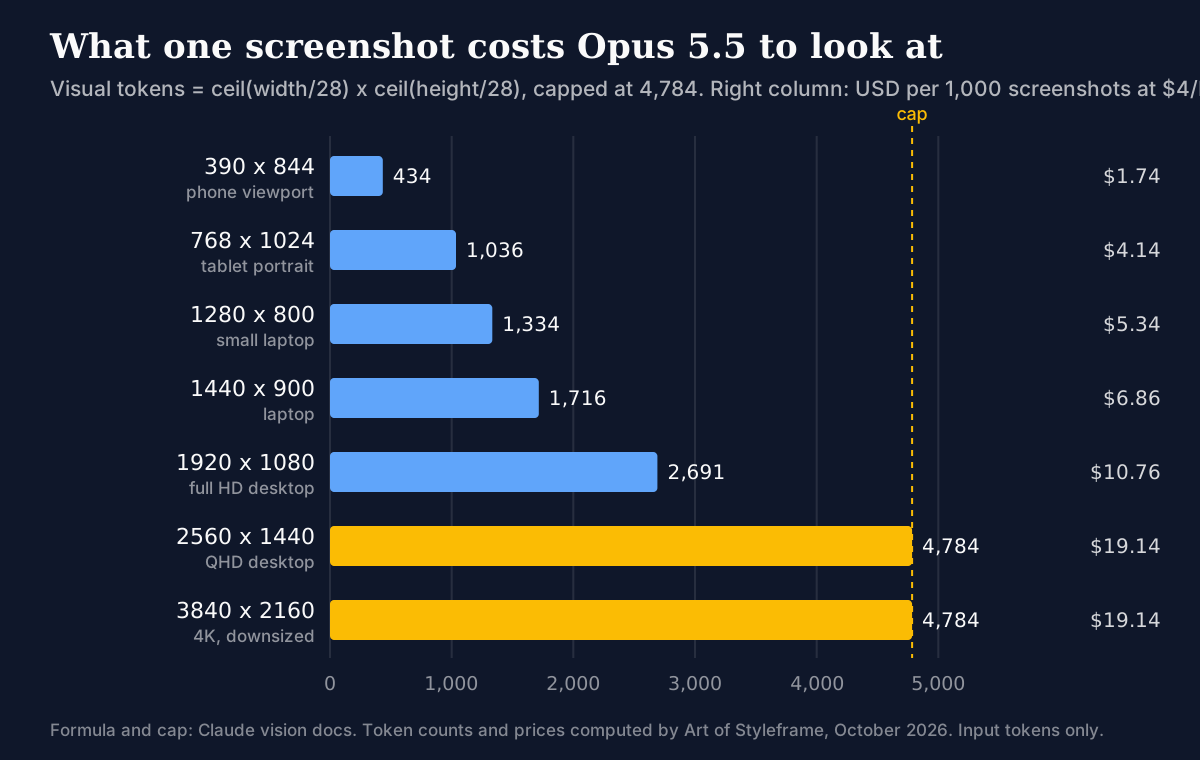
A few things jumped out when I ran the numbers.
A full HD desktop capture is 2,691 tokens, a little over a penny. Cheap, until you're running a visual QA agent that takes a screenshot after every interaction across 200 pages. A phone viewport at 390 by 844 is just 434 tokens, about a sixth of the desktop shot, which makes mobile-first review loops genuinely inexpensive.
Then there's the cap. A 2560 by 1440 screenshot lands at exactly 4,784 tokens, the ceiling, and a 4K capture gets downscaled to 2576 by 1449 and costs the same. Sending 4K buys you nothing over QHD except a bigger upload. Is retina capture worth it, then? Only when the detail you're asking about is genuinely small, like a 1px border or 11px caption text.
Two more limits from the vision docs bite design workflows specifically. If a single request carries more than 20 images, a stricter per-image dimension limit applies, and the docs' safe rule is to keep each side under 3,000 pixels. And for screenshots returned to the computer use toolset, the API rejects oversized images with a validation error instead of downscaling them, so resize before you send.
The Five Defaults Anthropic Admits To
Here's the part I'd print and pin above a monitor.
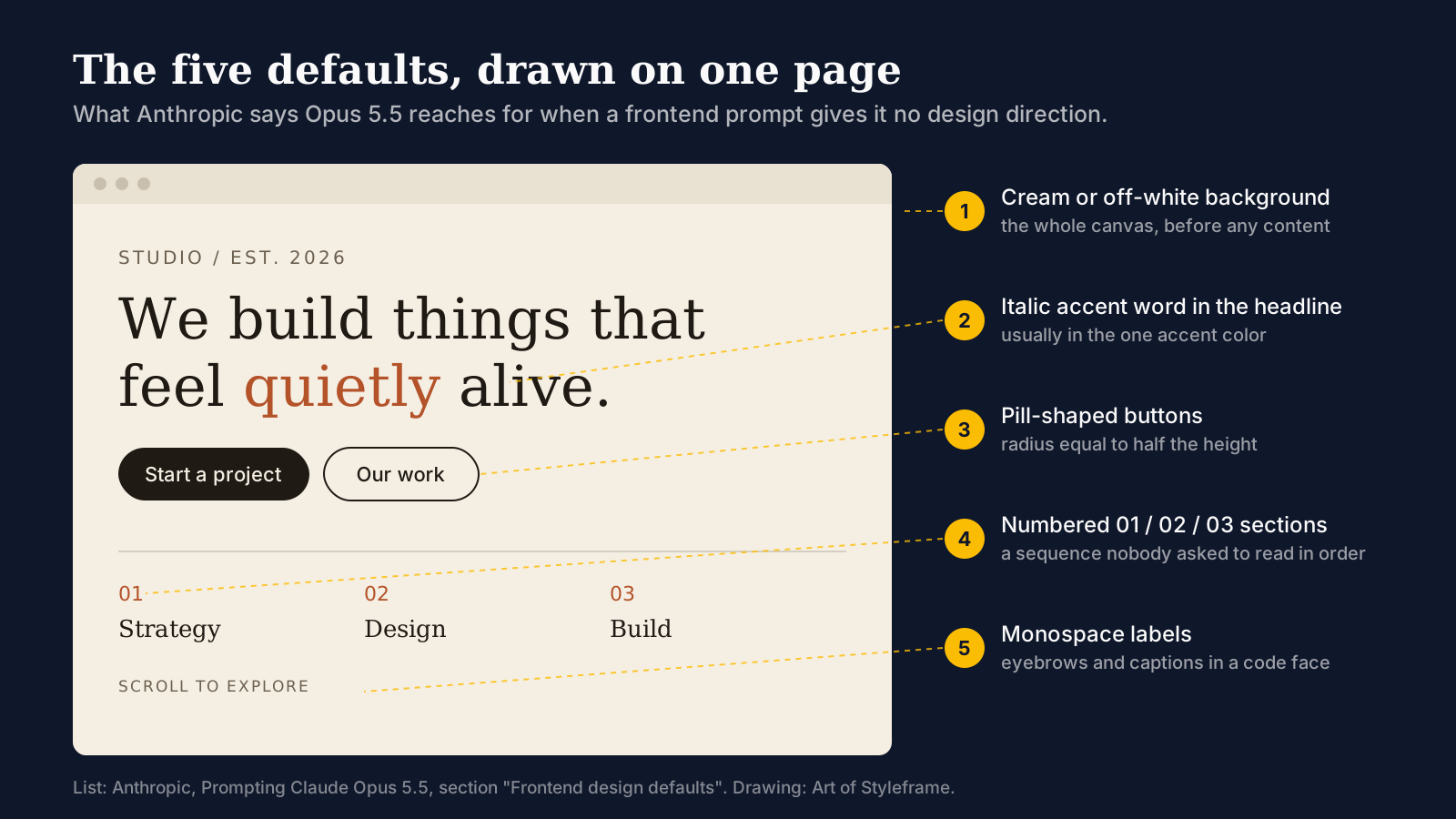
The prompting guide has a section titled "Frontend design defaults." Its first line says that asked for frontend work without design direction, Opus 5.5 "falls back on a few default styles," and that a general instruction such as "avoid a generic AI look" mostly swaps one default for another. Then it gives an example prompt that names five patterns to avoid:
- A cream or off-white background.
- Italic accent words in headlines.
- Numbered "01/02/03" section labels.
- Monospace labels.
- Pill-shaped buttons.
You've seen this page. Everyone who's spent 2026 looking at AI-generated portfolios and agency landing pages has seen this page. The hero image at the top of this article is my drawing of it, all five on one canvas, and I didn't have to invent anything.
A model's house style is a design system nobody chose. Opus 5.5 is the first one whose vendor wrote its tokens down.
Why these five? Anthropic doesn't say, so this is my reading rather than theirs. Every one of them is a cheap signal of taste borrowed from editorial and studio sites of the last few years. Warm off-white reads as print. An italic serif word reads as a magazine headline. Numbered sections read as a considered process. Monospace eyebrows read as technical. Pills read as friendly. None of them is wrong on its own. The problem is that a model trained on the web learns the average of what "tasteful" looked like, and the average of tasteful is a uniform.
The detail I find most useful is the second sentence: telling it to avoid a generic look just swaps one default for another. That matches how these models behave with negations in general. "Don't look like AI" isn't a constraint, it's a vibe, and the model resolves a vibe by picking its next-most-likely style. A named pattern is a constraint. "No pill-shaped buttons" leaves exactly one thing to change.
So what do you do with that?
How to Write a Design Prompt That Survives the Defaults
Anthropic's guidance is short: name the specific patterns to avoid, then "work iteratively: check which styles the first result used instead, and extend the list if needed." That second step is the one people skip. Strip five defaults and the model reaches for the sixth, and you only learn what the sixth is by looking.
I'd go one step further than the guide, and I'll flag that this is my recommendation rather than anything Anthropic tested. A list of negatives tells the model what not to do. It still has to invent everything else. The cheapest fix is to hand it the positive values too, in the same terms your codebase uses. Something like this:
Build a pricing page in vanilla HTML/CSS with placeholder data.
Use these tokens and nothing else:
--color-bg: #0f172a; --color-text: #fafafa; --color-accent: #fbbc04;
--radius-control: 6px; --font-display: Georgia, serif;
--font-ui: system-ui, sans-serif; spacing scale 4/8/12/16/24/32/48.
Do not use a cream or off-white background, italic accent words in
headlines, numbered "01/02/03" section labels, monospace labels,
or pill-shaped buttons.
The negatives handle the five known defaults. The tokens close the gap the negatives open. If your tokens live in code, you already have this block: it's your :root. If they don't, our guide to design tokens from Figma to code covers getting them there.
This is also why I think the bigger win for teams isn't prompting at all. Anthropic's own Claude Design product takes the opposite route and reads your design system before it draws anything, which is what we tested in the Claude Design on-brand review. If your components live in a repo, Claude Design from Storybook shows how making the repo the source removes the defaults problem at the root, because the model never gets a blank canvas in the first place. A negative prompt is a patch. A design system is the fix.
One honest caveat. The documented defaults describe what the model does with no design direction. Once you give it direction, the defaults matter less. Most of the generic-looking output people complain about comes from one-line prompts, and Opus 5.5 doesn't change that equation. It just tells you which five things to check first.
Effort, Thinking, and Why the Mockup Takes Longer
If you used Opus 5 through the API for UI work, two settings changed under you.
The default effort is now medium, down from high. Anthropic's prompting guide says Opus 5.5 at medium matches or exceeds Opus 5 at high on coding and knowledge-work evaluations, and recommends you set effort explicitly and test several levels rather than carrying the old one over. Effort names don't mean the same amount of thinking across models.
At a given level, though, Opus 5.5 "tends to think more per turn than Claude Opus 5, especially at xhigh and max." For a designer waiting on a generated component, that's latency you'll feel. The guide's advice is to lower effort before you try to prompt for brevity, because lowering effort reduces thinking more reliably than instructions do.
For visual tasks specifically, the docs draw a line worth remembering. With image tools available, the model uses them more effectively at higher effort. Without tools, raising effort improves its reading of technical drawings "but does little for charts." So a dashboard screenshot review can run at low or medium without losing much, while a dense spec drawing might earn high. That's the opposite of the instinct to crank everything to max for "important" design reviews.
When the Pixels Are Dense: Crops, Zoom and Resolution
The same guide is candid that the model isn't finished with hard images. For the densest inputs, it lists two things that still add accuracy.
Higher-resolution images help, "most of all for inputs such as technical drawings." For a design team that means sending the 2x export of an annotated spec rather than a compressed Slack thumbnail. Remember the cap from earlier, though: past 2,576 pixels on the long edge you're paying for an upload, not for detail.
Image-processing tools help too. Anthropic suggests running the model as an agent with a container that holds the raw images and libraries like PIL and OpenCV, so it can crop, zoom, measure and verify. If that's too much overhead, a cropping tool alone still helps, and the docs link a crop tool recipe in the Claude cookbook. On the computer use side, the newer computer_toolset_20260801 has zoom switched on by default, and on the Claude API it's now the only way to do computer use with Opus 5.5. The older computer_20251124 tool returns a 400 there, though Amazon Bedrock still accepts it.
What surprised me reading this section is how much it undercuts the "just paste a screenshot" workflow. For quick checks it's fine. For pixel-level QA, the documented best case is a model with scissors, not a model with better eyes.
Where It Still Falls Short for Design Work
No release note fixes everything, and the vision docs keep a limitations list that applies to Opus 5.5 as much as any current model. Four entries matter for UI work:
- Spatial reasoning: coordinate and localization outputs are approximate. Don't let it measure your spacing scale and take the number on trust.
- Counting: counts of many small objects might not be precise, which matters if you ask how many icons sit in a toolbar or how many rows a table renders.
- Small and low-quality images: it might hallucinate or make mistakes on low-quality, rotated, or very small images under 200 pixels. Favicons and app icons fall straight into that zone.
- AI-generated images: it can't tell whether an image is AI-generated and might be wrong if asked. Don't use it to vet stock or client-supplied art.
There's also a softer point from the announcement's safety section. Anthropic writes that Opus 5.5 often suspects it's being evaluated, which limits how well testing predicts real behavior. That's a safety observation, not a design one, but it's a fair reason to trust your own trials over anyone's benchmark table, this article's chart included.
And if your design work leans on a tool's accessibility audit, keep the deterministic checks. A model reading a screenshot is a second opinion on contrast, never the measurement. Our walkthrough on auditing UI against design tokens with Claude Code shows the split: code-level checks for what can be measured, a model for what needs judgment.
Is Opus 5.5 Worth Switching To for Design Work?
If you already use Opus 5 through the API for design tasks, my answer is yes, and the reason is mostly arithmetic. It's 20% cheaper per token, Anthropic says it's 40% cheaper at default settings on typical work, and on the two visual benchmarks it published, it beats its predecessor by five to eight points. Budget a day for the API changes: thinking can't be turned off, forced tool use returns an error, and computer use moves to the new toolset.
If you use Claude on claude.ai, there's nothing to migrate; Anthropic even publishes the system prompt Opus 5.5 runs with in the apps. What's worth changing is how you prompt for UI. Stop asking it to avoid a generic look. Name the five defaults, give it your tokens, and look at what it picks instead.
Want the broader picture of where Claude fits in a design workflow, beyond this one model? Our earlier piece on Claude for designers covers the jobs it's good at and the ones to double-check. The short version still holds after this release: it's a fast, increasingly sharp-eyed collaborator with a recognizable taste of its own. Now, at least, that taste comes with a list.